
Add Folders to Dock on iPhone & iPad to Expand the App Capacity of the iOS Dock
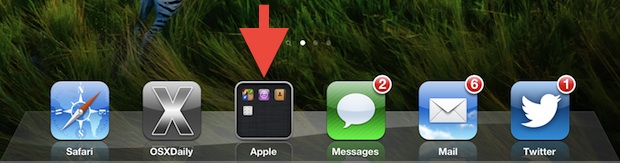
You can expand the app carrying capacity of iOS Dock by using Folders and placing those folders into the Dock on an iOS device. This is a great trick if you have more favorite apps than what fit in the iOS Dock by default (4 on iPhone, and 6 on iPad), so do yourself a favor and place a folder of more frequently used apps into the Dock.
Adding folders to the iOS Dock is really easy. This tutorial will walk through the process, it works the same with any folder on iPhone, iPad, and iPod touch with iOS.
How to Add Folders to Dock in iOS
All you need to do is drag any folder to the Dock.
Either rename an existing folder or create a new folder by tapping and holding an app to drop atop another.
Then, you simply drag and drop the folder into the iOS Dock, where it will stay.
Once the folder is in the iOS Dock, it will expand out when tapped on, in a similar way to how folders behave in the Mac OS X Dock when viewed by the Grid setting:
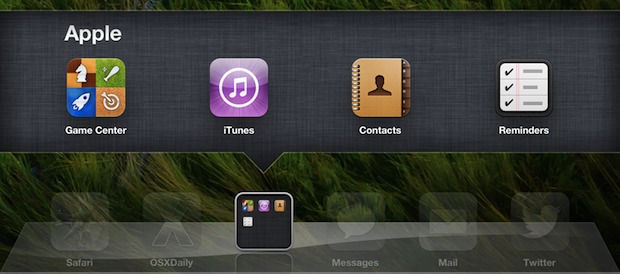
This is more of a usability tip than much else, especially for anyone who wishes the iPhone or iPad Dock held more icons, or for anyone easily lost in a sea of app pages. For example, if you frequently use more than one iOS web browser, try adding a folder dedicated to all browsers instead of cluttering the Dock with all of them.
Folders have been around in iOS since version 4.0. If you ever create a bunch of folders and get tired of having all your apps in them, the easiest way to dump all apps back to the homescreen is by resetting the home screen layout.






This would be great if it were available in OS X.
I know right! I was just this EXACT thing!
Não funciona no os lion.
Luiz paulo
Brazil.
Portugues/br
No mountain lion.
I have a bookmarks folder that I use constantly. Great idea, but it would be even BETTER if you could tap and hold Safari’s icon to access favorite bookmarks from a menu instead of making a folder of bookmarks. What do you think?