Subscribe to OSXDaily

Subscribe to RSS Subscribe to Twitter Feed Follow on Facebook Subscribe to eMail Updates

Shared on Facebook

Shop at Amazon

Ad

OSXDaily on Facebook

Search PwnageTool

How to Jailbreak iOS 5.0.1 and Preserve Unlocked Baseband for iPhone 4 & 3GS

Dec 31, 2011 - 27 Comments
PwnageTool

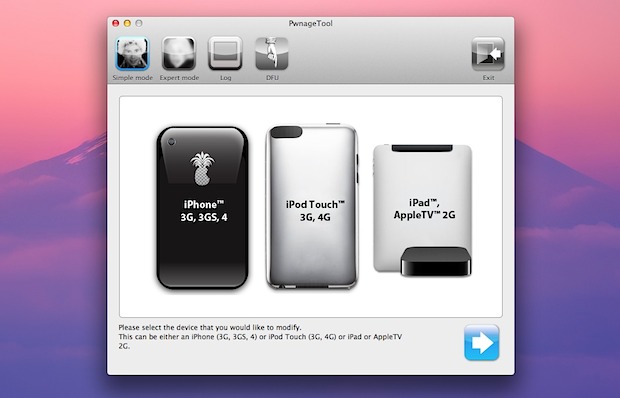
If you’ve maintained old iPhone baseband in order to utilize carrier unlocks, you’ll be pleased to know that you can now upgrade to iOS 5.0.1 and jailbreak untethered the iPhone while preserving the unlockable baseband. The procedure is done by using the newest version of PwnageTool 5.0.1, and if you’re familiar with past versions of pwnage then you should be right at home, but nonetheless we will walk through the entire process.

Note: Only need a jailbreak? If you don’t need a carrier unlock, use this guide to jailbreak iOS 5.0.1 untethered with redsn0w, it’s faster and doesn’t include the baseband preservation.

Before proceeding, make sure you meet the following requirements:

  • iPhone 4 or iPhone 3GS with preserved and unlockable baseband: 01.59.00, 04.26.08, 05.11.07, 05.13.04, 06.15.00
  • iOS 5.0.1 IPSW – optional, depending on if you already have it stored locally or not
  • iTunes 10.5.2
  • PwnageTool 5.0.1 – download now

Assuming you meet all those requirements and you understand the risks, continue on. Read carefully or else you can accidentally update your baseband and lose your unlock.

Jailbreak iPhone with iOS 5.0.1 while Preserving Baseband Unlock

  • Launch PwnageTool 5.0.1 and select your iPhone model, then click the next arrow
  • Let PwnageTool search for firmware (or you can download iOS 5.0.1 firmware manually), select it and click the Next arrow again
  • Click “Yes” when asked if you want to save the custom IPSW file to the desktop, and click yes/no depending on your activation
  • Let PwnageTool build the custom IPSW, enter the administrator password when asked
  • Now connect the iPhone to the computer and place it into DFU mode: Hold power button for 3 seconds, continue holding Power button and also hold the Home button for 10 seconds, release Power button but continue to hold Home button for another 15 seconds
  • When DFU is confirmed, quit out of PwnageTool and launch iTunes
  • Hold the Option key and click on “Restore” and select the custom firmware created by PwnageTool, located on the desktop
  • iTunes will now restore the iPhone to the custom iOS 5.0.1 build, simultaneously jailbreaking the phone and also preserving the unlockable baseband
  • After the device has been jailbroken and booted up, launch Cydia and download Ultrasn0w 1.2.5 to unlock the iPhone

The unlocked iPhone should now be good to use on another carrier. If you have trouble activating, use the original activated SIM card briefly to pass through activation, or run the newest version of redsn0w on top.

PwnageTool 4.3.3 Jailbreak Released (Download Links)

May 6, 2011 - 12 Comments

PwnageTool 4.3.3 Jailbreak Utility

PwnageTool 4.3.3 has been updated and released to provide an untethered jailbreak for iOS 4.3.3. The update supports jailbreaking iPhone 4, iPhone 3GS, iPad 1, iPod touch 3rd & 4th gen, and Apple TV2. Support is absent are iPad 2 and iPhone 4 CDMA.

Download PwnageTool 4.3.3

PwnageTool is for Mac only. Windows users will need to use sn0wbreeze or redsn0w.

The Dev Team provides the SHA1 Sum of fc2721a6c1230aa676729b2e4aeeec3cd4ffed7a if you want to verify your downloads.

The PwnageTool update comes alongside redsn0w 0.9.6rc15, but PwnageTool differs from redsn0w in that it allows Mac users to create customized versions of their IPSW. This is a necessary procedure for iPhone users who wish to preserve baseband and some carrier unlocks. If you are just looking to jailbreak your device, redsn0w is easier, but does not offer the ability to preserve baseband with custom IPSW.

PwnageTool 4.3.2 Download Released

Apr 24, 2011 - 4 Comments

PwnageTool 4.3.2 PwnageTool 4.3.2 has been released, the app lets you jailbreak iOS 4.3.2 untethered using custom built firmware, custom firwmare is necessary for users with preserved baseband and unlockers who use ultrasn0w. Speaking of ultrasn0w, if you are going to use the new PwnageTool, be sure to get ultrasn0w 1.2.2 as well since it is updated to support old baseband on iOS 4.3.2.

Supported iOS 4.3.2 devices include: iPhone 4, iPhone 3GS, iPad 1, iPod Touch 3G and iPod Touch 4G.

Download PwnageTool 4.3.2

PwnageTool is for Mac OS X only, currently you must download via torrent:

If you are just looking for a jailbreak, you may want to use redsn0w since it is easier.

Jailbreak iPhone iOS 4.3.1 with PwnageTool

Apr 10, 2011 - 1 Comment

PwnageTool 4.3 provides an untethered jailbreak for iPhone 3GS, iPhone 4 GSM, iPod Touch 4G, iPod touch 3G, iPad, and Apple TV 2, all running iOS 4.3.1.

This guide is geared towards jailbreaking iOS 4.3.1 on iPhone 4 and iPhone 3GS because PwnageTool is able to preserve baseband for iPhone carrier unlocks. If you are simply looking for a jailbreak and do not need to use an unlock, you will find jailbreaking iOS 4.3.1 using redsn0w is easier.

How to Jailbreak iOS 4.3.1 using PwnageTool

PwnageTool 4.3 allows you to jailbreak iOS 4.3.1 while preserving unlocked iPhone baseband. This guide assumes you have not upgraded the iPhone to iOS 4.3.1 yet:

  1. Download PwnageTool 4.3
  2. Download iOS 4.3.1 firmware
  3. Launch PwnageTool 4.3
  4. Select the “Expert mode” button at the top
  5. Select “iPhone” from the PwnageTool menu
  6. Click the Next button, then browse and select the iOS 4.3.1 firmware you downloaded earlier, click Next again
  7. Click on “General”
  8. Important for unlockers: Check “Activate the phone” if you rely on iPhone unlock, this is not necessary for official carrier use
  9. For now, ignore the Cydia package installations and click next
  10. From “Custom package settings” select to install “Cydia” by checking it, click next, then click “Build” to create a custom IPSW file
  11. Save this custom IPSW file to your desktop or another place you can easily find it, this is what you will restore to for jailbreaking your iPhone
  12. After the custom IPSW is built, you will be asked to connect your iPhone to the computer to enter into DFU mode
  13. Plug in your iPhone and follow the instructions for DFU mode: Hold Power + Home for 10 seconds, release power but continue to hold Home for 10 seconds. PwnageTool will notify you when it has detected your iPhone in DFU mode
  14. Now launch iTunes
  15. iTunes will notify you that it has detected an iPhone in recovery mode. Option click on the “Restore” button within iTunes to bring up the firmware restoration option
  16. Select the custom IPSW file that you created with PwnageTool
  17. iTunes will now restore the iPhone to the PwnageTool jailbroken IPSW firmware, this may take a few minutes

When iTunes is finished, the iPhone will boot into a jailbroken iOS 4.3.1. You can verify the jailbreak worked by looking the Cydia icon on your iOS homescreen.

If you completed the jailbreak properly, your baseband will also have been preserved allowing you to unlock iPhone 4 or 3GS running iOS 4.3.1 using ultrasn0w 1.2.1. Installing the ultrasn0w carrier unlock is simple, but you must have iPhone 4 or iPhone 3GS on baseband 01.59.00, 04.26.08, 05.11.07, 05.12.01, 05.13.04, and 06.15.00 in order to work.

PwnageTool 4.3 Download is Available Now

Apr 3, 2011 - 3 Comments

pwnagetool-4-3-download PwnageTool 4.3 has been released, this is the first untethered jailbreak available for iOS 4.3.1 and works for the iPhone 3GS, iPhone 4 GSM, iPod Touch 4G, iPod touch 3G, iPad, and Apple TV 2. Note that PwnageTool 4.3 will currently not jailbreak iPad 2 or the Verizon iPhone, or any hardware that is not compatible with iOS 4.3.1.

If you’ve been holding out on updating to iOS 4.3.1 in order to jailbreak without a tether, now is your chance. If you rely on the ultrasn0w unlock, be sure to preserve your unlocked baseband and then use ultrasn0w unlock for iPhone 4 & 3GS with iOS 4.3.1.

Download PwnageTool 4.3

PwnageTool 4.3 is currently available for Mac OS X users. These are all direct download links with the exception of the torrent file:

We’ll update a list of mirrors as they become available.

Finally, here is our guide to jailbreak iPhone iOS 4.3.1 with PwnageTool 4.3, this allows you to unlock iPhone iOS 4.3.1 with ultrasn0w.

PwnageTool 4.2 Download Released – Includes iOS 4.2.1 Untethered Jailbreak and iBooks DRM Fix

Feb 15, 2011 - 5 Comments

pwnagetool-4-2

Popular jailbreak and unlock utility PwnageTool 4.2 has been released and includes the untethered iOS 4.2.1 jailbreak in addition to resolving the iBooks DRM problem and some WiFi connectivity issues with the Apple TV 2.

PwnageTool 4.2 supports jailbreaking nearly all iOS devices including iPhone 3G, iPhone 3GS, iPhone 4, Verizon iPhone 4, iPod touch 3g, iPod touch 4G, iPad, and Apple TV 2. The only device that PwnageTool will not work on is the iPod touch 2G.

PwnageTool 4.2 is particularly important to those who rely on an iPhone unlock, since PwnageTool allows users to preserve existing unlocked baseband while allowing users to upgrade their device to iOS 4.2.1.

Download PwnageTool 4.2 Untethered for iOS 4.2.1

Currently for Mac OS X only:

We will update download link as they become available.

PwnageTool 4.1.3 Unlock Download Available

Nov 28, 2010 - 22 Comments

pwnagetool-unlock PwnageTool 4.1.3 has just been released and includes the ability to unlock iPhone 3G and 3GS with basebands later than 05.13.04 (iPhone 4 is apparently in the works). To do this, you will need to jailbreak using PwnageTool and then download Ultrasn0w for iOS 4.2.1 from Cydia. PwnageTool Unlock Edition works by using the iPad 3.2.2 IPSW file on basebands 05.14 and 05.15, this process is not reversible.

The iPhone Dev Team says that iPhone 3GS users with older bootrom should not use PwnageTool if they want to update to iOS 4.2.1, instead they should use the upcoming redsn0w release to update baseband firmware.

Download PwnageTool 4.1.3 Unlock Edition

You can grab the torrent here or use one of the following download mirrors provided by the Dev Team:

PwnageTool runs on Mac OS X. There is no PwnageTool for Windows, instead Windows users will want to download redsn0w 0.9.6b5 instead.

If you are not sure what to do, you can learn how to unlock iOS 4.2.1 for iPhone 3GS and iPhone 3G with ultrasn0w, the unlock does carry some risks for certain baseband versions, since the iPad firmware based unlock is not reversible.

Update: the iPhone Dev Team attached the wrong bundle for iPhone 3GS users with PwnageTool 4.1.3, you can fix this rather easily. Here is what they say about this: Read more »

Pwnage Tool 4.1 Download Now Available

Oct 20, 2010 - 9 Comments

pwnagetool 4.1 download The iPhone Dev Team just released Pwnage Tool 4.1 for download. The latest PwnageTool update works to jailbreak the following devices with the 4.1 firmware: new Apple TV, iPad, iPod touch 3G & 4G, iPhone 4, iPhone 3GS, and iPhone 3G.

Why is the PwnageTool 4.1 release useful? Pwnage Tool allows you to restore to custom IPSW files, in other words, you can restore pre-jailbroken firmware while maintaining your current baseband, thus allowing you to use a carrier unlock like ultrasn0w.

Pwnage Tool 4.1 Download

Currently PwnageTool 4.1 is only available for Mac users to download, there are several ways to get the file. The approach the iPhone Dev Team recommends is to download the torrent file from ThePirateBay:

PwnageTool Torrent – Pirate Bay Link

Many people cant access PirateBay so your other options are to use the provided download mirrors. Here’s a few direct links:

Mirror 1: fsckyou.org
Mirror 2: iPodTouchMastrFR.com

If either of those downloads don’t work for you, the Dev Team provides an updated download mirror list here, scroll to the bottom of the page to see it.
Read more »