
Shade inactive windows in Mac OS X with HazeOver
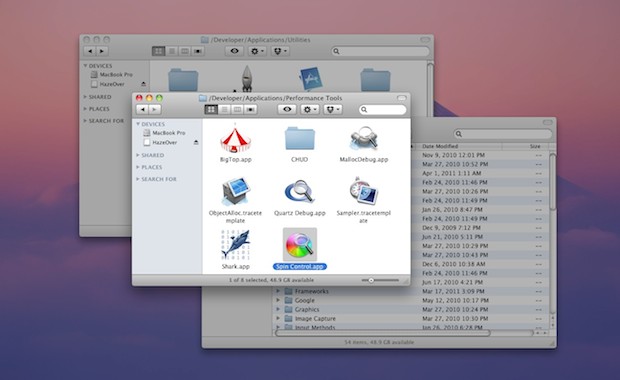
If you get easily distracted by things sitting around in the background on your Mac, HazeOver might be for you. It’s a free utility that casts a shadow on all inactive windows. In other words, any window that isn’t in the foreground will be “hazed over.”
With HazeOver open, windows actually phase in and out of the shadow, so it’s a neat visual effect even if you aren’t using it to minimize distraction, and perhaps you just want some additional eye candy on your Mac.
Oh and if you use multiple monitors on your Mac, it will only cast shadows on your primary display, but the developer is working to fix that bug.
You can download HazeOver for free from the developers site.
This is a pretty cool app with a variety of uses and utility. Maybe you want to reduce distractions, or highlight the foremost window, or maybe you want another alternative to the Single Application Mode feature that doesn’t completely hide background apps and windows. Give it a try, it’s pretty cool!






http://willmore.eu/software/isolator/ does something very similar for apps i.e. fading out all non-active-app windows. I’ve been using it for a couple of months and for me Isolator (or the focus concept it implements) has pretty much cemented itself as part of standard toolset.
I like the idea, but when having apps like inDesign and Photoshop with lots of panels it tends to highlight the panels instead of only document windows. So after a day or it went in the bin…
I like it but it pegs WindowServer to 20% CPU anytime there is a large transition. Definitely just eyecandy or not for work where you need CPU power.