How to Replace iTunes Dock Icon with Album Art
For the music lovers out there, DockArt takes the “Now Playing” notification concept a step further and actually replaces the iTunes Dock icon on the Mac with the currently playing albums cover art.
Tips and tricks for all things Apple! Whether you want to learn tips for a Mac, iPhone, iPad, Apple Watch, or much more, you will find many tricks, tips, tutorials, and excellent walkthroughs for Apple devices and software here.
For the music lovers out there, DockArt takes the “Now Playing” notification concept a step further and actually replaces the iTunes Dock icon on the Mac with the currently playing albums cover art.
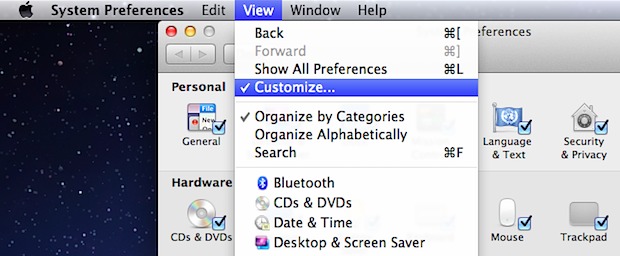
You can hide unwanted System Preferences from appearing in the control panel without actually removing them. This is a helpful distinction for setting up other user accounts or just for hiding System Prefs you never access and no longer need:
The iPhone can be set to always hide the dialing phones number from the recipients caller ID’s. That means that if you turn off the “Show My Caller ID” feature, every call you make will not show up on the phone number you are calling, offering additional privacy to phone calls made from your iPhone. … Read More
Ever set a desktop background picture on the Mac and have no idea where the original wallpaper image is stored in OS X? Maybe you set an image from the web and lost it, or maybe you’ve wondered where that default background image is stored so you can share it with your iOS device or … Read More
Using a defaults write command, the iTunes Dock icon can be set to display a “Now Playing” song and artist pop-up that transitions in and out and music starts. It’s a nice addition, particularly if you’re playing songs from a shared network playlist and have iTunes hidden in the background.
With iCloud and the “Find My iPhone” feature, you can send messages to your remote Apple gear. These come through in the form of a pop-up window in Mac OS X and a notification in iOS 5, and while there’s a variety of uses for this, it’s also a fun way to send a quick … Read More
After you’ve made the transition to iCloud from MobileMe, the option to remove the old and now obsolete MobileMe menu bar icon disappears. It’s easy to get rid of though, as Tony R shows us in this tip he sent in: Hold down the Command key and click and hold on the old MobileMe icon, … Read More
If you didn’t already buy an unlocked iPhone 4S from Apple or take advantage of Sprint and Verizons 90 day unlock request, you can apparently unlock the 4S’s GSM SIM card slot yourself by taking advantage of a strange bug in iOS 5 and how the iPhone 4S handles the Edge network. Here’s what you’ll … Read More
We showed you how to run OS X Lion in a virtual machine on top of Snow Leopard, but it seems everyone wanted to know the opposite of that: how to run Mac OS X 10.6 Snow Leopard in a VM on top of Mac OS X Lion. Follow our instructions and you’ll be up … Read More
You can quickly search the iTunes Store and iOS App Store from anywhere within iTunes, all you have to do is hold down the Option key while hitting Return in the standard search box. That’s really all there is to it, with Option+Return you search all purchasable content through the online stores whether its an … Read More
If you don’t want to deal with dual booting between Lion and Snow Leopard, another option is to run Mac OS X Lion in a virtual machine atop an older 10.6 Snow Leopard installation. This is not supposed to work with 10.6 without a quirky configuration, but it does, and it’s easy to do. For … Read More
Rather than rearranging all of the System Preferences to be sorted alphabetically, you can access a quick pull-down menu of all the panels that is sorted by name. Try it yourself, access System Preferences from the  Apple menu, then click and hold on “Show All” to see the full list of preference panes available sorted by … Read More
If you don’t have a spare Bluetooth keyboard to connect to an iPad, iPhone, or iPod touch with, why not use a Mac? This seems like a no brainer of an idea, but until the Mac app Type2Phone came along, I haven’t heard of any such solution. The app works by pairing a Mac to … Read More
In modern versions of Mac OS X, repairing permissions from the Disk Utility app doesn’t repair the users file permissions, oddly this has to be done separately on a per-user basis. If you’re running into problems with Spotlight not finding documents or folders, or if you’re having other issues that can usually be fixed with … Read More
If you want to quickly make a RAM disk for use on your Mac, you could create one manually through the command line, or you can make it even easier by downloading TmpDisk for Mac OS X. The open source application uses a menu bar item to quickly make ram disks from anywhere and of … Read More
Using AirDrop is the quickest way to transfer files between two Macs, even if they’re not on the same network or if there is no Wi-Fi network available to connect to. This is done by creating an instant Ad-Hoc network between the Macs, and there is practically no configuration required. For those who have never … Read More
You can quickly add or remove any items from showing up in Notification Center in iOS on your iPhone, iPad, or iPod touch by modifying your allowed apps through the central system settings. This isn’t the same method as disabling an item like the stock ticker, but it’s faster if you want to adjust several … Read More
Like most of the other transition effects in Mac OS X, you can hold down the shift key to force the animation to render in slow motion. In the case with Launchpad, this will cause the app icons to slowly rise out of the background, or for the Launchpad screens to very slowly switch between … Read More