Tips & Tricks

Tips and tricks for all things Apple! Whether you want to learn tips for a Mac, iPhone, iPad, Apple Watch, or much more, you will find many tricks, tips, tutorials, and excellent walkthroughs for Apple devices and software here.

Search Tips & Tricks

Eject a CD/DVD from the Mac OS X menu bar

Oct 8, 2010 - 10 Comments

There are numerous ways to eject a DVD from a Mac, but using a relatively unknown menubar item you can do this directly from the menubar too. To enable this feature, navigate to /System/Library/CoreServices/Menu Extras/ and double click on Eject.menu The easiest way to do this is with the “Go To Folder” key combo, which … Read More

Play Music Files in Quick Look from Anywhere in Mac OS X

Oct 5, 2010 - 9 Comments

You can play any song or audio file directly from within the Quick Look windows of Mac OS X, and that means music can be played from Finder as well as Open and Save dialogs, or anywhere else you can use the Quick Look function.

How to Check Bitrate of MP3, m4a, & Audio Files from Command Line of Mac OS X

Oct 4, 2010 - 10 Comments
Apple Music Icon

Mac users can quickly get the bitrate of any MP3, m4a, or other audio file from the command line of Mac OS X.

Compress All Files in a Directory by Command Line

Oct 4, 2010 - 1 Comment

This is a really great terminal command that compresses every file within a directory, turning them into a zip archive. We’ll offer two variants of it; one that removes the original source file and leaves only the compressed files, and another command that leaves the uncompressed source files intact. This has been tested and works … Read More

Mass Upload Pictures to Facebook from Mac the Easy Way

Oct 3, 2010 - 4 Comments

If you want to mass upload a ton of pictures to Facebook from your Mac, using the Facebook built-in photo uploader tool can be annoying. Another solution is to use Mac OS X’s highly customizable Services feature and download the Facebook Services automation scripts, which then allow you to select any number of pictures from … Read More

How to Reopen & Restore Windows from Last Session in Safari on Mac

Oct 1, 2010 - 2 Comments

Have you ever closed a window that you really wish you didn’t in Safari? It’s pretty common to accidentally close an important tab or browser window, and sometimes the Safari app will even crash too. But don’t freak out, you can re-open your last browser sessions in Safari regardless of why they were closed. Session … Read More

Command Line Cheat Sheet Wallpaper – Learn Commands with a Background Pic

Oct 1, 2010 - 15 Comments

If you’re new to using the command line and trying to learn the Terminal, setting a cheat sheet of command syntax for commonly used tricks as your background picture can be a pretty helpful way to help remember commands.

Show or Hide Macintosh HD and Other Disk Drives on the Desktop of Mac OS X

Sep 30, 2010 - 5 Comments

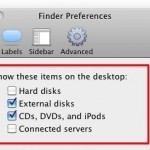
You can easily hide or show the “Macintosh HD” main hard drive from the desktop of Mac OS X, along with any other internal volumes and removable drives by adjusting some Finder options. If you like to keep your disk drives available on the desktop for easy access like this, here’s what you can do … Read More

How to Increase or Decrease a Songs Volume in iTunes

Sep 30, 2010 - 18 Comments

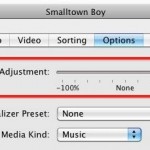
If you come across a song playing in iTunes that is not playing at an appropriate level, perhaps it’s playing back way too loud, or maybe it’s far too quiet and it doesn’t play loud enough for your preference, you can individually increase the volume level of any specific song in your iTunes Library. Likewise, … Read More

How to Change Notes Font on iPad and iPhone

Sep 28, 2010 - 3 Comments

Are you tired of the scribbly marker looking font in the Notes app on the iPhone, iPad, or iPod touch? Want to have a different font in Notes app for iOS? No problem, you can select a variety of font options to be the default on the Notes app.

Open Any man Page in Preview and Save as PDF

Sep 27, 2010 - 6 Comments

If you’re tired of looking over a man (manual) page within the Terminal, you can use a nifty command sequence to launch any specified man page into the Preview app of Mac OS X. This is done by piping the standard man output into the open command and Preview. Launching the man Page into Preview … Read More

Use Finder Windows as Application Launcher in OS X

Sep 24, 2010 - 5 Comments

An underused feature of Mac OS X is the ability to use any Finder window as an application launcher. This is actually a feature of the Toolbar, which is usually thought to just hold things like the back and forward buttons, list and icon views, etc. But in fact, that same toolbar can launch apps … Read More

Convert DOCX to DOC for Free with your Mac

Sep 22, 2010 - 21 Comments

If you need to convert a .docx file to .doc, don’t pay for one of the many conversion sites or utilities out there. Your Mac has the ability to handle the file conversion entirely on it’s own already built in, and it’s completely free, no downloads or third party software is required. To convert the … Read More

Map a Network Drive on a Mac

Sep 20, 2010 - 48 Comments

If you frequently access a file server from a Mac it’s pretty helpful to map the network drive to your desktop. There’s two ways to do this, one method is just mapped for one time use and will reset after a reboot, and another method is a more permanent route that allows the mapped network … Read More

Zoom into a picture with Quick Look

Sep 17, 2010 - 9 Comments

Here’s a Quick Look tip that’s pretty useful: you can zoom into any picture or PDF within Quick Look by holding down the Option key and then using the scroll wheel or trackpad. Try it out!

Trim an MP3 on your Mac

Sep 16, 2010 - 24 Comments

You can trim any MP3 file for free in Mac OS X thanks to the bundled QuickTime Player app, which comes preinstalled on every single Mac. Though we’ll cover trimming MP3’s, it turns out you can actually use QuickTime to trim just about any audio file, as the app supports many more other audio formats … Read More

How to Change MAMP to Default Apache and MySQL ports

Sep 16, 2010 - 2 Comments

MAMP is a great app for Mac OS X that lets you quickly and easily run an entire pre-configured web server on top of Mac OS X, it’s really helpful and I use it frequently for web development and testing web projects. Perhaps the only issue with MAMP is the port settings, which by default … Read More

Use Tab to Auto-Complete Paths at Go To Folder Screen in Mac OS X

Sep 15, 2010 - 6 Comments
Finder icon on the Mac

You can use the tab key to auto-complete paths within Go To Folder on the Mac, a particularly handy trick to keep in mind the next time you’re navigating directory paths on the Mac. Tab key auto-completion is a feature that many command line users are familiar with, particularly those with a unix and linux … Read More

Subscribe to OSXDaily

Subscribe to RSS Subscribe to Twitter Feed Follow on Facebook Subscribe to eMail Updates

Tips & Tricks

News

iPhone / iPad

Mac

Troubleshooting

Shop on Amazon to help support this site