Tips & Tricks

Tips and tricks for all things Apple! Whether you want to learn tips for a Mac, iPhone, iPad, Apple Watch, or much more, you will find many tricks, tips, tutorials, and excellent walkthroughs for Apple devices and software here.

Search Tips & Tricks

Install Software Updates from the Command Line

Apr 18, 2007 - 4 Comments

We all know the familiar Mac OS X Software Update and App Store Updates panel, it pops up weekly to give us a nice GUI interface to install all the latest updates to our Apple software. But did you know that you can get the same list, query the available updates list, and even install … Read More

Change the Minimize Effect in Mac OS X via Defaults Command

Apr 12, 2007 - 22 Comments
minimize windows in Mac OS X

When you click the yellow minimize button in Mac OS X, the snazzy Genie effect pulls the window into the Dock. Although you can change between the Genie and Scale effect from within the Dock preference pane, there is a third hidden effect that Apple has chosen to keep out of the preference pane. The … Read More

How to Disable browser window auto-resizing in Firefox

Apr 11, 2007 - 10 Comments

Hate it when a web site resizes your browser window? In Firefox, you can stop that. While development etiquette has generally made web browsing a more pleasant experience over the years, removing such horrors as blinking text and the background midi. Unfortunately, there are a few annoyances still left on web sites, and one of … Read More

Delete Thumbs.db files with Spotlight

Apr 9, 2007 - 16 Comments

Any Mac user that has shared files from a Windows PC has surely found the always annoying and completely useless Thumbs.db files scattered around their directories. We’ve been asked about deleting Thumbs.db files a few times before, and typically we run a simple script from the command line, but there’s another even easier way of … Read More

Change the Default Web Browser in Mac OS X

Apr 6, 2007 - 30 Comments
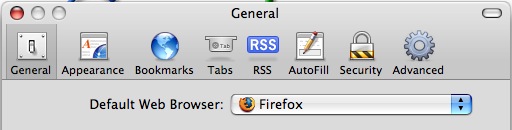
Default web browser in Mac OS X

Updated: 11/27/2021 Ever wondered how to change the default web browser app on your Mac? Maybe you prefer Chrome to Safari, or maybe you want to use Firefox instead of Safari, or vice versa? Whatever your choice, it’s easy to do in macOS Monterey, macOS Big Sur, macOS Catalina, macOS Mojave, High Sierra, Sierra, OS … Read More

How to disable automatic image resizing in Firefox

Apr 4, 2007 - 2 Comments

Tim Russell, the man behind the disabling favicon tip for Firefox, sent us another good Firefox tidbit today: “The worst thing about Firefox is undoubtedly that any image larger than your browser size is automatically resized, which has the effect of distorting pictures and generally being annoying. For some reason, Firefox didn’t include the ability … Read More

Using Pipes at the Command Line, a Basic Overview

Apr 3, 2007 - 1 Comment

One of the essential functions of the command line of Mac OS X, Linux, or any Unix, is understanding some basics about how to use pipes. Essentially, pipes allow you to direct the output of one command into the input of another command, allowing the following command to manipulate, adjust, or work with the prior … Read More

How to Disable favicon Support in Firefox

Apr 3, 2007 - 7 Comments

Don’t like favicons in Firefox? You can disable the showing of Favicons in Firefox with a settings adjustment. Tim Russell writes in with this tip: “If there’s one thing I hate about websites out there it’s the accompanying favicon’s that litter my browser tabs and bookmarks menu. Surely I’m not the only one that dislikes … Read More

Setup an anonymous proxy in Mac OS X

Apr 2, 2007 - 7 Comments

Many schools, employers, and countries restrict access to certain websites for any number of reasons. The easiest way to get around the restrictions is by browsing the web through anonymous proxies, and the web is littered with thousands of proxy sites that are capable of fulfilling this duty for you. But why use a third … Read More

Six Ridiculously Useful Shortcuts for Mac OS X

Apr 1, 2007 - 2 Comments

When it comes to increasing productivity within Mac OS X you can never know too many keyboard shortcuts. Found on the Mac developer blog, Theocacao, we’ve covered over half of these shortcuts before, but those that we haven’t are worth knowing, and those that we have are worth a reminder. Shortcut #6 is probably my … Read More

Mac OS X Directory Structure explained

Mar 30, 2007 - 36 Comments
Mac Finder, where you can copy the path of a file name easily

If you have ever looked at your Mac root directory and wondered what some of those other directories are for, you’re probably not alone. Mac OS got a whole lot more complex with the advent of Mac OS X, adapting a unix file structure that is largely unfamiliar to Mac OS 9 and Windows users. … Read More

Transfer music to your iPod via the command line

Mar 29, 2007 - 9 Comments

Most of us use iTunes to transfer files to and from our iPod, but apparently you can also use the command line. Sasha Ingbram writes in with this tip: “I realize this is a controversial position to take, but I’m not always thrilled with iTunes and how long it takes to get things done. For … Read More

How to Use Redirection at the Command Line, a Basic Overview

Mar 29, 2007 - 4 Comments

Ever wished you could send the output of a command to a file or append that output to an existing file? That’s what redirects do. To put it simply, command line redirects allow you to take the output of certain commands and create new files or add to existing ones with this data, this is … Read More

How to Convert DMG Images to ISO Easily with hdiutil

Mar 28, 2007 - 21 Comments
ISO

If you have ever wanted to turn a DMG file into an ISO file, look no further than the handy command line utility called hdiutil, which is bundled in all versions of OS X. This can be helpful for many reasons, but one of the primary reasons to convert a DMG to ISO is for … Read More

How to Mount a Windows PC Shared Folder On a Mac

Mar 27, 2007 - 2 Comments
Windows

Love it or hate it, but we live in a multi-platform world with multiple operating systems. Sure we prefer Mac’s, but the chances are high that at some point you’ll have to interface your Mac with a PC to share files between the two machines, particularly if you are in an office environment or school. … Read More

Quick Tip: Eject Media from Command Line on Mac OS X

Mar 26, 2007 - 10 Comments
A disc

Ever needed to eject a disc, cd, DVD, or media from the command line on a Mac? You can do that from the Terminal, as we’ll show here. To eject a disc or media from the command line on Mac, open up your Terminal and type the following:

How to Disable the Built-in iSight Camera on a Mac

Mar 26, 2007 - 39 Comments
FaceTime

Most new consumer Macs come with a built-in iSight / FaceTime camera which can be used for all sorts of fun, ranging from live video chatting in FaceTime, Skype, and iChat, to horsing around in Photo Booth, to using third party apps like Gawker to capture time lapse photography of whatever is going on. That … Read More

How to Always Boot Mac OS X in Verbose Mode

Mar 25, 2007 - 31 Comments
Terminal in macOS

Booting Mac OS X as usual shows the Apple logo and eventually you’ll wind up at a login screen or desktop, that’s attractive and all, but some users would prefer to see what’s going on behind the scenes. That’s what Verbose Boot Mode does, it shows you what is really happening during system startup on … Read More

Subscribe to OSXDaily

Subscribe to RSS Subscribe to Twitter Feed Follow on Facebook Subscribe to eMail Updates

Tips & Tricks

News

iPhone / iPad

Mac

Troubleshooting

Shop on Amazon to help support this site