How to Enable AirPlay Mirroring in iOS to Stream an iPhone, iPad, or iPod Touch Display Wirelessly (iOS 10, iOS 9, iOS 8, iOS 7)

AirPlay Mirroring sends exactly what is on the iPhone or iPad screen wirelessly over to an Apple TV or a compatible AirPlay receiver app on a Mac or PC like Reflector or XBMC, including the audio stream if one is available. This mirroring feature is great for demonstrations, presentations, picture slideshows, watching video on a larger screen, gaming on a bigger display, recording an iOS device screen, and so much more.
While iOS AirPlay Mirroring is simple to use, how it works can cause some confusion and lead some users to believe it’s not working at all. Furthermore, AirPlay and Mirroring is hidden by default in iOS, and you’ll need to meet a few basic requirements before finding the feature available for usage on any iOS 9, iOS 8, or iOS 7 device. This makes it a bit different than how it works from a Mac where it’s always visible but not necessarily usable, but once you learn how to use it on your iDevice, you’ll find it’s not complicated.
Read more »


 The next time you’re using the Maps app in Mac OS X to plot a road trip,
  If you need to record some simple sound or audio on a Mac, you can do so easily using a bundled app that comes with Mac OS X, without having to download any third party utilities. That app is QuickTime, which may come as a surprise to some users as it’s typically thought of as a movie viewing application, but believe it or not it has video,
  If you need to find out just how fast your wi-fi link speed is, or rather, the speed of which your Mac is connected to a particular wireless router, you can find this data through the Network Utility app that is bundled in every version of Mac OS X.
  If you have multiple email accounts setup with Mail app on your iPhone or iPad, you’ve probably noticed that each email account name defaults to the provider, like “iCloud”, “Gmail”, “Outlook”, and “Yahoo”. Those names aren’t the most explanatory, and it can become even more confusing when you have two mail accounts from the same service provider setup with Mail app, where you may end up with “Gmail” and “Gmail” or “Outlook” and “Outlook”, one of which may be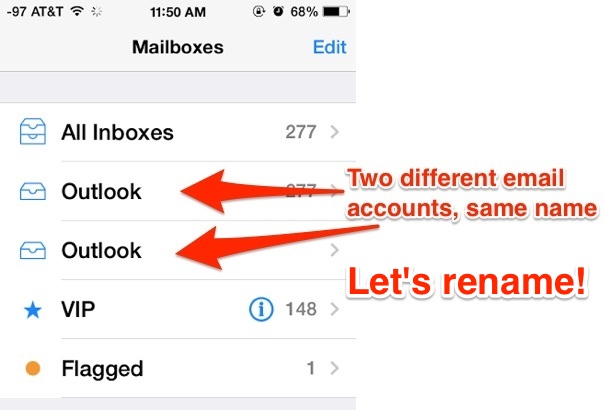
 Time Machine is by far the simplest way to keep regular and reliable backups of a Mac, and usually the automatic backups start and finish without any incident. On some rare occasions though, Time Machine may get stuck* on the “Preparing Backup” stage for an inordinately long amount of time, causing a backup to never start, let alone finish. It’s these failed backup attempts that we’re looking to remedy here.



 If you’re a fan of using gestures for navigation, you’ll be pleased to know that you can navigate browser history in Safari for iOS (versions 7+) by simply swiping back and forth. This basically functions as an alternative to the traditional Back and Forward buttons in Safari, allowing for quick swipes to go forward or backwards a page as needed while you’re browsing.