Converting a PNG file to JPG, or converting JPEG to PNG, is really easy in Mac OS X. You can use the built-in Preview utility to perform the file format change quickly, and Preview is a great choice since it’s bundled with all versions of MacOS and Mac OS X, meaning it does not matter what version of software you have installed on the Mac. No additional downloads are necessary, Preview is built right in on the Mac.
Have you ever had an iPhone experience cellular data problems? Maybe the iPhone has an inability to connect to a cellular network, or some other cellular connection issue occurs that makes it unable to send and receive data or even calls.
If an iPhone is experiencing cellular connectivity and cellular data issues or problems, you may be able to resolve your cellular or general network data problems with a relatively simple trick, which is to reset the iPhone Network Settings. This article will show you how to do just that.
It’s Sunday funday again… and though this doesn’t really fit into a ‘fun’ category it’s sure interesting anyway… we bring to you a rather unfortunate incident that caused a MacBook Pro to be pierced with a bullet hole, right through the screen! Yikes! Read more »
The above image was generated with ShapeCollage, which is a great free Mac software program that allows you to create some pretty fancy photo collages, fitting into various shapes (even ones you define yourself) and text barriers.
It’s surprisingly quick and very easy to use, basically you just drag and drop images into the application that you want to create your photo collage out of, set the parameters of your collage, and then click ‘create’ to save it at whatever size you want. Does it get much easier to make photo collages?
If you’ve ever wondered what your Mac Multitouch Trackpad is doing, download this fun little application. It tracks multitouch input and shows you just how sensitive the multitouch surface really is, detecting up to 11 input points, and also knowing the surface area.
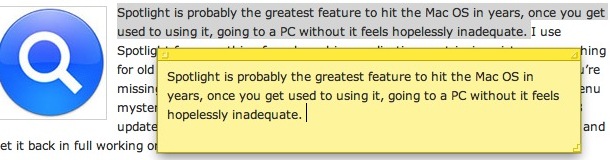
Want a block of text to float over your Mac desktop so that you can reference it easily? That’s a perfect usage for the Stickies app in OS X, and using a little known trick you can instantly create a new Stickies note from within Safari.
The secret to this trick is quite simple: you’ll need need highlight some text, images, or both, and then just hit the following command key sequence: Command+Shift+Y
If you know some specific attributes of a file, application, or item you are looking for on a Mac, you can use Spotlight Search Operators to dramatically narrow down your returned results in the Mac OS search feature. For example, if the file type of a document you are looking for is a PDF, you can pre-qualify search results by using operators to return only PDF’s within Spotlight. There are tons of search operators to use, and some can get very specific. Let’s jump into this a bit to learn more.
Remember, to access Spotlight search on a Mac, hit the Command+Spacebar keys together. Then just type in the little popup search box to start narrowing down the queries and returned items. Spotlight adjusts files live and on the fly depending on what is looked for and specified, thus if you want to try an operator it will immediately adjust the search to accommodate the search operator request.
Here are a some sample operators and parameters to enter before your search query that you can try yourself in Spotlight for Mac OS X:
You can easily open OS X Finder windows containing any search results from the Spotlight menu.
After you have entered a search query into Spotlight, highlight the item you want by navigating to it in the search results, and as the desired item to be opened in the Finder is selected, hit Command+R to reveal the item within the Mac Finder.
Did you know the Mac has a little file inspector tool that can be used in the Finder for quickly getting information about files, folders, and anything else selected in a Finder window?
The File Inspector is basically a dynamic “Get Info” window on the Mac, as it adjusts depending on what you select in the Finder of Mac OS. This is very useful for so many reasons, but particularly if you frequently use the “Get Info” command in Mac Finder to reveal details about finder items.
If you’ve ever needed to get music off of your iPod or iPhone and onto a different machine, then you’ll know it’s not always as easy as you’d like it to be. Let’s say you got a new computer or lost your old one, but still have your iPhone or iPod with music files on it. Because the iPod/iPhone is attached to the old computer’s ID, you can’t just hook up the iPod to a new computer and expect to be able to get the files off. So how do you get music, pictures, and videos off of the iPhone or iPod? My personal choice is to use the easy, and free (for Mac users at least) Pod to Mac software, it’s no frills but easy enough to use and reliable.
Update: Pod to Mac was freeware, but now the developer is charging for Mac versions of the application on their site, you can still download the free version on BrotherSoft.com and possibly CNET
You can also transfer music files that you purchased through iTunes using iTunes itself, and if you’re feeling a bit more adventurous you can get music, videos, and whatever else off your iPod using just the Finder. The Finder method doesn’t work with the iPhone or iPod Touch though, so don’t bother if you’re using one of those. Instead of covering the iTunes or Finder methods myself, I’ll point our a nice how-to guide on Endgadget, check it out here:
When you go to change the file extension in Mac OS X you will get a dialog box notifying you that by changing a file type it may open in another application. Chances are if you are changing the file extension deliberately, you did this intentionally and the warning is not necessary, but it’s shown just in case.
That’s ok though, because a keystroke expedites the process. You can quickly accept this file type extension change by using a simple keyboard shortcut that’s pretty easy to remember: Read more »
Happy New Year to all of you from the writers of OS X Daily! It’ll likely be a slow day around here, but here are some of the more popular posts of 2009 to keep you busy for now:
I frequently get asked about the purpose of .DS_Store files by Mac users and Windows System Administrators who have a few Mac’s on their networks, where seeing the files turn up when hidden files are made visible.
Here is an explanation as to what a DS_Store document is in macOS and Mac OS X, what happens if you delete them, and how to disable their creation if you’d rather not have them around any longer on network environments. Read more »
Have you ever gotten emails from someone that you really don’t want to get? Be it just plain spam or annoying messages from people you’d rather not hear from, you can reduce this unwanted email by using the Bounce feature of Apple’s Mail app. Bounce tells the message sender that your email address isn’t valid, which is very effective when dealing with real people, but less so when dealing with spammers.
You can restore the original location of a file that has been sent to the Trash very easily. This quite literally sends a file that is within the Trash back to where it was originally stored on the Mac OS X file system.
Using the “Restore to Previous Location” feature is really easy, you’ll need to open the Trash can and then do one of the following (one is a keystroke, the other is a right-click option, both work the same however): Read more »
If you’ve ever accidentally deleted pictures from your digital cameras memory card, you’re not alone. That feeling of dread when you forever lose photographic evidence of memories and experiences in digital form can sometimes be resolved though – so don’t freak out quite yet!
Using an excellent free tool called Exif UnTrasher, Mac OS X users can attempt to recover deleted images from memory cards, USB drives, and other volumes, and it works pretty well as long as you can mount the volume, card, or drive that the pictures were deleted from.
You can easily sync your Mac Contact list or Address Book contacts with your Google Contacts. This is quite easy to set up, we’ll show you how to do so in all versions of OS X.
So, you want to connect to your Mac remotely from your iPhone? It’s possible, and it’s easier than you might think. and though you may have heard of people controlling their Mac’s via their iPhone but assumed it was something just for the jailbreak crowd, well that’s assumed wrong, because it turns out that iOS has VNC clients that allow you to remotely control a Mac that is setup for remote control.
It’s actually really easy to control your Mac from the iPhone, iPad, or iPod touch, we’ll run through a look at how it works. Read more »


 Have you ever had an iPhone experience cellular data problems? Maybe the iPhone has an inability to connect to a cellular network, or some other cellular connection issue occurs that makes it unable to send and receive data or even calls.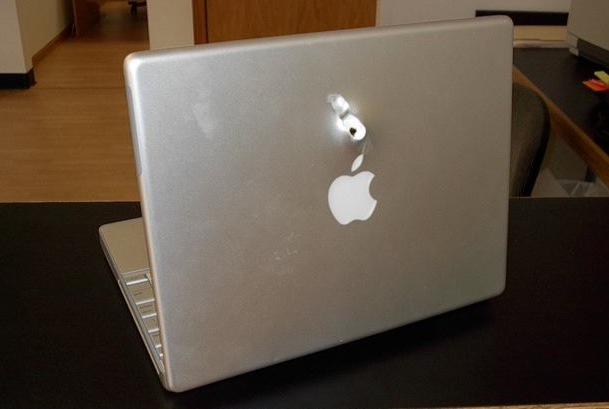

 If you know some specific attributes of a file, application, or item you are looking for on a Mac, you can use Spotlight Search Operators to dramatically narrow down your returned results in the Mac OS search feature. For example, if the file type of a document you are looking for is a PDF, you can pre-qualify search results by using operators to return only PDF’s within Spotlight. There are tons of search operators to use, and some can get very specific. Let’s jump into this a bit to learn more.
 You can easily open OS X Finder windows containing any search results from the Spotlight menu.
 If you’ve ever needed to get music off of your iPod or iPhone and onto a different machine, then you’ll know it’s not always as easy as you’d like it to be. Let’s say you got a new computer or lost your old one, but still have your iPhone or iPod with music files on it. Because the iPod/iPhone is attached to the old computer’s ID, you can’t just hook up the iPod to a new computer and expect to be able to get the files off. So how do you get music, pictures, and videos off of the iPhone or iPod? My personal choice is to use the easy,
 Have you ever gotten emails from someone that you really don’t want to get? Be it just plain spam or annoying messages from people you’d rather not hear from, you can reduce this unwanted email by using the Bounce feature of Apple’s Mail app. Bounce tells the message sender that your email address isn’t valid, which is very effective when dealing with real people, but less so when dealing with spammers.
 If you’ve ever accidentally deleted pictures from your digital cameras memory card, you’re not alone. That feeling of dread when you forever lose photographic evidence of memories and experiences in digital form can sometimes be resolved though – so don’t freak out quite yet!