
Mac OS X 10.6.2 Update Released. Intel Atom Support Officially Missing, breaks Hackintosh Netbooks
 Mac OS X 10.6.2 has been released, for most Mac users this is great news because it fixes over 40 problems and bugs, including the rare but very problematic user account deletion bug. If you have an official Apple Mac then go right ahead and update to Mac OS X 10.6.2, but if you have a Hackintosh Mac Netbook… well you will want to hold off. It has been confirmed that the final release of 10.6.2 kills Intel Atom support officially. Hackintosh Guru StellaRolla reports:
The netbook forums are now blowing up with problems of 10.6.2 instant rebooting their Atom based netbooks.
A quick glance at the Hackintosh forums on MyDellMini.com confirms this:
So, I can tell you 10.6.2 DOES NOT WORK with the Mini10v.
OSX tries to start, but it hangs before you can see the apple and system ist trying to boot again … you are in a loop…
StellaRola goes on to note that the OSx86 community is pretty crafty and a modded kernel will likely surface in the near future. In any event, if you have a Hackintosh, hold off on the official 10.6.2 until more information is available.
You can read more about the Mac OS X 10.6.2 Update from Apple.com
[ Sources: Gizmodo: 10.6.2 bug fixes and StellaRola: Official: Atom Not Supported in 10.6.2 and MyDellMini.com Forums ]
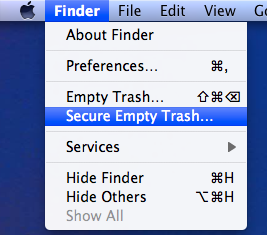 You can securely delete files from Mac OS X right from the Finder. This is by far the simplest method to securely delete something on the Mac, and the process is pretty straight forward, very similar to the normal procedure of deleting a file except that you will access a separate option to enable the ‘secure’ layer:
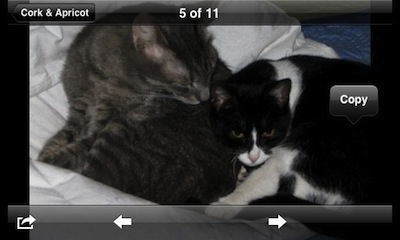 When you’re viewing an image on the iPhone (or iPod Touch) you can tap and hold the image to prevent it from rotating, regardless of the devices orientation. Handy for showing off photos to friends!


 Fortune Magazine has named Steve Jobs the CEO of the decade, and it’s a pretty fitting title really, the guy is a powerhouse. Nearly 10 years ago Apple was struggling to find their place in the technology world, there were rumors of collapse and impending bankruptcy or buyouts, the first release of Mac OS X (10.0) was a slow cumbersome dud, and they had just entered an extremely crowded MP3 player market with a seemingly overpriced product with a weird name, the iPod. Apple stock at the time was right around $7. Now fast forward to today, where the iPod is the only MP3 player people talk about, the iPhone is taking over the cellular world, and
  It’s baaaaaack! Like a relentless zombie in a bad horror flick that just can’t be killed, the Intel Atom chip is now supported again in the latest developer build of 10.6.2, 10C53. This doesn’t mean much since it’s just a developer build, but for now Hackintosh Netbook users can feel a bit better about their uncertain future.
 Anyone fascinated by the mystique of Apple should check out the CultOfMac.com interview with a man you’ve probably never heard of, Ken Segall. His claim to fame? He named the iMac, and was in charge of that whole ‘Think Different’ campaign. With how ubiquitous the iBranding has become, I find it really interesting that Steve Jobs didn’t like the iMac name at all and rejected it on several occasions, but started using it anyway:
 You can use Spotlight as a calculator on the Mac, and it actually works impressively well. Yes, the Spotlight search feature can do calculations!
  TechCrunch is reporting that the



