My one and only email client is the web based Gmail, and for years I’ve been using Google’s Notifier menubar add-on to check for incoming messages, but that has changed. Notify is very similar to Google Notifier, only better – it allows for multiple accounts with tabbed separation, growl notification, and a very sleek modern GUI that fits right into Mac OS X beautifully. If you’re a Gmail Mac user, don’t miss this one!
TechCrunch has an interesting op-ed piece today about why Snow Leopard is seen as disappointing to some casual Mac users who upgrade. The readers digest version? It doesn’t look or feel different enough. TechCrunch author MG Siegler basically argues that to the average user, changes in the look and feel of an operating system are what users notice most. Snow Leopard looks the same as Leopard, therefore in the eyes of most users, it is the same.
“…it’s fairly hard to tell that you’re actually using something that is any different from the previous version. Yes, there are many little, subtle changes all over, but aside from maybe Quicktime X, there is nothing that immediately strikes you as being different. I’d be lying if I said this wasn’t a little disappointing to me.”
Interesting argument, and I partially agree, but for me Snow Leopard has brought vast speed improvements to the Mac OS X Finder, iTunes, Preview, and Safari, which make the upgrade more than worth it. Like MG Siegler, I was a little disappointed to not get the rumored ‘marble’ GUI change that has been long discussed, but Snow Leopard won me over anyway with the functionality improvements. I know that TechCrunch isn’t an outlier in thinking this way though, a friend of mine who recently installed Windows 7 told me that although he still prefers Mac OS X, Windows 7 just looks more modern and fancy with all it’s transparency, gradients, and 3d effects.
What do you think? Are you disappointed that Snow Leopard doesn’t look and feel different enough?
Everyone can make an iPhone ringtone using iTunes or Garageband, but is Apple ready to sell pre-made ringtones to iPhone customers?
That’s that latest word from the Apple rumor mill, with CNET making the claim that on September 9 2009, Apple will be releasing an iPhone Ringtone Store.
Remember, this is just a rumor, but it sounds like it could be happening.
Personally I just use the default ringtone because I like it, but anytime I have changed my iPhone ringtone I just create a new one with iTunes since it’s so easy.
Would people really pay for pre-made ringtones for the iPhone when they can make them easily on their own? If the rumor is true, we’ll see in a week!
Anyway, there are a lot of interesting ringtone tips if you’re interested in this topic. You can make your own, convert your own from songs or audio files, and so much more. But soon, maybe there will be an official method to buy ringtones too directly to the iPhone… we’ll see.
If you’re an iPhone 3G or iPhone 3GS owner and you’re on the AT&T network, you’ll be pleased to hear that AT&T is finally stepping out of the cellular stone ages and on September 25, 2009 will FINALLY enable MMS on the iPhone! It’s kind of amusing to be excited to get a 7 year old technology onto the otherwise wildly modern iPhone, but AT&T has been disappointingly slow with enabling the MMS service for iPhone users. Currently if you’re an AT&T subscriber and someone sends you an MMS message, you might get an annoying text message with a URL to a shoddy webpage and login/password to access a super reduced quality image of the original sent. I say *might* get the annoying message because on average I receive about 30% of incoming MMS’s this way, the remaining 70% get lost in the mystery AT&T MMS abyss and I don’t get any notification at all. Hooray AT&T! Welcome to 2002! err 2009!
The Hackintosh community just keeps on growing, and this particular guide is sure to roil some feathers. Lifehacker has an excellent walkthrough from start to finish on how to build a screaming desktop Mac Hackintosh that runs Snow Leopard, for under $900! Assuming you order the same parts, the incredible specs of the machine you end up with are as follows:
* 8GB of RAM
* 3.1 GHz
* 8GB of RAM
* 1TB Hard Disk
* GeForce 9800 GTX+ 512mb Graphics Card
* DVD Burner
* Mac OS X 10.6 Snow Leopard
LifeHacker sums up the specs of this build versus something comparable at the Apple Store as follows: “In short, my $900 “Hack Pro” sports better hardware than any Mac that Apple sells short of the $3,300 8-Core Mac Pro” – Wow! Now obviously building this machine takes some tech savviness, but if you want a powerful Mac and don’t have $3000 to spend, the Hackintosh build is a very compelling weekend project.
I actually have my own Hackintosh but it’s a Netbook and I simply love it. Several of my techy friends also have Hackintosh’s that are both Netbooks and Desktops and they are enthralled with the machines as well – the primary reason for creating a Hackintosh for them? Cost savings. The interesting thing is we are all ‘real’ Mac owners as well, but instead of buying a brand new machine we each opted to go the Hackintosh route.
Check out the Lifehacker article for the walkthrough of building a desktop Mac, or follow some of our other Hackintosh links:
QuickTime X is really cool and one of the many great improvements in Snow Leopard, but I was really surprised to find out that QuickTime X no longer automatically plays movie files on open, you’d think since I just opened the file I’d want to watch the movie! Thankfully resolving this is just a matter of entering a command in the Terminal.
While digging around to figure this out I also uncovered some more QuickTime X hacks, like forcing QuickTime to stay full-screen even when it’s in the background, or how to force the titlebar to always show or always hide.
As determined by unique user pageviews, here are the top six most popular OS X Daily posts for the month of August, 2009! If you happened to have missed one, check them out now!
Cult of Mac posted a pretty compelling picture of a new full screen keyboard feature in Snow Leopard that certainly looks like it’d be handy if you had a touchscreen Mac. With all the rumors of the Tablet Mac floating around, this just may be some evidence that the upcoming Mac Tablet will be running Snow Leopard rather than some version of the iPod Touch / iPhone OS. Here’s how you can see the screen keyboard yourself, courtesy of Cult of Mac:
* Go to System Preferences>Keyboard
* Click the box “Show Keyboard & Character Viewer in menu bar”
* Go to the menu bar at top right and click “Show Keyboard Viewer”
If you have a Mac without a functioning DVD drive (or a MacBook Air), you’ll need to find another way to upgrade to Snow Leopard, thankfully this is very easy, all you’ll need is an external firewire or USB hard drive. You’ll need access to a DVD drive *somewhere* so that you can make a disk image of the Snow Leopard install disk with the Disk Utility tool, but once you have the disc image you won’t need the DVD drive again. What you WILL need the entire time though is an external Firewire or USB drive that you don’t mind formatting, so that you can make the device bootable and upgrade to Snow Leopard from it.
OS X Daily reader Todd Harris has tipped us off that when installing Mac OS X 10.6 Snow Leopard, your /etc/hosts file is reset. If you followed a tip we posted a while back about how to block access to specific websites then this is particularly relevant to you, so be sure to manually adjust /etc/hosts again so that the sites you want blocked are reincluded. Of course there are many other uses for /etc/hosts too, so the long story shortened is this: if you have a custom /etc/hosts file, back it up prior to and restore it after you have finished installing 10.6 Snow Leopard! Thanks for the tip Todd!
I don’t know why but when I upgraded to Snow Leopard my wireless internet got all wonky, connections were dropping left and right and I couldn’t maintain any worthwhile airport connection for longer than a few minutes. DHCP was behaving particularly strange and the automatic settings pulled from my router were dropping every few seconds. I’m reposting this here not only as some sort of catharsis but also in the event that it helps someone else troubleshoot their wireless problems in 10.6.
Here’s what I did to fix my Airport wireless connection from dropping in Snow Leopard. There was no silver bullet, but each setting allowed my airport connection to become more stable, and the combination of all of these changes has sustained a connection without dropping:
* Changed DHCP auto settings to manual – now I manually set my IP address on the network, I just set something high so it wouldn’t interfere with other DHCP machines. As long as you have the subnet mask, router, and DNS settings configured manually as well, this shouldn’t be a problem.
* Change Wireless Channels – I noticed that a neighbor recently changed their wireless channel to the same one I was on, it’s a weak signal but can still cause interference. I logged into my wireless router and changed the wireless channel to a more obscure and unique one.
* Disabled “Wireless G only” Mode – what seems to have finally sealed the deal was disabling ‘Wireless G Only’ mode that I had set on my router, yea things could theoretically be a little slower but I haven’t noticed, and I’ll wait an extra millisecond or two for a webpage to load if it means I can use my MacBook wirelessly at home as intended.
Interestingly enough, I tried doing each of these things entirely on it’s own and it did not resolve the problem, it was the combination of everything that seems to have ‘fixed’ my airport connection problems. I know my wireless connection issues with Snow Leopard are a fluke here, I imagine it’s something unique to my network and router that only a few other users will encounter. Anyway, if you’re having any wireless connection problems in Snow Leopard 10.6 too, try these things out and see if it works for you as well.
Update: Mac OS X 10.6.3 has been released and contains a few Airport bug fixes, it would be wise to install that software update in addition to trying these tips.
Some more Wireless connection troubleshooting tips:
* Update to the latest version of Mac OS X (10.6.3 includes numerous Airport fixes)
* Reset your router
* Reset your cable modem/DSL
* Disable WPA/WEP protection
* Change security protocol from WEP to WPA/WPA2
* Switch wireless channels – pick a channel no neighbor is using.
* Turn Airport on & off (via menu or Network preferences)
* Delete and then recreate/reestablish wireless network connection
* Create a new Network Location
* Make sure your router firmware and Airport card firmware is up to date
* Zap the PRAM on your Mac (hold Command+Option+P+R on restart)
* Flush the DNS cache using the Terminal command: dscacheutil -flushcache
* Delete the com.apple.internetconfigpriv.plist and com.apple.internetconfig.plist files from ~/Library/Preferences
* Trash your home directories SystemConfiguration folder and reboot – Remove all files within ~/Library/Preferences/SystemConfiguration/ and reboot your machine. Make sure you delete the proper folder, this is in your home directory.
If all else fails, try this, which has worked for some individuals:
* Reset your Mac’s System Management Controller (SMC) : Shutdown the MacBook/Pro, remove the battery, disconnect the power, hold the Power Key for 15 seconds. Replace the battery, reconnect power, and zap PRAM and wait for 2 chimes before letting the keys go. Check out more information on when and how to reset your SMC.
I still don’t know why AT&T and Apple don’t enable Internet Tethering by default on the iPhone, but nonetheless they don’t… but you can enable it yourself with a little work! The simplest way I’ve found without Jailbreaking your iPhone requires a few settings changes from updating a system profile, which you can download from BenM.at, just visit the page from your iPhone. After you install the adjusted profile, Internet Tethering will be enabled, easy huh? This definitely works, but it does have the strange effect of disabling Visual Voicemail… now supposedly if you have AT&T then this configuration profile fixes that problem, but I haven’t tried it myself, so your mileage may vary and proceed at your own risk (remember to visit that link from your iPhone). Basically after you install that profile and double-check the setting exists, have your iPhone hooked up to your Mac (or PC? untested) and the rest is pretty much setup for you, your Mac should pull DHCP settings from AT&T and suddenly you’re using the AT&T data network from your Mac via your iPhone! Sweet!
If you run into any problems, simply go to Settings > General > Profiles and delete the profile and things should be back to normal. Remember to proceed at your own risk! I have no idea if AT&T will start charging you different rates or if this voids your warranty, but like any hack, it’s best to proceed with caution and expect some disapproval from AT&T and Apple. Hopefully Apple and AT&T will soon enable this feature by default and won’t charge anymore for it.
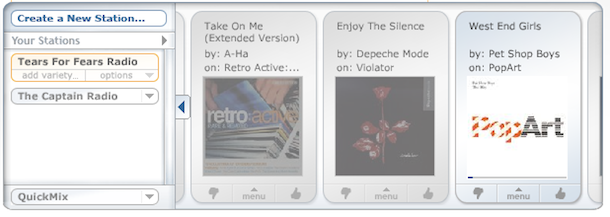
I love Pandora and use it all the time, so I was pretty frustrated when I discovered that I had hit the 40 hour limit and was being asked to pay for the service. Well, like any good Mac geek I poked around and figured out a way to reset the 40 hour limit (Windows users scroll below for how-to), and here’s how I did it:
Reset / Remove Pandoras 40 hour limit
* In your Home directory, open Library > Preferences > Macromedia > Flash Player > #SharedObjects
* You’ll find a bunch of directories in here with various randomly generated names like JZK819C3P and H8R1ZK19M, etc – these are basically cookies for Flash Player and if you don’t mind losing other settings elsewhere, you can delete all these folders to reset your Pandora music limit, but if you’d rather preserve other settings and just reset Pandora, read on…
* In the Finder window Search Box, type “pandora” and then select the folder “Macromedia” as your search directory rather than ‘This Mac’
* Delete just these files/folders, they’re usually labeled pandora, pandora.com, and #pandora.com
* Ta da! Your Pandora limit is now reset and you have another 40 hours to listen! Alternatively, you could just pay the $1/month to use Pandora, it’s such a great app it’s worth it.
Reset / Remove the Pandora 40 hour limit in Windows
Many of us have Windows PC’s as well, so we might as well cover the bases for the Windows XP/Vista/7 users too:
* Navigate to C:\Documents and Settings\USERNAME\Application Data\Macromedia\Flash Player\#SharedObjects
Replace “USERNAME” with your user name
* Same as above, there will be a bunch of random folder names, you can delete them all, or just the ones containing ‘pandora’ in the name
* Now navigate to C:\Documents and Settings\USERNAME\Application Data\Macromedia\Flash Player\macromedia.com\support\flashplayer\sys
* Find the folder named ‘#pandora.com’ and delete it, or just delete all the files
* Finally, navigate to C:\Documents and Settings\USER\Cookies and delete everything labeled ‘pandora’
Following all these directions, and you’ll be listening to Pandora free of the forty hour limitation again! Enjoy!
iPhone / iPod Touch users: the iPhone and iPod Touch version of Pandora seems to be immune to the 40 hour music limit (for now at least).
So now that Snow Leopard is out, how does it stack up? In many cases it’s faster and in some cases, well, it’s slower. It appears that the most significant speed gains are in Apple’s own software and Mac OS X itself, this is likely because Apple has optimized as much as possible to use Grand Central Dispatch and OpenCL. Overall, nearly everyone who has installed Snow Leopard agrees that their Mac feels faster and more responsive, and Gizmodo has a pretty compelling video of the speed boost in Apple’s Preview app. For me personally, Snow Leopard feels a lot faster, and I’m pretty happy about that! Check out the links below for more.
Successfully developing for the iPhone and iPod Touch is fun but it’s not easy, sure, you’ll want a good book, but after you’ve written your first app, what do you do next? TechCrunch for mobile geeks site MobileCrunch has a couple great detailed tips for small independent developers to increase their chances for success on Apple’s App Store for the iPhone and iPod Touch. Here’s the readers digest version:
#1) The Hare beats the Tortoise. Develop fast, release often.
#2) Make sure the price is right. (basically, $1)
#3) Show off your feathers. (ie: have a good looking icon and screenshots)
#4) Partner for success. (group with other small developers to cross promote)
#5) PR isn’t all its cracked out to be. (send links to blogs and reviewers, but don’t bother spending big money on a PR rush)
I installed some Software Updates recently on an older Mac Mini and left my house to go on a run, I came back about an hour later to find that nothing was installed yet, my Mac Mini was stuck on “Configuring Installation” – hmm now what? Well, it’s a rare occurrence, but it can happen and thankfully it’s easily fixable. First, do not reboot the machine half installed! Follow these steps from Apple and you should be good to go:
Quit (or if necessary, Force Quit) Software Update.
Click the Finder icon in the Dock.
From the Go menu choose “Go to Folder”.
Type: /Library/Updates
Click Go. The /Library/Updates folder opens.
Select all contents of this folder and move them to the Trash.
Once the above steps are complete, use Software Update again to re-download and install the update.
Phew! Apple to the rescue! This hanging installation problem was supposedly fixed in 10.5.6 so anyone that has kept up to date thus far will probably not run into this problem… unless you’re like me and have older Macs that you neglect to update the software on more than once a year! Oops!
If you’ve ever wanted to know what’s being executed, which packages are being installed, and the installation directories and file locations of a Mac OS X system install, then you’ll enjoy this tip sent to us on Twitter by Murtika Laksmi:
While installing Snow Leopard do the following:
* At the “Mac OS X Installer” menu select “Window > Installer Log”
* In the “Installer Log” select “Show All Logs”
* Resize the window so you can see both the text and progress bar
It was quite interesting to watch during my upgrade!
I was pretty excited to install Snow Leopard today, and the upgrade from 10.5.8 went without a hitch, finishing in about an hour. A couple Snow Leopard install tips:
* Be sure to customize your installation to have Rosetta support, as it’s not installed by default anymore.
* If you’re an X-Code user, you’ll probably want to upgrade that separately as well (included in the optional installs directory on the Snow Leopard disc).
Positive Observations: Finder is definitely snappier, so are Preview, Safari, iTunes, and iChat. The new darker default display gamma is a big improvement, looks very nice.
Negative Observations: Wireless connections are dropping randomly and constantly on my MacBook, lookslikeI’mnot alonehere, I can sustain a connection longer than a few seconds by not using DHCP and manually entering the necessary TCP/IP settings. Synergy does not work well, if at all, unable to connect, timeouts, and drops (could be related to aforementioned network problems?)
It’s worth mentioning that several of my friends and colleagues have installed Snow Leopard on their machines (upgrades and fresh installs) with no issues.

 My one and only email client is the web based Gmail, and for years I’ve been using Google’s Notifier menubar add-on to check for incoming messages, but that has changed. Notify is very similar to Google Notifier, only better – it allows for multiple accounts with tabbed separation, growl notification, and a very sleek modern GUI that fits right into Mac OS X beautifully. If you’re a Gmail Mac user, don’t miss this one!

 If you’re an iPhone 3G or iPhone 3GS owner and you’re on the AT&T network, you’ll be pleased to hear that AT&T is finally stepping out of the cellular stone ages and on September 25, 2009 will FINALLY enable MMS on the iPhone! It’s kind of amusing to be excited to get a 7 year old technology onto the otherwise wildly modern iPhone, but AT&T has been disappointingly slow with enabling the MMS service for iPhone users. Currently if you’re an AT&T subscriber and someone sends you an MMS message, you might get an annoying text message with a URL to a shoddy webpage and login/password to access a super reduced quality image of the original sent. I say *might* get the annoying message because on average I receive about 30% of incoming MMS’s this way, the remaining 70% get lost in the mystery AT&T MMS abyss and I don’t get any notification at all. Hooray AT&T! Welcome to 2002! err 2009!
 The Hackintosh community just keeps on growing, and this particular guide is sure to roil some feathers.
  QuickTime X is really cool and one of the many great improvements in Snow Leopard, but I was really surprised to find out that QuickTime X no longer automatically plays movie files on open, you’d think since I just opened the file I’d want to watch the movie! Thankfully resolving this is just a matter of entering a command in the Terminal.
  As determined by unique user pageviews, here are the top six most popular OS X Daily posts for the month of August, 2009! If you happened to have missed one, check them out now!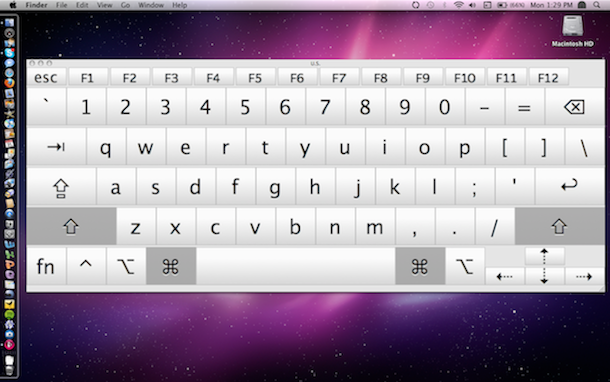
 If you have a Mac without a functioning DVD drive (or a MacBook Air), you’ll need to find another way to upgrade to Snow Leopard, thankfully this is very easy, all you’ll need is an external firewire or USB hard drive. You’ll need access to a DVD drive *somewhere* so that you can make a disk image of the Snow Leopard install disk with the Disk Utility tool, but once you have the disc image you won’t need the DVD drive again. What you WILL need the entire time though is an external Firewire or USB drive that you don’t mind formatting, so that you can make the device bootable and upgrade to Snow Leopard from it.
  OS X Daily reader Todd Harris has tipped us off that when installing Mac OS X 10.6 Snow Leopard, your /etc/hosts file is reset. If you followed a tip we posted a while back about
  I don’t know why but when I upgraded to Snow Leopard my wireless internet got all wonky, connections were dropping left and right and I couldn’t maintain any worthwhile airport connection for longer than a few minutes. DHCP was behaving particularly strange and the automatic settings pulled from my router were dropping every few seconds. I’m reposting this here not only as some sort of catharsis but also in the event that it helps someone else troubleshoot their wireless problems in 10.6.
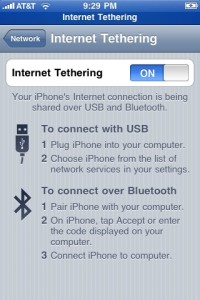 I still don’t know why AT&T and Apple don’t enable Internet Tethering by default on the iPhone, but nonetheless they don’t… but you can enable it yourself with a little work! The simplest way I’ve found without Jailbreaking your iPhone requires a few settings changes from updating a system profile, which you can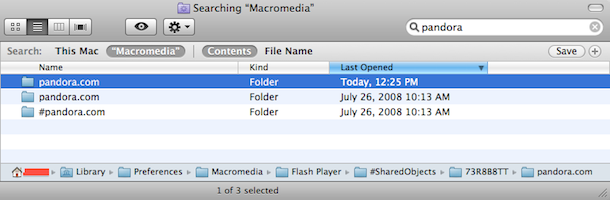
 So now that
  is out, how does it stack up? In many cases it’s faster and in some cases, well, it’s slower. It appears that the most significant speed gains are in Apple’s own software and Mac OS X itself, this is likely because Apple has optimized as much as possible to use
  Successfully developing for the iPhone and iPod Touch is fun but it’s not easy, sure, you’ll want
  , but after you’ve written your first app, what do you do next? TechCrunch for mobile geeks site
  I installed some Software Updates recently on an older Mac Mini and left my house to go on a run, I came back about an hour later to find that nothing was installed yet, my Mac Mini was stuck on “Configuring Installation” – hmm now what? Well, it’s a rare occurrence, but it can happen and thankfully it’s easily fixable. First, do not reboot the machine half installed! Follow
  If you’ve ever wanted to know what’s being executed, which packages are being installed, and the installation directories and file locations of a Mac OS X system install, then you’ll enjoy this tip sent to us on