tips

Search tips

Always Show Scroll Bars in Mac OS X

Aug 3, 2011 - 73 Comments
Show Scroll Bars in Mac OS X Lion

The scrollbars in new versions of Mac OS X are hidden until activated by use, that is, by scrolling, making them invisible by default. This is the new default behavior that works very well if you primarily use a trackpad with your Mac. I use an external mouse with my Mac quite often though, and … Read More

Access iCloud.com Beta Springboard without an Account via Web Browser

Aug 2, 2011 - 13 Comments
Enter iCloud springboard with javascript

iCloud Beta is now live for developers to access, and we know what the pricing plans look like, but average users are left just looking at screenshots for now. Just kidding! If you want to check out iCloud’s very iOS-like Springboard and web apps, and you don’t have a developer account, you can use this … Read More

Re-Download Mac OS X Lion from the App Store

Aug 2, 2011 - 104 Comments
re-download Mac OS X Lion from the App Store

Need to redownload Mac OS X Lion from the Mac App Store? If you plan on making an install drive but you already upgraded to Lion, you’ll need to redownload the Installer so that you can extract the DMG file. This is the sure fire way to do it, in short, hold the Option key … Read More

The Easiest Way to Make a Lion Install Disk, USB, SD Card, or DVD is Lion DiskMaker

Aug 2, 2011 - 13 Comments
Easily Make a Lion Install DVD or USB Drive

If you don’t want to deal with the already simple task of making a Lion USB install drive or boot DVD, you will probably like the little third party utility called Lion DiskMaker, it’s an AppleScript that handles everything for you as long as you have the requirements met. In order to use LionDiskMaker, you … Read More

Turn Off Resume on a Per App Basis in Mac OS X Lion with defaults write

Aug 1, 2011 - 23 Comments
Turn Off Resume on a Per App Basis in Mac OS X 10.7 Lion

In our post on how to disable Resume for Safari or other applications in OS X 10.7, several of our commenters pointed out that it isn’t necessary to change the individual app directories permissions. Alternatively, you can turn off Resume on a per-app basis using a defaults write command entered into the Terminal. Turn Off … Read More

How to Refresh Launchpad in Mac OS X

Aug 1, 2011 - 32 Comments
OS X Lion's Launchpad database files

Launchpad is the app launcher in Mac OS X that is quite like the iOS Home Screen, showing a series of app icons and names on a simple screen making it very easy to launch whatever apps you want to open. It’s a nice utility and feature built into the Mac, but it does have … Read More

Disable Resume for Safari or Other Specific Applications in Mac OS X Lion

Jul 31, 2011 - 26 Comments
Disable Specific Apps from Resume in Mac OS X Lion

Resume is that feature of Mac OS X Lion that causes apps windows to reappear after you have quit and then relaunched the app. It’s a great feature but not one that we want all applications to use, so here is how to disable Resume on a per app basis.

Convert Audio to M4A in Mac OS X

Jul 30, 2011 - 21 Comments
Convert Audio to M4A in Mac OS X Lion

One of the many understated features in Mac OS X is the ability to natively convert audio to m4a directly in the OS X Finder – without any additional downloads or add-ons. Yes, an MPEG audio encoder is built directly into Mac OS X since versions 10.7 and 10.8, 10.9, 10.10 (and beyond of course), … Read More

Hide the Reading List Icon from Safari Bookmarks Bar in OS X Lion

Jul 30, 2011 - 2 Comments
Hide Reading List in Mac OS X Lion's Safari

If you don’t use Safari’s new Reading List feature in Mac OS X Lion, you probably don’t want that little eyeglass icon cluttering up your bookmarks bar. It’s easy to hide though, here’s how: Go to the Safari menu and open Preferences Click on the “Bookmarks” tab and uncheck “Include Reading List” If you don’t … Read More

Cut and Paste Files & Folders in Mac OS X

Jul 29, 2011 - 86 Comments

The Mac now has the highly desirable “Cut and Paste” file feature throughout the Mac OS X desktop and Finder, allowing users to truly cut and paste to move the selected documents or folders to a new location, rather than just making a copy of them. In this sense, the cut & paste ability behaves … Read More

How to Delete Voices from Mac OS X

Jul 29, 2011 - 9 Comments
Remove Voices from OS X Lion

One of OS X’s many great new features are all the new high quality multi-lingual voices (here is how to add them yourself). If you went on a voice adding spree like I did, you may quickly realize that all these new voices take up a fair amount of disk space, each weighing in around … Read More

Discard Windows on Quit to Prevent Resume from Reopening Last Session in OS X Lion

Jul 29, 2011 - 8 Comments
Discard Windows from Resume on Quit

Want to toss out the windows in your current application session, preventing them from reopening again via the Resume feature in OS X? This is pretty easy you just have to remember to do it, to discard windows as you quit an app in Mac OS X just do the following: Hold down the Option … Read More

Easily Hide Apps & Folders from Appearing in LaunchPad with LaunchPad-Control

Jul 28, 2011 - 20 Comments
Hide Apps from LaunchPad in Mac OS X Lion

If you’ve spent much time using OS X Lion’s new LaunchPad feature you’ve probably noticed that outside of stuffing things into new folders you can’t really hide apps. If you enter the ‘jiggle‘ mode and try to remove an app from LaunchPad, it actually uninstalls the app, which makes it very easy to uninstall things … Read More

Add a Message to the Login and Lock Screen in Mac OS X

Jul 28, 2011 - 14 Comments
Message at Login and Lock Screen in Mac OS X Lion

OS X has a nice new feature to login and lock screens that allow you to display a message underneath the login panel. This is visible to everyone who can see the Mac screen, and it makes for a great place to put either a bit of generic personalization message, or better yet, a lost … Read More

Turn Off Auto Correct in Mac OS Mojave, MacOS Sierra, OS X Mavericks, Yosemite, etc

Jul 28, 2011 - 68 Comments
Turn off Auto Correct in Mac OS X Lion

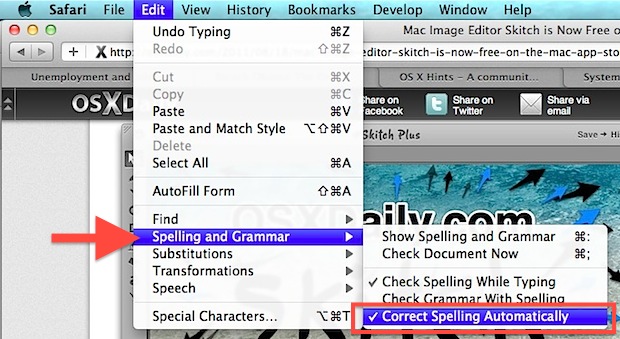
The Mac has an autocorrect feature that can range from excellent to annoying, and it works by attempting to automatically correct typos and misspellings of words as they appear, which are instantly compared to an extensive dictionary and replaced on the fly. It can be a great feature but it’s not perfect, and how you … Read More

Change Dashboards Lego Background Wallpaper in Mac OS X Lion

Jul 27, 2011 - 88 Comments
Change Dashboards background wallpaper image in Mac OS X Lion

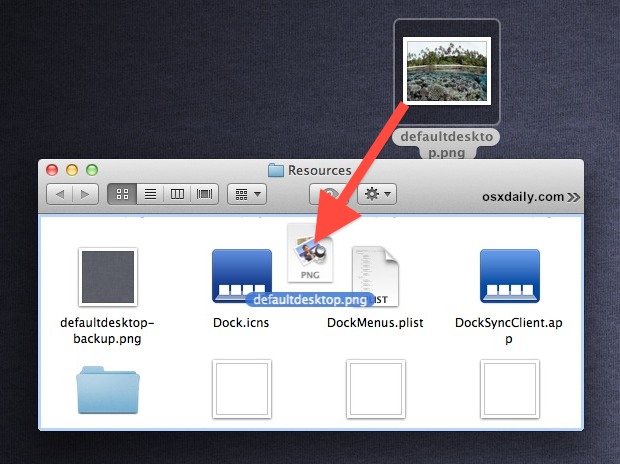
Mac OS X Lion brought a few changes to the Dashboard, one being that it’s contained within it’s own Space by default, and the other noticeable UI difference is the new Lego lookalike background wallpaper that looks a little, well, Lego-like. That background image is easy to change, so pick an image you’d rather see … Read More

Check Download Progress on the Mac App Store

Jul 27, 2011 - 30 Comments
Check download progress of apps in the Mac App Store

Outside of watching the little progress bar on the downloading apps icon in LaunchPad or the Dock, there isn’t much of an outward display of how downloads are progressing from the App Store in OS X. Instead, more specific information about download progress and download speed is contained within the Mac App Store app itself, … Read More

Disable Mail Animations in Mac OS X

Jul 27, 2011 - 15 Comments
Disable Mail Animation in OS X Lion

If you have used Mail for a long time, you have probably noticed the new Mail animations for replying and sending, where the message seems to slide off the screen. Like all the other new animations, this is a polarizing addition and some people hate it. Turning off the general new window animations in OS … Read More

Subscribe to OSXDaily

Subscribe to RSS Subscribe to Twitter Feed Follow on Facebook Subscribe to eMail Updates

Tips & Tricks

News

iPhone / iPad

Mac

Troubleshooting

Shop on Amazon to help support this site