tips

Search tips

Hack Mac OS X Lion to work on unsupported Core Duo & Core Solo Macs

Apr 8, 2011 - 34 Comments

Mac OS X 10.7 Lion Developer Previews 1 and 2 currently do not install on older Macs with unsupported Core Duo and Core Solo hardware, but by performing a simple hack you can get these machines to boot Lion. Apparently the only thing preventing Lion from working on these 32-bit Macs is a single file … Read More

Extract and Explore an iOS App in Mac OS X

Apr 7, 2011 - 14 Comments

You can find some interesting things in iOS apps that you’ve downloaded from the App Store, all you need to do is extract the file from its container and then you’re free to browse around like any other application package. This works with any iPhone or iPad app, and you’ll obviously need a Mac with … Read More

Show Folder Sizes in Mac OS X List View

Apr 5, 2011 - 7 Comments

If you would like to see the folder sizes on the Mac, you can do so easily by enabling a folder size calculation when looking at directories in the List View of Finder in Mac OS X. What this trick does is show folder sizes on the Mac, calculated in megabytes, kilobytes, or gigabytes, depending … Read More

Show a Spectrum Analyzer in iTunes Instead of Song Info

Apr 3, 2011 - 6 Comments

In a somewhat hidden feature of iTunes, you can display a music spectrum analyzer in place of the iTunes song info. All you need to do is click on the little play icon in the song info area, it’s highlighted below with an arrow pointing to it: This has probably been around for a while … Read More

Boot into Mac OS X Verbose Mode

Mar 31, 2011 - 4 Comments

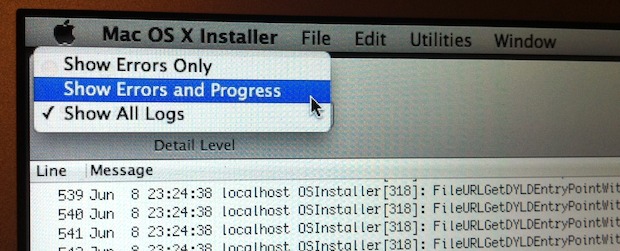
Booting a Mac with Verbose Mode can be a helpful troubleshooting trick for some obscure situations where users are trying to determine what is going wrong with a Mac during the system boot process. Just as it sounds, verbose mode is verbose, meaning it lists everything going on behind the scenes, and you’ll watch as … Read More

Read any New York Times Article for Free

Mar 30, 2011 - 9 Comments

The New York Times recently put up their paywall, blocking users from reading over a certain number of articles a month. Their pricing scheme is sort of a mess but I can understand charging for quality content. That’s not really the point though, their paywall implementation makes it difficult for paying users to share content … Read More

Use iOS folders to have a minimalist and icon-free iPad homescreen

Mar 28, 2011 - 8 Comments

If you’re a fan of minimalist workstations and desktops and you have an iPad, you’ll like this trick.

Reclaim Disk Space on a Mac by Periodically Clearing Out ~/Downloads

Mar 23, 2011 - 9 Comments

Mac users can often reclaim significant disk space by clearing out their Downloads folder. Just how significant depends on the user, what they download, and if they tend to that directory often, but… See that screenshot? That’s my Macs Downloads folder measuring in at a whopping 26.18GB and begging for deletion. I’m a pretty savvy … Read More

Relaunch the Mac OS X Finder

Mar 22, 2011 - 12 Comments

Generally speaking, if you kill the Mac OS X Finder it will automatically restart itself as it should. We say “generally” because from time to time things don’t go exactly as planned, and on rare occasions the Finder won’t reopen itself after being killed, restarted, or manually quit. When the Finder doesn’t auto relaunch itself … Read More

Change the Mac Startup Drive on Boot

Mar 22, 2011 - 14 Comments

A Macs startup drive can be changed during system boot by holding down the OPTION key, start holding down Option the moment you hear the boot chime sound and while the screen is still black, this will bring up the boot drive manager. From this startup boot disk menu, you can use the mouse or … Read More

Temporarily Prevent a Mac from Sleeping

Mar 21, 2011 - 13 Comments

For security reasons, it’s always a good idea to lock your Mac screen when you step away from the keyboard. On the other hand, there are times where you’ll be away from your Mac but you don’t want to have to re-enter your password to login, or you just don’t want your screensaver activating or … Read More

Maintain iChat Conversations & Train of Thought by Showing Last Messages

Mar 21, 2011 - 2 Comments

If you’ve ever needed to reboot in the middle of an iChat conversation you know how distracting it can be to your train of thought, plus it’s also a huge interruption to the flow of conversation. An easy solution to this is to set iChat to keep track of your last messages:

Increase the Size of Mac OS X Desktop Icons

Mar 16, 2011 - 5 Comments
Mac Finder

It’s really easy to increase the size of the icons that appear on the Mac OS X desktop or anywhere in Finder by using an adjustable slider. This lets you select icon sizes as small as 16×16 pixels and as large as 512 x 512 pixels, which is really quite big, and of course, you … Read More

How to Reformat an iPad

Mar 15, 2011 - 20 Comments
iPad Pro

Want to erase and reformat an iPad? If you recently upgraded to a new iPad and you’re either selling or passing along your old iPad, you’ll want to reformat the iPad before sending it off to live with it’s new owner so that none of your personal stuff is on the device. There are two … Read More

Show Remaining Battery Life in the Mac OS X Menu Bar

Mar 14, 2011 - 10 Comments
MacBook AIr 2012 Battery Life

If you’ve ever wondered how much battery life is remaining on a MacBook, MacBook Pro, or MacBook Air, you should set the battery icon in the OS X status bar to display some additional details, like the percentage remaining. This gives you an immediate idea of how much longer you can use a Mac.

Disable the Spaces Animation in Mac OS X

Mar 9, 2011 - 9 Comments

Anytime you flip between Spaces in Mac OS X there’s a fancy animation, this is nice and all but it makes switching Spaces slower than it needs to be. You can disable the animation which speeds up Spaces transition a bit. Disable Spaces Animation Launch Terminal and type: defaults write com.apple.dock workspaces-swoosh-animation-off -bool YES Then … Read More

Remove an Agent from launchd

Mar 8, 2011 - 35 Comments

The vast majority of Mac users won’t need to manually tweak launchd and launchctl, but there are times when you uninstall or stop using an app in Mac OS X and a service agent continues to needlessly load in launchd. This is annoying, but these rogue agents are easy to remove via the command line, … Read More

How to Move the iPhone & iPad iTunes Backup folder to an External Hard Drive

Mar 5, 2011 - 98 Comments

If you have a Mac with an SSD or otherwise limited disk space (like the MacBook Air 11″ with a 64GB drive), you might consider moving your iPhone backup folder to another drive to save some of that precious SSD space. Before proceeding you might want to determine if this is necessary for you. Do … Read More

Subscribe to OSXDaily

Subscribe to RSS Subscribe to Twitter Feed Follow on Facebook Subscribe to eMail Updates

Tips & Tricks

News

iPhone / iPad

Mac

Troubleshooting

Shop on Amazon to help support this site