
Block Access to Websites on a Mac by Modifying /etc/hosts
 We’ve received several questions asking how to block specific sites from being accessed directly on the Mac. The frustration seems to lie in how easy it is to circumvent the typical measures, such as setting Parental Controls and blocking sites in Safari, only to have them accessed in Camino or Firefox. Well, a quick and efficient way to block access to specified sites is by editing the /etc/hosts file, which has the added bonus of providing system wide results. Whether it’s children or your roommate who you’re trying to stop from visiting a particular website, here’s how to do it.
Block Access to Websites on a Mac
Editing /etc/hosts
1) To edit the hosts file and add a new entry, open up your Terminal and type the following (You’ll be asked for your root password because this is a system file):
sudo nano /etc/hosts
2) This will bring up a screen that looks a lot like the one below, notice that yahoo.com has been added at the bottom as a site we want to block. To block any other site, simply type it in the same fashion. You can use the loopback IP of localhost and have as many sites map to 127.0.0.1 as you want, or specify other IP’s to redirect a URL to, like 0.0.0.0:
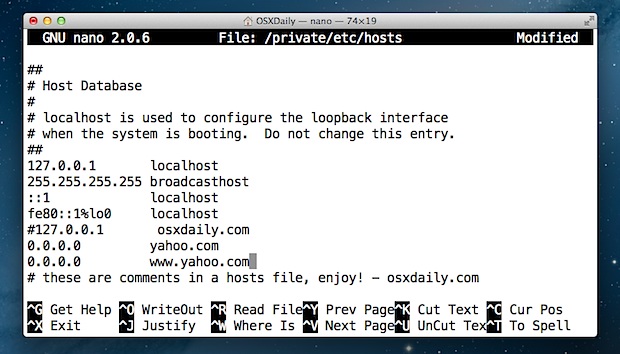 Blocking websites in ETC HOSTS File of a Mac
3) Now save the file in nano by hitting control-o and the return key.
Note that you may need to run the following command for changes to take effect:
sudo dscacheutil -flushcache
This flushes your DNS cache.
How this works: you are now telling your Mac to send requests for MySpace.com (or whatever site you listed) to 127.0.0.1, your local machine. This completely blocks the MySpace.com address from being loaded in any web browser. (Note that if someone is savvy enough though they could access the blocked site through a web proxy). If you really want to be crafty and have Personal Web Sharing enabled, you could put up a simple webpage for people to see when they try to access the blocked sites.
Confused? Want a visual walkthrough? Take a peak at our video guide showing how to edit /etc/hosts in Mac OS X






anybody else find that this doesn’t work any more?
The /etc/hosts approach to blocking websites always works, but you must be sure you put the domain in properly and are editing the proper files. The reason it works is because it’s at the system level, and essentially it redirects a domain access and DNS to a localhost rather than the intended server. Developers use this all the time for testing websites locally for example, same idea.
Be sure the file changes to /etc/hosts are being saved too, which is why it requires root access. Modern MacOS may need to disable SIP sometimes, but I have not had to.
I have a macbook, 10.7.8 OS. Do you have a fix for this annoying regular occurrence of sales sites, namely mackeeper, but there are others from jumping onto my internet connection when using safari? When this happens, I have to exit safari and reenter wasting time getting back to the same place.
What I have done is spotlight my files for a zeobit or mackeeper entry, open up this file and send it to trash, then clearing the trash. But i still get the damn mackeeper daily and then go into the safari preferences, clear all the caches and cookies, but within minutes, the preferences can have another huge batch to get rid off. The clearing of the preferences helps me reuse the internet but only for a while.
Any suggestions of what a non techy can do?
I use Persistence
It’s got that iOS and Mavericks look and feel.
[…] can block websites through hosts by adding them to the file and sending them nowhere, preventing […]
Hey,
they ask for my pasword, but I cannot type there? Why so? It’s show
Password:
But now matter what key I punch, it doesn’t type out!!! Help please
Never mind, got it.
What about websites like twitter? I tried 127.0.0.1 http://www.twitter.com but I still can visit the site by just typing twitter.com on the browser. What now?
remove http:// and just keep the domain
this works for me on the admin account but how do I get it to filter down to other accounts on the same mac (parent with children accounts). thanks.
thanks for the tip
Hello productivity! Thanks for this…
Note that ‘facebook.com’ is a different address than ‘www.facebook.com’. So if it does not work for you, you may have blocked the wrong address
nano is just an editor. Any other editor works, eg ‘vi’ ’emacs’ textedit or whatever you prefer. Save as plain text.
[…] backups so you can quickly restore things to how they were before being edited, be it htaccess, /etc/hosts, or just a plist […]
this is the same method as in windows, seems like both companies agreed that this is the best website blocking / redirecting method
I can’t seem to block specific facebook pages (ie facebook.com/johnsmith but not all of facebook)? Also I can’t seem to block a certain wordpress blog. I tried blogname.wordpress.com and also its redirect site, blogname.org, and neither worked. Any tips?
Blocked perfectly, but need to unblock it now! What’s the procedure…pretty please???
Remove the entry from /etc/hosts
I tried deleting it, and can’t. It just stays.
Oh, got it! never mind!!
Thanks.
What program do i need to save it? When i press ctrl o return it doesnt let me save i just brings up my folders. What program do i need etc? or where should it be stored?
Control+O saves it in nano editor
[…] build a profile of your activity. It's for this reason that facebook.com and http://www.facebook.com are blocked in my /etc/hosts file.I have ten extra minutes every day.I won't ever remark out loud about someone's funny status or […]
[…] spending too much time checking sports scores or gossip news or other unproductive content you can block it. You can always unblock the page but the extra step will make you think […]
Hi
Works on the first 2 addresses but not on # 3 and 4 ???
I’m on Lion.
help please
thanx
Facebook is delivered via many different servers:
# Block Facebook
127.0.0.1 http://www.facebook.com
127.0.0.1 facebook.com
127.0.0.1 static.ak.fbcdn.net
127.0.0.1 http://www.static.ak.fbcdn.net
127.0.0.1 login.facebook.com
127.0.0.1 http://www.login.facebook.com
127.0.0.1 fbcdn.net
127.0.0.1 http://www.fbcdn.net
127.0.0.1 fbcdn.com
127.0.0.1 http://www.fbcdn.com
127.0.0.1 static.ak.connect.facebook.com
127.0.0.1 http://www.static.ak.connect.facebook.com
Hello, i’m having the same trouble as Jon, Susan, and Jen. I attempted Mark Crane’s method also, but to no avail.
I need to do this across 18 school mac’s.
heres what my terminal says:
##
# Host Database
#
# localhost is used to configure the loopback interface
# when the system is booting. Do not change this entry.
##
127.0.0.1 localhost
255.255.255.255 broadcasthost
::1 localhost
fe80::1%lo0 localhost
127.0.0.1 http://www.facebook.com
127.0.0.1 facebook.com
127.0.0.1 static.ak.fbcdn.net
127.0.0.1 http://www.static.ak.fbcdn.net
127.0.0.1 login.facebook.com
127.0.0.1 http://www.login.facebook.com
127.0.0.1 fbcdn.net
127.0.0.1 http://www.fbcdn.net
127.0.0.1 fbcdn.com
127.0.0.1 http://www.fbcdn.com
127.0.0.1 static.ak.connect.facebook.com
127.0.0.1 http://www.static.ak.connect.facebook.com
sudo dscacheutil -flushcache
I do not see any screens, above.
Even so, I tried ” sudo nano /etc/hosts”.
It returned “sudo: nano: command not found”, which is zero help!
I am using OSX 3.5.
I am looking for something which will, when a browser or other software, makes a request for a commercial, ad, or some other annoyance, that something useless be returned to the requester.
Comcast is too lousy to download as many things are requested. This means garbage is loaded, then nothing useful. I want to ignore the junk, given Comcast’s functioning-challenged state, and have only the content download.
The difference between an ad and a commercial is functional: An ad minds its own business. A commercial interferes with your enjoyment or usage of your time.
Thanks for the assistance. Worked like a charm
when it asks me for password: i then cannot type anything in? the grey box just stays there…… how do i enter my password??
Sorry for inconvinience :
Correction in above comment :
….
I tried using deleting and saving the host file using pico cmd. It gets saved but the website remains BLOCKED.
….
Hello all,
Problem : How to unblock the blocked website ?
Details :
I blocked one website using sudo command. I just wanted to check how this blocking works. It worked great for blocking websites according to the procedure stated above.
and now I want to unblock it. But I could not.
I tried using deleting and saving the host file using pico cmd. It gets saved but the website remains unblocked.
Please help me out.
Thanks in advance.
Editing the hosts file has been done and cache flushed, but Mac OS 10.4.11 seems to ignore the hosts file, and the undesirable pop-unders still occur. How do we force the OS to abide by our hosts file instructions?
please what can i do the facebook is blocked and this massege apper in terminal
sudo: /private/etc/sudoers is mode 0644, should be 0440
please help
please what can i do the facebook is blocked and this massege apper in terminal
sudo: /private/etc/sudoers is mode 0644, should be 0440
please help
I think I had this problem before and could solve this problem – the problem can be solved in two ways
Please send a copy of the screen to this message
Is there a way to revert this blocking?
Hey I’ve managed to block websites in firefox but not safari ? I use both browsers and want both to block darn facebook !
ok what if i wannt to unblock them back?
Ive been using http://www.timedoctor.com/2 .
It uses a better procedure than blocking social media sites because it only monitors websites during production hours. People/Employees still have the option to use it for a breather or during breaks really . Sometimes they use it for work too .
what if you need to block a specific address like:
https://www.google.com/voice/#billing
Thanks
[…] involves editing your /etc/hosts file. You may recall that you can edit your /etc/hosts file to block access to websites on your Mac, well that is exactly what we’re going to do, block Tynt’s Javascript from […]
Had configure SQUID for Windows. I was a linux guru back in the old days until such time when SQUID was released to support Windows and an office consult me of setting up their web proxy cache I tried using this and it’s awesome. In my page I’ve put step by step configuration on Windows with scripting on squid.conf on how to block sites like streaming,porn sites and block port.
Yahoo! You’re the best! thanks so much
[…] This tip was covered a few years back with instructions to block websites on a Mac. I’ve gotten enough messages about the topic that I felt it was worth repeating, even though […]
having the same problem as Jon, Susan and Jen!
I have on my screen exactly as it is in the example box above – i have put in 127.0.0.1 facebook.com and then pressing cntrl-o and return, but all it does is say at the bottom File name to write: /etc/hosts with space to type. Then what?! Do i exit terminal without saving changes? I don’t understand as the process seems unfinished. Also the ‘sudo dscacheutil -flushcache’ thing doesnt seem to work. Im sitting my A-Levels and I REALLY need to block Facebook… please help!
Jon, Susan, and Jen:
Make sure you flush your cache after you save the hosts file.
For Mac OS X 10.5 and above, this can be done by opening Terminal and entering the following:
sudo dscacheutil -flushcache
If you are using Tiger, open Terminal and type the following:
lookupd -flushcache
I hope this solves your problem! Good luck!
Hi
Ive been trying this for 3 hours, and have had no luck.
Any ideas? I”ve attempted using 0.0.0.0, 127.0.0.1 and the google ip, here’s what i’ve entered into the terminal window:
##
# Host Database
#
# localhost is used to configure the loopback interface
# when the system is booting. Do not change this entry.
##
127.0.0.1 localhost
255.255.255.255 broadcasthost
::1 localhost
fe80::1%lo0 localhost
0.0.0.0 http://www.facebook.com
0.0.0.0 facebook.com
0.0.0.0 static.ak.fbcdn.net
0.0.0.0 http://www.static.ak.fbcdn.net
0.0.0.0 login.facebook.com
0.0.0.0 http://www.login.facebook.com
0.0.0.0 fbcdn.net
0.0.0.0 http://www.fbcdn.net
0.0.0.0 fbcdn.com
0.0.0.0 http://www.fbcdn.com
0.0.0.0 static.ak.connect.facebook.com
0.0.0.0 http://www.static.ak.connect.facebook.com
0.0.0.0 en-gb.facebook.com/
sudo dscacheutil -flushcache
Ditto as Susan and Jon. Anyone?!
I’m having the same problem that Jon did back in June. I did what the instructions said and saved the sites I wanted to block, but they’re still coming up on both firefox and safari. Need to get this done to keep kids off of sites where they shouldn’t be. Love my mac, but this site blocking stuff should be easier. Used Blocksites with Firefox and it works like a dream, but even when I try to set safari parental controls through the System Preference, nothing is blocking sites.
How can I block the IP adress and block surfing using proxy?
I don’t have a password set on my system so when I type in nothing it just goes back to the command line again.
What type of password does it asks for? System?
Thanks
It’s easier to type
sudo /Applications/TextEdit.app/Contents/MacOS/TextEdit /etc/hosts
…into terminal and then you can edit the hosts file in TextEdit. WAY easier in fact! Terminal seems to act weird sometimes with the delete and backspace key.
To remove a site, just delete that line and then save.
Hi Greg, your way of doing it is indeed way easier. I have on problem though: it perfectly blocks certain pages but it displays some I put down on the list… can’t understand why… any idea? I had everything in “www.nam.e” form and certain pages did not work, changed that to http and still dd not work… any idea? Do i need to clean cache or? No clue… :(
Thanks for reply..
alex
just one more thing that can give a bit more light on it… One website I tried to block was just a section of one. But as I wanted to try how it works I blocked the “main” web site as well. It worked great. But then I deleted the “main” one as it was newspapers and I wanted to read it and all of sudden nothing from those pages cannot be blocked… Other web sites can be blocked and it works okay….
Cheers..
alex
Please help! Thanks for the step-by-step guide, unfortunately it doesn’t work. I am using OS 10.5.7, 2 GHz Intel Core 2 Duo, and don’t have fire vault on. After entering the Terminal, adding my password, the screen I get is similar to your example above, except that the title line reads Terminal – sudo – 80×24, and after the line that reads
::1 localhost
I have another line that reads
fe80::1%lo0 localhost
Followed by the lines I added such as
127.0.0.1 myspace.com
127.0.0.1 facebook.com
127.0.0.1 asx.com.au
I then re-started my computer, only to find that safari version 4 public beta and firefox I can still enter the websites. I know my command lines are saved as when I re-enter the Terminal my added lines immediately appear. I would really appreciate it if you could help.
try to tape http://www.facebook.com instead of facebook.com (idem for other sites)
I tried it even with ‘http://www.facebook.com’ just for a test, and it doesn’t work. Yosemite…?
So,
1. hosts file updated properly.
2. cache flushed
(3. Once I even restarted the machine.)
No result. WTF? :D
Try it without the http:// so:
127.0.0.1 facebook.com
127.0.0.1 http://www.facebook.com
Facebook is a website that redirects to its www.* subdomain.
Not that you need to know, but I have blocked reddit, facebook and google news… and am already feeling more productive as I regain control of my fingertips. It’s satisfying to watch the browser load a list of web projects I usually forget about rather than some dumb garbage crap.
Worked for me :
Block the login page depending on your location
• 127.0.0.1 fr-fr.facebook.com
• 127.0.0.1 en-gb.facebook.com
• 127.0.0.1 es.la.facebook.com
@Jill and girlfriend on myspace to much guy, to unblock all you have to do is go back into the command and delete the urls you put in and also the ip address to your computer and safe the file again and that worked for me, just double check if you remove access to a site or add it back to see if it worked i have a mac with file vault on and it did not work for me i tested it on another account with out it on and it worked fine.
I also want to know how to unblock if needed…
You can also unlock these websites by repeating the steps above but removing the sites you added.
I was able to block the site but wanted to unblock it to make sure I could unblock if needed. How do you undo the block I deleted text and saved what now?
Will this work if you wanted to block a specific page on a site? without blocking the hole site.
example: myspace/yoville.com, so the myspace page could be viewed but not the link to the application on myspace.
sorry if that makes no sense :)
simple enough
try
http://someonewhocares.org/hosts
you’ll find more information about hosts files and a very nice list of sites to block…
that’s so last millenium
Like hmmm how ancient is this technique!! I’ve been blocking internet hosts using /etc/hosts (or the windows equiv.) for about 8 years and it was already prolific back then.
I seem to remember something about using 0.0.0.0 instead (or was it the other way?).
Blocking MySpace, LOL!
Your method works great for Mac’s and Linux machines, but you can do it on a Windows PC too, this link will show you how:
http://www.allthingsmarked.com/2006/08/28/howto-block-websites-using-the-hosts-file/