
Command-Click Safari Title to Navigate Website Directory Path
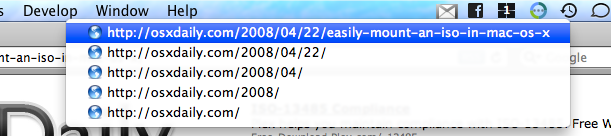
Want to navigate within a websites directory structure? If you use Safari then you can Command+Click the Title of any website window in Safari and you can pull up a nice navigable drop-down list of the websites directory paths.
This is really handy if you’re deep in some archive or if you’re looking at an image and want to cut down to the parent directory.
Note this particular trick only applies to versions of Safari on Mac where the title bar is visible on of a website, which is generally on older versions of Safari for older versions of Mac OS X. Modern Mac OS versions have simplified the Safari interface to show the URL and search bar within the title, and instead page titles are part of tabs or in a tab bar, where command+clicking does not do anything on those versions. There may be a way around that, if you know if it share with us in the comments of course.
Regardless of whether or not a particular Safari version supports this trick, this tip also works in a similar way in the Finder of Mac OS X too and that applies to basically every version of Mac OS released, so try it there too!






Remarkably useful tip. Thanks very much.
[…] Command-Click Safari Title to Navigate Website Directory Path – OS X Daily Command+Click the Title of any website window in Safari and you can pull up a nice navigable drop-down list of the websites directory paths. This is really handy if you’re deep in some archive or if you’re looking at an image and want to cut down to the parent directory. This tip also works in the Finder (tags: mac osx tips) […]
beside command+click, you can do the same thing by right-click the title in safari…
That’s brilliant, Apple hide so many useful little things :)
[…] auf die Taskleiste den Pfad auf einer Website darstellt.Gefunden habe ich diesen Tip bei osxdaily.com und auch sofort ausprobiert. Beim Finder habe ich diese Funktion schon sehr hilfreich gefunden, mal […]