
Sync your Mac Address Book with Google Contacts
You can easily sync your Mac Contact list or Address Book contacts with your Google Contacts. This is quite easy to set up, we’ll show you how to do so in all versions of OS X.
First we’ll cover new versions of OS X with the Contacts app, new versions of OS X automate this process quite well making it remarkably simple.
How to Sync Mac Contacts App with Google Contacts in OS X
- Open the Contacts app in OS X and go to the “File” menu followed by “Preferences”
- Choose the ‘Accounts’ tab and click on the + plus button
- Choose ‘Google’ and enter your Google account login information, complete the setup process and choose to sync the contact information with Google
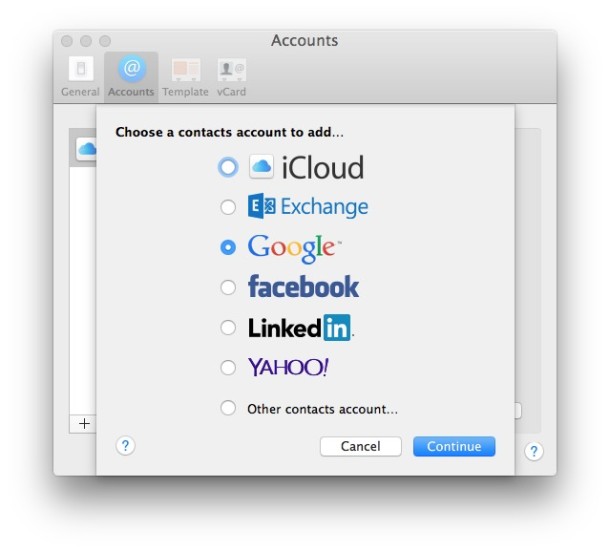
This is the same for all modern versions of OS X, including Yosemite, Mavericks, Mountain Lion, Lion, anything where the contacts app is labeled as “Contacts”. The Google-to-Mac sync ability is available in earlier versions of OS X however too, it’s just slightly different to setup and a bit less automated.
Syncing Mac Address Book with Google Contacts in OS X Snow Leopard
* Launch Address Book
* Click on the “Address Book” menu and select “Preferences”
* Click on the “Accounts” tab
* Select the “On My Mac” under the left accounts
* Check the checkbox accompanying “Synchronize with Google”
* Click on “Configure…”
* Enter your Google Account login, click “OK”
* Then click “Sync Now” from the menubar
* Now your Address Book is synchronized with your Google contacts!
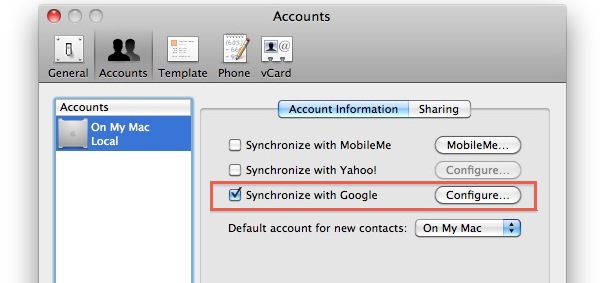
This latter walkthrough is set within Mac OS X 10.6 Snow Leopard but the ability to sync Google contacts with Address Book is within 10.5 as well (users have mixed results, I don’t have Leopard 10.5 so I am unable to help much). Syncing makes everyones life easier. Your Gmail contacts will now be the same as what is on your iPhone, Mail.app, and anything else that uses the Mac Address Book!
Update: If you’re having troubles with older versions of OS X, one of our helpful readers, Steve Guttbinder, suggests the following:
This process uses iSync to synchronize. You need to manually hit sync from the menu bar OR use iSync. The menu bar icon is the SAME as the MobileMe sync icon (since that uses iSync as well). If you do not manually hit sync, it will NOT DO ANYTHING, you merely just set it up.
Thanks for the tip Steve!
Let us know in the comments if you have any questions or comments regarding syncing your contacts between Google and Mac OS X!






I’m running Mohave, and have a new Android phone. I have synced the contacts by importing contacts into Google, but I note that some contacts didn’t sync. I looked at one contact I know didn’t sync – it all looks correct. When I tried your syncing method above (which is wonderfully simple compared to some other advice I read) of going into accounts and clicking Google, and logging in, it said you are already logged in. Ideas on why some are not syncing?
This just doesn’t work. No matter how many times I follow these directions and hit the “rotating arrow” and Sync Now. Using 10.7.5.
Google doesn’t sync down to Address Book and Address Book doesn’t sync to Google Contacts.
I am pretty certain I set everything up correctly according to your instructions and even was able to locate the sync button. However, no contacts appear in my google account. After I choose sync now it spins for a couple seconds then stops. I checked the console log and found the following error:
9/27/12 2:49:15.775 PM SyncServer: [0x7fd0c8c16f40] |SyncManager|Warning| client com.apple.MobileSync.f499615668e5133669566156710ce36820a4fa43 not added to plan because it isn’t syncing any entities in the plan
Any idea what is going on?
Hi,
I understand the set up and it worked oK. Is there a way to have from there mac address as the master and to have it updating yahoo and google and any other account ?
Thanks
Hi… I just posted a question, but I think I did something wrong, so here it goes again:
The sync doesn’t seem to work in my computer: I go to address book preferences, check the google sync box, and when it asks for my google account and password I get a “wrong account or password” message. I am positive the account and password are right. Can somebody help?
Thanks!
Ha ha… yea I forgot to hit the “sync” button this time. I did remember to do this before.. so I was sitting, wondering, why my new contacts are taking more than an hour to pop in. Few re-loads of the app later, found this page via Google. What would I do without Google search, and good samaritans like you sharing expertise & knowledge all over the world?
Thanks Paul & Steve.
I have a new problem that has cropped up recently. I’ve had my Address Book sync successfully from my Google contacts for a long long time, but just recently I’ve noticed that the contacts pics in my address book are now gone – even though they’re still in my Google contacts. What’s up? What’s changed? Even contacts in the Address Book that once had pics don’t have pics any more. All the other information syncs correctly.
I dont have mobileme account but have successfully manually sync’d adddress book with gmail contacts and to my iphone by hitting the isync icon top right
will the syncing continue automatically when i make changes within address book to my phone and gmail account
or do i have to manually sync every time changes are made, kind of defeats the object but i do understand why if it is the case
For everyone who can’t find the “Sync Now” button (like me), it’s on the upper right side of your Mac desktop screen, near the icons for the Bluetooth, Wifi, volume and battery. It looks like a little set of arrows making a circle. :-) Hope this helps!
Thanks so much! This did help!
Thanks so much Rachel! I finally got it!!
Just like to add a bit of my learning to the knowledge pool. I was being driven demented because every time I Synced I was creating duplicates but not of all my contacts. In the end I sussed out that I was using two fields for first name and second name but sometimes I would enter for example Mike & Helen all in the first field (they are friends I didn’t need their surname). But when it synced with google, Google made a call and entered it as Mike (first name field) & (middle name field) Helen (surname field). Now the next time I synced address book would see this as a new contact and the time after that google would see the two of them, hence two copies on gmail and mac address book. So moral of the story is you have to play by google’s rules and enter separate words in separate fields. I found adding ‘middle name’ to the address card template helped me to do this.
I Really wanted to post this somewhere because I get so much online help. Chose OSX daily and this thread cos OSX daily is the best! (But please lads get an ios ipad app together because the x2 iphone app looks rubbish) :)
Thanks so much iGnome for your insight.
That explains why, after importing in Google agenda my 1028 entry Mac Address book, the immediate Mac Sync warned that it would add 199 new entries on my Mac ! Because I don’t want to screen all my entries to correct the multiple name field, I’ll just iTunes sync my iPhone with the Mac, as I did years back before Mobile.me.
Apple has absolutely no respect for legacy users. Preventing Snow Leopard users from migrating to iCloud is a shame. Moving to Lion without Rosetta is a nono for me. Since I’m going back from 2 Macs +iPhone to one Mac +iPhone, the ol’manual sync will work again !
Thanks again very much for sharing your experience.
[…] Contacts — It’s not an app, but I did use this and this post to sync my Google contacts with my Mac Address Book to then have all my contacts on […]
I only sync contacts between mac & iphone. Once every 2-3 months, I delete me gmail contacts and then I import my mac contacts again.
1. Open Address Book, click into a contact, sellect all [cmd+A]
2. File -> export -> export vCard… -> Save
3. Log in to gmail, go to -> Contacts -> more -> import -> choose file -> select the saved file
4. All your mac address book contacts will be added to gmail contacts
cheers
Thank you, thankyouverymuch! Spyr0s, that was the winning strategy – it’s a kludgey workaround, but work it did!
To BigJimT and everybody else. His suggestion with hte fake user name and password at the Mobile me worked just fine.
If you cannot sync just right click on the isync, open Mobile me pref. and enter a new user name and password. It can be any stupid combination of letters and numbers. Then hit the sync now and it will sync. I run Snow Leopard 10.6.8
Everything worked great when syncing my google contacts over to my mac address book. however, it did not sync my groups. any way to fix this?
Aaron, did you try downloading the “Contacts Sync With Groups For Gmail” app at the Mac App Store? It will sync groups like you were asking for.
Thankyou once again, after reading pages of people saying “press the sync icon manually”, finally someone explains that the sync option is NOT an icon on the toolbar of the app.
All hail Scott.
How do you get the groups in Address Book to sync as well?
I had to redo to the Address sync after I changed Mac from a 10.5 to a 10.6. The gconsync no longer works for me (sth that I had to do to get the sync rolling on 10.5) but now even though the iSync still asks for the MobileMe account it does sync w Google correctly on its own.
My Mac address book would not sync to Google although I had followed all steps. The iSync in Mac kept looking for a MobileMe account, of which I have never had one! Finally, I saw a post that said just put in random letters for username and password in the MobileMe login window. I did that, and even though I of course was not logged into Mobileme, it let the iSync circle “spin” and then connect to Google. It worked!
Took me 5 minutes to find the Sync now feature, but here’s what I did on 10.6.7:
“Sync now” is not in the Address Book app.
I opened “iSync” and then after that on the upper right corner by the clock there was the “chasing arrows” sync icon. I ran that and it worked.
BTW this shouldn’t be called a menu bar.. this is really the task icons.
I loved as much as you’ll receive carried out right here. The sketch is attractive, your authored subject matter stylish. nonetheless, you command get got an edginess over that you wish be delivering the following. unwell unquestionably come more formerly again as exactly the same nearly very often inside case you shield this hike.
[…] can also sync your Contacts with a Mac running OS X 10.6 with your Google Apps account. OSXDaily.com has a handy posting that I have recapped […]
Is there a way to set the priority to your mac book address book when ongoing sync takes place. I make changes in address book only to have them overridden during the sync processes by the old data on the google database.
I have looked everywhere for a “Sync Now” button and cannot find one! I’m running on OS 10.5.8. Can anyone tell me why I don’t have a “sync now” button??
Wow- the info is great here! I just got an Android phone and that I had sorted out all the details to get my mac info ready to go. But the contact info was confusing! Based on the info here, i borrowed a friend’s iTouch (since I’ve never synced any ipod to this computer) and the Google sync showed up in Address book. (I was about to copy the pref file from my daughter’s computer, but then I got the iTouch)
But then nothing happened when I went to iSync! So I clicked to sync also to MobileMe (okay, so I have an account which I know some of you don’t). Clicked iSync in the toolbar again and Voila! Contacts showed up in google account! Now I can get back to business!! Thanks for the insight folks!
Jas- that worked great! Thanks so much!!
Still couldn’t get it to work since iSync (10.5.8) doesn’t allow you to activate a sync process and instead only wants you to sign up for MobileMe. It just read Sync Disabled & Open Prefs. The prefs is also a dead end since it only contains MobileMe login & 60 day offer :-(
In a separate thread somebody posted a command to activate the sync via the Terminal. Give this a try, it worked for me. Open the Terminal (in Utility folder or via Spotlight), type:
System/Library/PrivateFrameworks/GoogleContactSync.framework/Versions/A/Resources/gconsync –sync com.google.ContactSync
It’ll rattle a bit, but in a minute or so, I had all my contacts synced to Address Book. Yay!
Hi all, anyone know if this is supported on OSX Server? We want to have our server sync with Google apps and then server the contacts to multiple clients. Thanks, Matt
Using 10.6.2. I have the same problem with syncing google contacts to address book as well. However, what is strange is that it worked when I used another google account! When I switched back to my original account, it failed to sync again.
HI I am using 10.6.4 and cannot sync to my address book. When I select the Accounts tab I do not see ‘Account information’ all I see is the ‘On my Mac’ icon with a + at the bottom right. clicking this doesnt allow for any google mail option. HELP!
[…] OS X Daily. […]
I don’t use MobileMe, but when I set up Google to sync in addressbook and click on the sync now menu option I get the following note:
“You entered an invalid MobileMe member name or password. Verify your MobileMe member name and password in MobileMe System Preferences”
Any suggestions on how to get resolve this?
BR,
Alex
I have the exact same problems, which occurred after upgrade to Snow Leopard. I have synced with Google without a mobileme account for almost a year.
H-E-L-P!
I cannot shut off google sync with my Mac. I do NOT have MobileMe. I do NOT have the boxed checked in imail preferences to sync with Google (or anything else). I even deleted ALL my contacts out of google, and yet I still get an alert every single hour that google is trying to sync. Apple support doesn’t know how to fix. Any suggestions? I’m about to lose my mind…
-Chris
Hi, nice post! You should add where to find the “sync now” button though for us new mac users :)
@scott, thanks! found the sync button with your comment!
By the way guys, this is the lifehacker approach. Maybe it’ll work for you. Google sync currently only appears on 10.5.8 if you have synced an iPod or iTouch to your mac.
http://lifehacker.com/393855/enable-google-contact-sync-without-an-iphone-or-ipod-touch
I’m on Mac 10.5.8 with a new HTC Evo 4G for Sprint and have been trying to track down a solution for syncing my Apple Address Book with the Evo. This post about the lifehacker fix using PlistEdit Pro revealed the “Synchronize with Google” option in the Address Book preferences. Thank you for that! However, my Apple Address Book contacts are not syncing even after I hit the Mobile Me “Sync Now” button in the menubar at the top right of the screen.
Does anyone have any further recommendations?
My next best solution is to upgrade to Leopard for $30.
(And yes, I have backed up both my Address Book contacts and my Google Contacts.)
I’m replying to my own post to say I found a semi-fix for the lack of google sync here:
http://discussions.apple.com/thread.jspa?messageID=8988977
“It appears that if Google is the only sync, it doesn’t work. You need some other sync service. In my case I enabled sync with Yahoo. Now it syncs correctly with both Yahoo and Google, at least the the initial sync. I didn’t want my contacts to Yahoo, but it seems that’s the only way to get them to Google! ” from ahostmadsen.
I tried this fix – allowing yahoo to sync – and now google syncs as well. None of my Address Book Groups transferred to Google Contacts, but the individuals are all there. Will tackle the Groups issue another day. open to suggestions about how to fix that, too!
Thanks.
me too! i followed the instructions on lifehacker but 10.5.8 doesn’t seem to want to cooperate. does anyone with 10.5.8 and an ipod with working google sync want to take a looksy to see if the plist file has changed?
I have the same problem as Tquigs. I don’t get it.
I am using OS 10.5.8. There is no sync option to select Google in Address Book/Preferences/General. There are options to select Mobileme, Yahoo and Exchange, but nothing for Google.
I’d like to use this and am not interested in 10.6 just yet.
No problem setting up and syncing with iCal.
I can sync from google to Address Book, but not the other way (as in, any changes I make through Address Book don’t show up on google). This is using 10.6.2
Bob, the sync ‘button’ is actually an icon on the task bar. To the left of the clock icon. It looks like two arrows wrapped around in a circle. Click that icon and select ‘sync now’ from the pop up menu.
thanks Scott, you’re the ONLY one that actually provided me with the RIGHT solution!!! i’m new to the mac scene (prev a pc user) and didn’t know where that sync option was…so thanks for that!
thanks Scott, as Zely says below, you’re the ONLY one that actually provided me with the RIGHT solution!!! I’m fairly new to the Mac and smartphone (Android) systems and couldn’t get the final step (syncing) done. Thanks a million!
I cannot find the sync now button ..what menu bar? I’m going nuts.
I tried above steps and about only one quarter of my contacts on Mac Address Book went through to Gmail account (900 out of 4000)… I am using Macbook Pro with Snow Leopard 10.6.2. Anyone experienced same ? Any suggestion to address this ?
I have address book syncing with gmail contacts just fine (10.6.2). But to get it to sync I seem to need to manually trigger an iSync “sync now” each time. Obviously I needed to do it the first time, but I had hoped it would pick up when something changed and automatically sync. In the gmail help screens it mentions that syncing happens once an hour in Snow Leopard (though I haven’t let it sit long enough to test that theory). Is there a way to adjust this schedule or to have it automatically sync with gmail when a change is made in address book (or vise versa).
Adding a yahoo account made the “Sync Now” option appear in 10.5.8! Thanks Tim.
I have added a yahoo account but still cannot sync google contacts in 10.5.8. Where does the “Sync Now” option appear?
You may have problems with Leopard syncing just your Google Contacts. Add a yahoo account and then try to sync. It should work then.
For those who have Windows Mobile Phone, you can sync also with Gmail account – making all synchronized :)
In ActivitySync make a new connection (config server)
Server address: m.google.com
your user: user@gmail.com
and your pass…
Hit Syncronize :D
Google syncs just fine with Mac OS X 10.5, here is the proof:
http://imgur.com/g9pdm.png
To get this option available in 10.5 you have to have an iPhone. Once it sees that you sync to an iPhone the option will appear to sync google contacts.
Folks, read my post above! This process uses iSync to synchronize. You need to manually hit sync from the menu bar OR use iSync. The menu bar icon is the SAME as the MobileMe sync icon (since that uses iSync as well). If you do not manually hit sync, it will NOT DO ANYTHING, you merely just set it up.
so… ignore the errors from the Sync Now menu? Errors that say I didn’t give it a valid MobileMe password??
I do not see a “sync” option anywhere on contacts menu. And iSync looks for mobile devices to sync… what am I missing?
@Macnewbie
I have the same problem. You can set things up to sync in adressbook but it doesn’t give a sync now button. Seems like one needs an iPhone for this. I wonder how this will work with an android based phone.
Will this work even if you don’t have mobileme and a iPhone? I tried it and don’t see a change.
The ability to sync with Google isn’t available in 10.5. The synchronize options are under the General tab–there is no Accounts tab–and the only options are MobileMe, Exchange, and Yahoo!.
I have the same problem
How did you solve it???
Thanks>
You forgot the most important step! If you just follow the steps above… nothing will happen! Once you complete the steps above, you actually have to go to the menu bar, click the sync icon, then click “Sync Now”.
Thank you! I was wondering what was wrong
Steve, I followed all the steps, including “sync now” from the sync button on menu bar, but no contacts are here–do I need to have gmail open in safari while Im doing this process ? Do U know of any other reason the contacts would not import ?
I have followed the steps above several times but I do not see any option on the menu bar that says SYNC or ISYNC. What am I doing wrong?
I’ve followed the directions but there is no “Sync Now” option that I can find from the Address Book or in Finder. And in iSync, it just tells me it can’t find any devices. I have OSX 10.6.8
I did that and nothing happened. I have not been able to debug contacts at all. It won’t import vCards from an earlier version and won’t sync with my Google contacts. Sometimes contacts that I manually created just disappear. It was a good program that has become virtually useless.
[…] a rest here: Sync your Mac Address Book with Google Contacts
My adressbook synched with google contacts but it duplicates all entries. as previously i was having around 2600 entries in both my google contacts and address book and all were same. but after synching it became 4710 both side. please help if you know why!!!
yup! me too, duplicated!
any way to fix this??
I have the same duplicating problem, everytime it syncs, it duplicates creates more duplicates.
I’ve got the same problem. Did you sort it?
I got the duplication problem as well, did you sort it out ? Thanks