
How to Check your Apple Warranty

Wondering what the warranty status is of an Apple Product? You can easily check.
Sometimes troubleshooting your problems just isn’t enough and you need to take your hardware in for service, but before you do so, you might want to check on your Apple warranty status. This is very easy to do for any hardware, including Mac, iPhone, iPad, iPod, Apple Watch, Apple TV, all you need is the devices serial number to check the warranty of that device.
How to Check the Apple Warranty Status of Hardware
This applies to checking warranty status on all Apple hardware:
- Locate the devices serial number
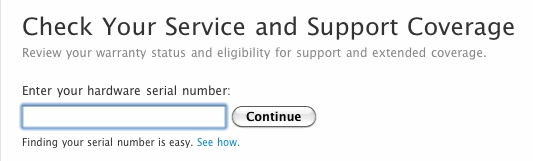
- Go to Apple’s Service & Support Coverage check
- Enter your serial number, click on “Continue”
You’ll now see a screen like this, which gives you details on your hardwares Apple Care warranty status, including time left with phone support, if you’re eligible for repair coverage, and if you’re eligible for extending the warranty:
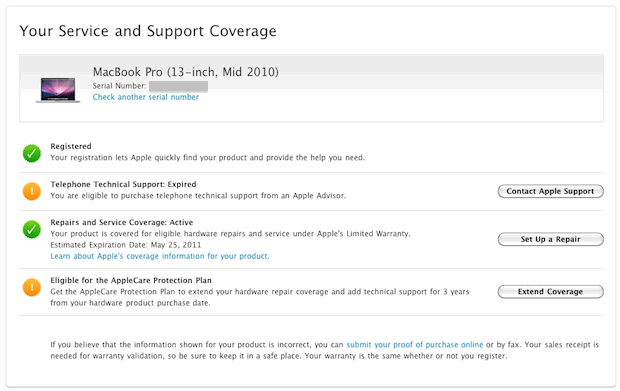
Pay special attention to the remaining time left on your AppleCare warranty, and eligibility to buy an AppleCare+ warranty plan. If this is about to expire soon, it may be a good idea to buy an extended AppleCare coverage plan for your device.
If you want an AppleCare extended warranty today, you need to purchase it within the first 60 days of ownership of the product, in most cases.
Previously the extended warranty was eligible within the first year your Apple hardwares ownership, but that policy has changed.
Once upon a time you could get discounted extended warranty plans through Amazon and third party resellers, but now it appears that Extended AppleCare warranty plans and AppleCare+ are only available through Apple.
You can check out other Apple deals on Amazon and you can still find the old boxes for sale on Ebay and Amazon, but they don’t necessarily work and so that’s important to point out.





359302068213021
SIM card not working
Hi,
I have purchased apple iphone6 in amazon, how do i check that phone is applicable/qualified for India apple 1 year warranty/service, because if the phone is imported from US is not applicable for warranty/service in India, so i want to know my phone is not imported from other country & warranty/service applicable in India Apple store or not?..please let me asap.
Thanks
I’m not able to track my iPhone 4 warranty left.
its a gifted handset and i wanna know warranty badly.
looking forward to hear from you soon.
[…] General warranty coverage information (same as this) […]
[…] you have a serial number, you can do things like check AppleCare warranty status and repair […]
No matter what your status, you should still go to the Genius Bar with your difficulties. The amount of case-by-case exceptions that Apple makes is incredible and I speak from experience.
Another related tip:
You can avoid the hassle of finding the serial number on the device or packaging and trying to read that tiny print and then typing the sequence of letters and numbers.
For a Mac, Apple Menu > About This Mac > Hardware (Overview) will get you the computer serial number. You can then copy and paste it into the web page describe above.
For an iPod, in iTunes, select your device, then click the Settings button at the top of the device window. I couldn’t select the S/N to copy, but it is there in larger, easier to read type.
Any iPhone and iPad owners, please comment on those devices.
For iPhone, iPod touch, and iPad you can also get serial number from iTunes or on the device by clicking Settings > General > About Just scroll down and you’ll see Serial and other data.
I always buy AppleCare on Mac hardware because I keep it for at least 3 years. I don’t bother with iPhone warranties because I upgrade each major product cycle.
nice one …. i do it to my macbook pro 3year ,