
Enable AirDrop Over Ethernet & AirDrop On Unsupported Macs Running OS X
AirDrop is the extremely easy local peer-to-peer file transfer tool that is built into OS X 10.7 and 10.8 and beyond, it allows you to easily send and receive files wirelessly over a network just by dragging and dropping. It’s a great addition to Lion, but it’s not supported on all Macs (some 2008 model MacBook, MacBook Pros, some Mac Pro’s and Mini’s, etc), and most Hackintosh setups also can’t access it… and you can’t use it over Ethernet… until now.
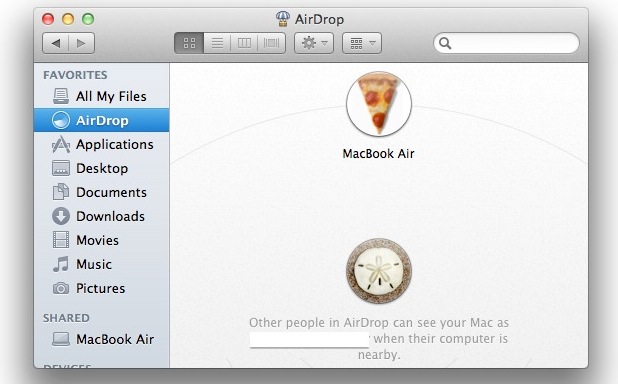
You can enable AirDrop with Ethernet and enable AirDrop Wi-Fi support on technically unsupported Macs running OS X 10.7 Lion, Mountain Lion, or later by using a simple defaults write command in the Terminal. It’s a fairly easy procedure, and we’ll walk you through it.
Enable AirDrop Over Ethernet & Wi-Fi for Old Unsupported Macs
- Launch Terminal, found in /Applications/Utilities/
- Paste in the following defaults command:
- Hit Return, then on a new line in the Terminal type the following command to relaunch the Finder:
- Exit out of Terminal if you want, and launch any Finder window to discover the AirDrop icon
defaults write com.apple.NetworkBrowser BrowseAllInterfaces 1
killall Finder
You can also reboot the Mac for changes to take effect.
What’s really interesting is that this enables AirDrop over both Wi-Fi and wired Ethernet connections, which basically means any machine running Lion or later can use it whether or not it has a wireless card. As long as it’s connected to the same network you will be able to see the Mac in the AirDrop list of another Mac running 10.7, 10.8, or 10.9. This trick also works to enable AirDrop on many Hackintosh Macs for those who built their own…
Keep in mind that you will need at least one other Mac in the same region in order to use AirDrop. If you’re totally new to the feature, check out our quick guide that covers how to quickly and easily share files with the AirDrop protocol, it’s really one of the fastest ways to share files between Macs and is well worth using.
If you ever want to disable this for some reason, you can just use the following defaults command instead:
defaults write com.apple.NetworkBrowser BrowseAllInterfaces 0
Same as before, you will need to relaunch Finder for the changes to take effect and have AirDrop disabled again.
With how easy this is to enable, it makes you wonder why it was left off of some older Mac models to begin with, and why it’s not enabled for Ethernet connections either.
This tip comes from a user submission to MacWorld, and attached is a note that you may need to use this command on all Macs that intend to interact with the unsupported Mac, although that doesn’t seem to be the case on all machines.
Don’t forget that you can also change the AirDrop sound effect too.






Thanks a lot. I was frustrated not being able to use airdrop. This worked great once I rebooted by desktop.
Worked like a charm!!! Funcionó excelente!!!
Thx for the tip guys!!!
Mac Pro early 2008! Now I can see airdrop between this Mac Tower and my newer MacbookPro 2012! Thx!!!
El Capitan broke Air Drop between my MBPro v10.11.1 and iPad running iOs 9.1
How do I get it working again? Your article doesn’t help.
Interesting. Well considering that the iPad doesn’t have ETHERNET at all and only uses Wi-Fi and BlueTooth I would not be surprised if you don’t find this article to help with the iPad for AirDrop to a MacBook Pro.
Frankly, I’m not particularly impressed with your ability to read, this is about Macs with ethernet it has nothing to do with the iPad.
But for me, I need AirDrop over ethernet, and this works exactly as described for that. Maybe you should return your iPad to Apple? Get something with ethernet.
Umm, yeah, bit of a douche bag reply there eh?
Hi, nice post…I did it but inmy case trying airdrop by macbooi air and iPad….I once get connection with my old ipad4 however I never get it with my mini iPad…
Is there any reason for it? all devices are uptodated with the latest iOS.
tks
Samuel
Works great for me thanks!!! MacPro early2008 and MacBook Pro early 2011, both Maverick..
Doesn’t work between os x iPad/iphone. os x os x only.
Or – you can have any wi-fi device on os x.
Well yes that is correct, the iPhone and iPad do not have ethernet and they are not Macs. Airdrop works to send files between Mac and iOS in iOS 8 and Yosemite.
“In order to transfer files between a Mac and and an iPhone, iPad or iPod touch, your iOS device needs iOS 7 or later installed and your Mac needs to be a 2012 or later model”.
http://support.apple.com/kb/HT6510
This works on Mavericks too, at least on a Mac Pro 3,1
Thank you so much! It worked!
I can verify that this does work on my hackintosh core i7.
This is fantastic! However is there anyway to keep Airdrop constantly connected other than having to keep a finder window open with it selected?
Thank you so much, one of the best tips i’ve read in awhile. Now to transfer files to my new imac 27 when in comes in!
Perfect, smooth and quiet!
1min to go!!
With iMac mid2007 and macbookpro2012 works if ethernet cabled but not over air…
but for me it fits!
Thanks for the tip!
Thank you so much for this tip! I’ve been upset about my Early 2008 Macbook not having airdrop since the day I downloaded it last summer. You guys are the best.
[…] Mac that doesn’t officially support AirDrop, or if that Mac doesn’t have Wi-Fi, you can enable AirDrop support on old Macs and through wired ethernet connections with a simple […]
[…] accidentally stumbled upon this tip, the other day, while searching for something completely different. I upgraded to Mountain Lion […]
t showed up in my both macs a macpro early 2008 and makboock pro , however, it keep scanning but both are unable to get connected
[…] variety of helpful tweaks like showing the Library folder, always showing scrollbars, and enabling AirDrop for unsupported Macs and ethernet, and many other tricks we’ve covered here before. […]
Thanks for this! Worked great on my older model MBP and Desktop MacPro!
Wow! This actually works.
I’m using an early 2008 Mac Pro 3,1 with Ethernet as my only internet access point.
Thanks for the tip!
zk
It is works! Great! But now I have a problem with general internet over wifi. It is not working now. When I disabling this function general internet over wifi it becomes working!
[…] precis som funktionens namn antyder kan du endast använda AirDrop över Wifi (det finns dock ett hack som aktiverar även trådbunden […]
Worked with a 2008 PowerMac and 2010 MBP.
Had to run the command and force quit Finder on both machines.
Great tip! Worked on my early 2008 MacBook. Have tried to both send and receive files, and it’s all systems go. Thank you!
It worked the very first time from my wired 2007 iMac (unsupported) to my white macbook (supported), but only from the iMac to the macbook, the iMac never showed up in airdrop on the macbook. Now, the macbook doesn’t even show up at all. I did the command on both computers. AAAHHHHHH.
thank you! this worked with my 2007 MacBook Pro! Now all i need to do is find someone else with Lion and test it out! :D
Works a treat for me, from my wired-in iMac to my wireless Macbook. Just what I needed.
What’s the catch? Why isn’t this an option from the System Preferences, for example?
[…] Macs must running Mac OS X 10.7+ and have AirDrop support (here is how to enable AirDrop on older unsupported Macs or over ethernet […]
Thanx budy. it works great on 2008 mac 2.4 , core 2 duo
This Perfectly Works on my Macbook Late 2006 with core 2 duo
Thank you so much! Yes, it works flawlessly. I have an early 2008 white MacBook I recently upgraded to Lion, and I almost didn’t update because the lack of features for older computers, but I’m closing as many gaps as I can!
Thanks for the code! I was looking everywhere for a solution.
I have two early 2009 Mac minis and a mid 2009 15″ Mac Book Pro. I did exactly as it said in the tip on all the Macs – first the default network change, then the Finder restart (I used Force quit on one and killall on the other two, just for the hell of it).
Worked flawlessly. Brilliant tip!
[…] [via | OSXDaily] […]
[…] | OSXDaily] Condividi questo […]
great tips. works like a charm..thank you.
I am an Über novice on Mac. I have a 2 1/2 year old iMac used for photos, bought a new MacBook Pro. iDrop available on MacBook but not on iMac. I followed instructions, force quit finder and had to do it on both machines but it worked. First time I ever used terminal, had to search of it. Very Cool>>
i can’t believe it worked for me too on my old MacBook and iMac (both intel Core 2 Duo, though)! since it’s my first time using Airdrop, is there anyway to change the default drop location to the Desktop rather than the Downloads folder where it’s currently going?
[…] MacMini, the card is not easily changed as it integrates Bluetooth with broadband. However, this tip from MacOSXDaily works fine and has been successfully implemented on Thomas’s MacMini. It should work on any […]
[…] X: and there are still more to come. OS X Daily has a good record on hints and at the weekend they put out an interesting point about Lion’s AirDrop, which I was not happy about when it did not appear with my older Macs. […]
I put this on my 2007 MacBook Pro (2.16GHz Core 2 Duo) and it worked fine in the Admin account, but I had to do this separately for a user account. Fine there too once done. Like others, I also used Force Quit via the Apple menu. Excellent tip: thanks for passing it on.
[…] | OS X Daily En Applesfera | DropCopy, el AirDrop universal para cualquier Mac, sea Intel o […]
This works on a Macbook and a iMac that was Unsupported.
Instantly.
what do you have to down load to get airdrop for my imac
it’s work for me!! thanks
Macbook 4.1
Worked for me on my late 2006 iMac (connected via ethernet) and early 2008 MacBook (connected via AirPort). Brilliant tip!
Worked for me on my 08? iMac Core 2 Duo 10.7.1. Haven’t checked if I also need to do it on my 2011 Macbook Pro for it to interact with the iMac.
allows you to easily send and receive files wirelessly over a network<—-no
What about the nic firmware???
Contact me because this article is wrong
The tip is “for user”. As I taught it is “system wide”, I typed the cmd lines prefixed by a “sudo”… But it wasn’t ok.
I retried to type the cmd like said (copy/paste)… and it work like a charm (no need to reboot with the killall).
Airdrop is know available on my wireless-less mac…. but I still don’t see my macbookair (finder opened on airdrop section on both) -> on the same network.
Man! This is right on the bat!!!! You have to issue the commands as a USER!!! NOT AS ROOT! THANK YOU very much! I’ve being wrestling with this issue for quite some time now! ;-)
Excellent tip, works with 2006(I think) white Core2duo iMac and 2009 aluminium Macbook.
Airdrop just appeared on the iMac’s finder, where none existed before. Remember to select Airdrop on both machines ….
[…] De ahí que con una simple linea en nuestro amigo terminal quedara habilitado en los equipos que no lo soporten, como indican en Osxdaily. […]
I have a mid 2007 iMac and a 2010 MacbookPro. Strangely, when I do the procedure on both Macs, Airdrop works on the old iMac but not on the new MacBookPro…
What could be the problem?
once you enter the command, you have to go to the apple logo on top, go to force quit, and then relaunch finder, then restart. Also tested this out with quite a few older macs, works great! However on new macs, you have to run the same command line in order for them all to work in harmony.
no go for me either. I have a 2008 macbook pro (pre unibody) and it doesn’t work for me.
I have a MBA 2011 and iMac 2007. I use TimeCapsule 2011 as router.
Issued the command in terminal on both machines.
Also did killall Finder and also did reboot
But still doesnt work.
Help!
I copy pasted the command line into terminal and rebooted but no go for me on my 2006 intel iMac.
Shame but it’s not worth the $2000+ hardware upgrade while the old girl still runs…
Any other advice by someone knowledgeable will be happily tried.
Cheers
Works on the tonyMacX Hackintosh build, excellent tip!
I can verify that. Works fine on my Core i7 Hackintosh.
Yep. Works on my HackBook Pro (HP dv7 4087cl)
I installed Lion on a 07 MacBook Pro and have followed the tip but it’s a no go. AirDrop does not show up on the MacBook Pro 07 as it does with Lion installed on a 2010 MacBook Pro
Whats the problem?
Did you restart the Finder and/or reboot the unsupported MacBook Pro? Put the defaults write command on both Macs? It should work.
You will have to run the command on every computer, even the newer one. Once I did that, and restarted Finder, I was able to see the older computer from newer one.
Also, you don’t have to reboot computer. just restart finder.
how about mac and a PC, any airdrop-like service? (dropbox is slow for larger docs.)
No. You must manually share folders on the PC, connect with Ethernet cable directly, manually set IP address for each computer.
It’s this sort of feature, AirDrop, that I really like about Apple. They find an easy (for the user) way to solve a common problem. The implementation underneath is quite clever (one mac can be connected to wifi, and the other one connected to no network at all, and wirelessly the first mac can airdrop to the second while the first mac is using the wifi connection for something else entirely, like web browsing )
Use the “LAN Sync” option in Dropbox’s preferences.
https://www.dropbox.com/help/137/en