
How to “Save As” in Mac OS X Lion with an “Export” Shortcut
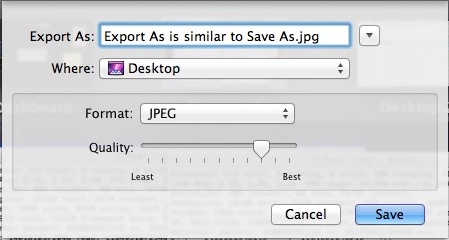
Mac users may have noticed that the longstanding “Save As” function has disappeared as of OS X Lion, and’Save As’ is something that many Mac users have become accustomed to using over the years. The default choices replacing “Save As” are two different features, Duplicate and Export, neither of which work quite the same, and neither of which are attached to a keyboard shortcut.
If you want to get your “Save As” function back on the Mac again, we will show you how to create your own keyboard shortcut to mimmic the old behavior of “Save As” so that when you hit Command+Shift+S, a Save (Export or Save As) dialog box will appear, allowing you to do the exact same Save As function that existed before.
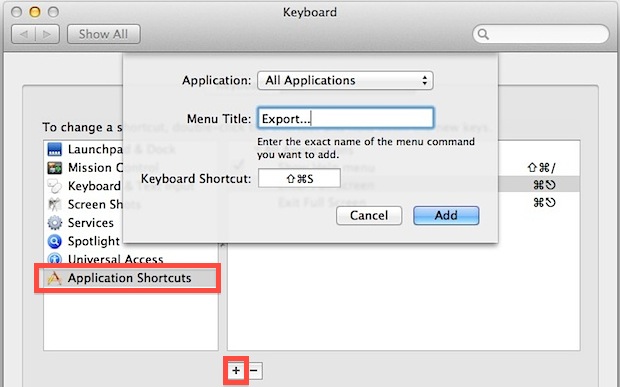
- Open “System Preferences” from the Apple menu and click on “Keyboard”
- Click the “Keyboard Shortcuts” tab and then choose “Application Shortcuts” from the list
- Now click the + plus icon to add a new shortcut accessible to All Applications
- Type the Menu Title exactly as “Export…” with the three periods*
- Click the “Keyboard Shortcut” box and hit Command+Shift+S
- Click “Add” and close out of preferences
Open a file in any application and try out your new “Save As” (Export As) shortcut by hitting Command+Shift+S. No it doesn’t work exactly like the old “Save As”, but neither does the Duplicate command.
* Note if you’re on a modern version of OS X, you can actually type ‘Save As…’ into that field and return the true keyboard shortcut Save As functionality as of OS X Mavericks, Mountain Lion, and OS X Yosemite!
This tip aims to improve on some of the suggestions that have recently picked up steam on the Apple-centric web, where some people favor macro hacks or the same shortcut but related to the “Duplicate” function instead. This certainly works, but anything tied to the “Duplicate” function requires an additional step to save a document, rather than “Export” which brings you directly to a familiar “Save As” dialog box.






Can this be used for other shortcuts too?
Im trying to save
CMD+ALT+Q
as a shortcut
to
Save All & Quit
because its annoying when I try to resize a batch of images in Preview and I have to keep clicking through each one to save them.
I cant get it to work though (Running 10.10.5)
Thanks – a helpful post.
Many thanks!
Just bought a replacement Macbook Pro, and made sure I found one that still allows everything from Snow Leopard onward.
Besides some other pesky annoyances with Mountain Lion, the missing Save As… drove me nuts, and made me fish for the 10.6 install DVD.
One annoyance less now, perhaps I’ll wait to downgrade another week.
They came up with this now, after Lion is a few generations old?
thanks for that
Lifesaver! Hated having to make duplicates of the PDF’s every time! Thanks for that.
SOLUTION:
(It is not ditched)
Click File > then hold ‘alt/option’ key.
There is is!
Keyboard shortcut:
Shift + option + command + ‘S’
Genius! I didn’t realise it was buried in there. Thanks Marky :D
You can remap the Text Edit Save As hotkey in ‘System Preferences’, ‘Application Shortcuts’, ‘Keyboard Shortcuts’.
Application – Text Edit
Menu Title – Save As…
Keyboard Shortcut – ‘Apple+Shift+S’
I can’t say a kind word about the unuserfriendliness of the ‘Duplicate’ Function. #*&#*&@6 a-holes
Tip: you can *usually remap any hotkey to whatever best suits you as long as you write the Menu Title as it appears exactly in the drop down application menus.
*(I’ve found a few things in some graphics and drafting programs that don’t let you remap hotkeys)
one of the most stupid implementations from apple EVER. I dont want to upgrade to ML bloatware just to get back this most BASIC of functionality. Give us the option no matter what version of the OS FFS. Little by little Im loosing faith since Jobs died, I dont even use %90 of the crap apple call os ‘updates’ and now how many gig of useless data will I have to put on my computer so I can have a ‘save as’ command?
after 15 years of loving apple they are loosing me one stupid move at a time! I foresee a nice minimal clean Linux instal in my near future and they can keep their candy cane sickly sweet IOS interface BS, If they ever push that to OSX like they did the app store Im done.
This isn’t working as Save As for me, its just duplicating the copy once i do the command, which i have followed precisely!
How irksome.
Does anyone know of a solid hack or script for Save As? I know Sean Blonc has written one for duplicate to mimic Save As, but I would prefer an actual Save As. And 10.7.4 will not let me remap the keyboard, as it does not even recognize the command.
Also, does anyone know of an effective feedback source to Apple?
Alex is a god
Or, you could just press alt when you click on the file menu or use Alt-Shift-Cmd-S and get the exact same “Save as…” feature as before.
I don’t really know what to say.
I’ll start with thanks. I made a shortcut with shift-cmd-E for Export just to make nobody will confuse this for a replacement of Save as.
The second thing I’ll say is PATHETIC. So now with every update the features that we actually use are being removed and whole lot of junk that we never wanted and that we’ll never use are being forced in our throat.
This plus the removal of many shortcuts that I used to use all the time plus the behavior of mission control that’s utterly useless to me makes it a pretty hard buy.
Apple gets a free pass this time but by the time I’ll go shopping for a new laptop (in a couple of years) I really hope that all this crap will be sorted out otherwise that will be without me. And for Pete’s sake no more of this iOS stuff in OSX. What I have is a laptop/desktop with a keyboard and a mouse, not a touch device. Didn’t anybody tell them that there was a difference between the two?
[…] yes, this is actually Save As, not like the hack to map a keystroke to Export in Lion to obtain similar […]
Brilliant! It was driving me crazy having to duplicate every PDF I wanted to save.
Removing “Save As”, What I am incapable of doing my own versioning?!? The OS is my tool or my Master?!!! This is a major fail on Apples part, I should be the one that controls Saving and Versioning. If I want to set Lion (Time Machine) up to do it for me, then that should be a choice, MY CHOICE!! to turn that on. Apple PLEASE put that control back in our hands.
Thnx for the help! Worked out great for me!
greets from Germany
The BEST I can tell you —> hold down the “control” key and save from the pulldown w your mouse: opens up dialog again so you can select alt location, and alt file name…
Cheers
By Watson, you’ve got it!
That is it!
That or press option!
command+option+shift+s will do it.
[…] auto-save will overwrite the existing file. This is best disabled with either some variation of restoring the “Save As” option or an understanding of how to use Duplicate so that you files are not accidentally […]
[…] OS X Daily comes to our rescue by providing a clever tip for how to duplicate the “Save As” […]
The only problem I can see is that using the “Export…” shortcut, I cannot save as a native file e.g. a Pages document saving as another Pages document etc which is what the “Save as” option gave.
Or am I missing something?
Gold tip! thanx
Oh, I don’t see the last one, sry.
Under Lion I have a TextEdit app from my previous system, SnowLeo – yes, it works. With the Save As function…
Unfortunately, the great majority of the times I used the Save As… command is with TextEdit.
Even adding a “Save As…” keyboard command for the specific application “TextEdit” was unsuccessful, I assume because there is already a Save command.
To that point, I’ve replaced the Lion TextEdit (version 1.7) with the previous one that was shipped with Snow Leopard (TextEdit 1.6).
That required a bit of work changing permissions and then removing the version 1.7 from the boot drive completely before it would become effective.
I couldn’t get it to work in 10.7.2
I immediately tried to set the Shortcut only for Preview, but it does not work. It is not a Lion problem, but Preview, since the App shortcut for Mail, which I change back the Cmd+0 for Activity viewer works fine. What is great, that keyboard shortcuts do not require app restart.
Pity, that Preview is worse as in SL – slower, sometimes less handy and has bugs.
This export still cannot solve the Save As and resize…
[…] criar atalhos de teclado para opções de menu no Mac é fácil, e o @osxdaily nos lembra o quanto é simples criar um atalho fazendo o Shift+⌘+S acionar o Exportar – ou, […]
Can’t seem to get this to work with Preview, even when it’s set to “all applications” – anyone having luck with this?
I think the reason others are recommending Duplicate instead of Export is because Export changes in some apps whereas Duplicate is consistent, thus Export will break sometimes.
Worked as described with Pages, but not with Textedit!
Yes, as I mentioned below this is because in TextEdit the “Export” feature is limited to only “Export as PDF”
Apple can’t make up their mind, it seems.
Because textedit does not have ‘Export…’ as a menu item. It has ‘Export as PDF…’ as a menu item. Makes sense why it does not work. Has to be exactly, ‘Export…’ As specified in Keyboard shortcuts.
a macro??? someone really suggested a macro? are we in 1993 with windows 3.0?? do i have to install it with a 3.5 floppy too??
No, but the next computer you buy does have to be something other than a Mac :p
Trolls get everywhere.
:p
How funny is that!
Removing “Save As” is a major failure of Lion. Export is significantly better than Duplicate, but it doesn’t preserve the document state the same way Save As did.
Thank you! Really appreciate this.