
How to Create a Windows 10 Installer USB Drive from Mac OS X
Windows 10 is able to run on all modern Mac hardware in a dual boot environment thanks to Boot Camp. If you’re aiming to run Windows alongside Mac OS X on the same Mac, you’ll want to create a bootable Windows 10 installer drive out of a USB drive, which can be done quickly from Mac OS X and the Boot Camp Assistant tool.
For the less familiar, using Boot Camp essentially means Windows 10 will run directly on the hardware as if the Mac were a PC, rather than in a virtual machine which runs Windows atop OS X, that translates to much better performance and a completely native experience – you boot the Mac, and you can choose to start Windows, or to start Mac OS X.
Here, we’re going to focus on making a bootable USB installer drive using a Windows 10 ISO from a Mac.
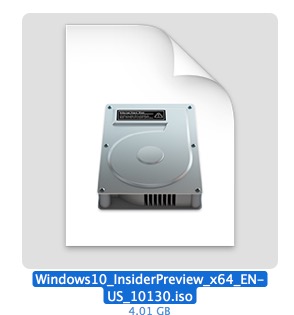
To create the install disk, you’ll need a USB flash drive that’s at least 8GB in size which you don’t mind erasing, and a Windows 10 ISO (a Windows 8 ISO works fine too).
If you need to download a Windows 10 ISO to work with, you can get one for free here from Insider Preview right now from Microsoft, the Windows Insider program is a bit like the Mac OS X Public Beta program offered by Apple (you may recall we used this same ISO of Windows 10 to run in VirtualBox atop MacOS X). Interestingly enough, if you download the Windows 10 preview and install it onto any computer, Microsoft will offer the final build of Windows 10 for free on that machine, which is pretty generous and perhaps offers an added incentive to install Windows 10 on a Mac for users who were considering running Boot Camp anyway.
So, have a USB flash drive and a Windows ISO file on your Mac? Then everything is ready to go, the rest is super easy.
How to Create a Windows 10 Installer Drive from Mac OS X with Boot Camp Assistant
Even though we’re focusing on just creating the installer drive for now, you may want to start and complete a back up of the Mac with Time Machine beforehand, particularly if you’re unfamiliar with formatting drives.
- Have the Windows ISO file downloaded and somewhere easy to find
- Connect the USB flash drive to the Mac – this will be erased and turn into the Windows bootable installer drive
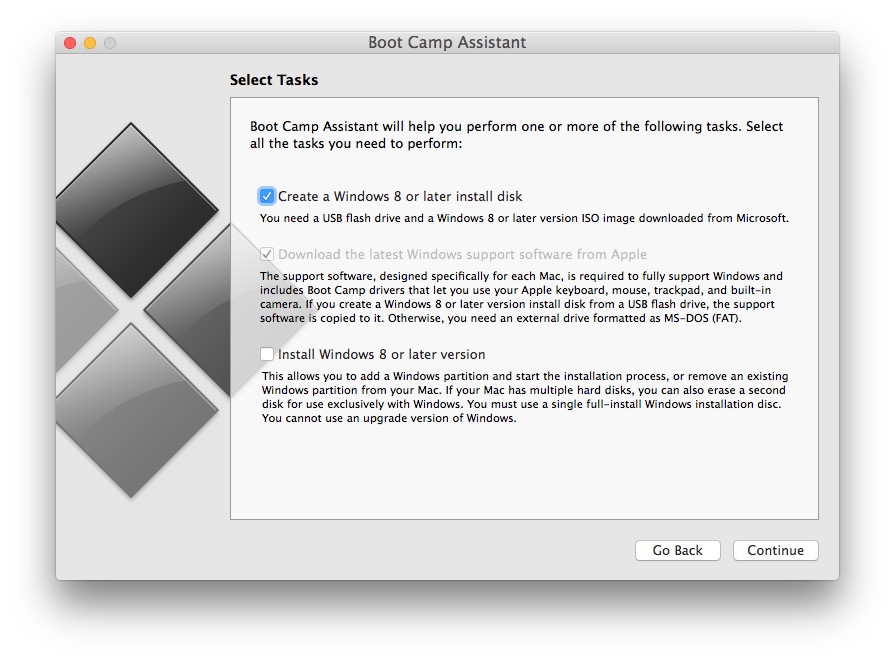
- Open the Boot Camp Assistant app, located in /Applications/Utilities/ (or launch it with Spotlight)
- Check the box for “Create a Windows 8 or later install disk” – and, for now – uncheck “Install Windows 8 or later version” – do not skip unchecking this for now, otherwise Boot Camp will attempt to install Windows on the Mac right away, which is not what we’re looking to do here (yet anyway)
- Click the “Continue” button – you did select to not install Windows, right?
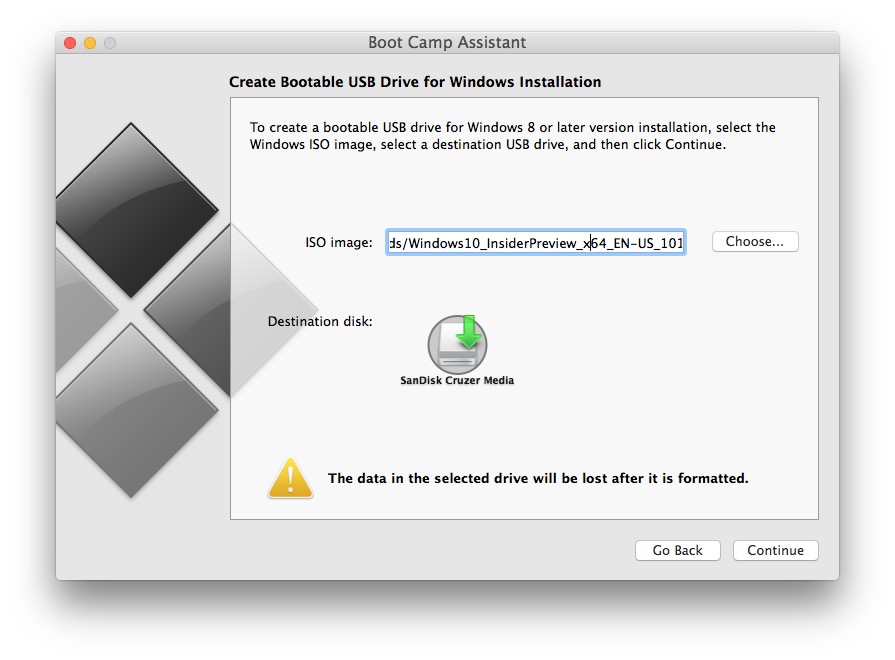
- Alongside ‘ISO image:’ click on the “Choose” button, if the Windows 10 ISO is in your Downloads folder it will likely be selected automatically, but confirm it is the proper ISO anyway
- Select the destination USB disk for the Windows 10 ISO to turn into the bootable installer drive, then click on “Continue”
- Confirm that you wish to format the USB flash drive – be absolutely certain you selected the proper drive in the prior step otherwise you may erase the wrong volume – then wait a while, creating the installer drive for Windows will take some time
When finished creating the Windows 10 installer, you’ll find the USB flash drive on the Mac has been renamed to “WININSTALL”, if you browse through that volume you’ll discover it’s full of .exe, .efi, .inf, BootCamp, and other files and processes which will not run in Mac OS X because they are Windows files.
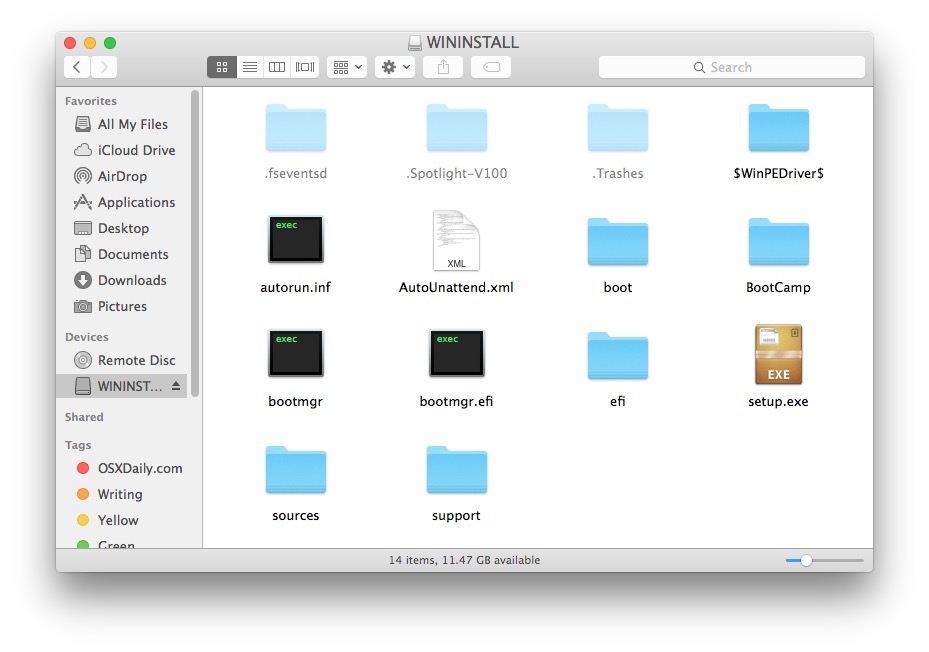
That’s it, you now have a Windows 10 installer drive that is ready for creating a Boot Camp partition and installing Windows onto a Mac.
Note: We’re not going to cover the specifics of installing Windows in Boot Camp on Mac for this particular walkthrough, we’ll focus simply on creating the Windows installer drive for now. If you want to forge ahead after that, the Mac will need a separate 30GB or larger partition or drive to run Windows in, and as always complete a full back up of your Mac before modifying partitions or installing any sort of system software, be it Mac OS X or Windows. The actual installation of Windows 10 to a Boot Camp drive or partition can also be handled through the same Mac OS Boot Camp Assistant application used to create the installer drive, but we’ll cover those specifics in another article here specifically about installing Windows 10 into Boot Camp.






I have to say that this thread is old and it’s super easy to use etcher. Just install etcher and use it — boom, done.
Needs more pipes to pv
I have installed windows 10 on iMac (Retina 5K, 27-inch, Late 2015), which has OS X El Capitan. I have issues as magic mouse is not working on windows side and the key board has issues with special characters. Can anyone help please? I believe that microsoft hasn’t release windows 10 usb drivers that support OS X El Capitan
But what if I’m going to install Windows on a PC?
THIS WAS SO HELPFUL. THANK YOU.
Hi how are you?
i tried to instill windows 10 in my mac and it show me (your bootable USB drive could not be created)
Boot Camp only supports windows 7 or later installation on this platform. please use an ISO file for windows 7 or later installation by the way i download the windows 10 but i could not instill it
This is NOT working for windows 32 bit! It only works with the 64 bit iso!
Yes correct, new Intel Macs are 64 bit and must use the 64 bit ISO. You can use the old 32bit ISO but it won’t install on new Macs.
would I be able to use this stick to reboot a PC?
Note: You can run 64bit Bootcamp and Windows 10 on Macs as old as 2009, and get all the perks of the BootCamp control Panel – and get to use the full amount of RAM. . I managed to run 64bit BootCamp and Windows 10 on an iMac from 2008. Works as a charm, and runs smoothly!
When is the next part of the article coming out? Maybe you can address what to do if I get a Boot Camp assistant message “Disk cannot be partitioned because some files cannot be movied”. “…use Disk Utility to format it as a single Mac OS Extended (Journaled) volume”.
This is an article about creating a Windows 10 installer drive with a USB flash key or flash disk, it’s done from OS X. You can then use that Windows 10 installer drive to install Windows 10 onto a Mac with Boot Camp, or if you skip the boot camp and just burn the ISO, you can install it onto a Windows PC. What ‘next part’ are you talking about? You want a walkthrough on how to click the ‘install’ button or what?
For anyone receiving the “Your bootable USB drive could not be created. Boot Camp only supports Windows 7 or later installation on this platform. Please use an ISO file for Windows 7 or later installation.” message:
I had my .iso mounted, simply umounting it allowed Boot Camp assistant to continue. Hopefully the same will work for you.
Problem must be that you are running an older mac (pre 2010) https://discussions.apple.com/thread/4897066?tstart=0
Had the same problem, Thanks!
Thank you so much! :) I was confused before seeing this.
Will the windows 10 public release work my macbook pro 13″ eary 2011 as the drivers are latest by downloading 5.1.5621 and while launching bootcamp it shows option as install windows 7 or later
While on new macs it shows Install Windows 8 or later
Does this mean my mac will not support Windows 10 as apple hasnt updated the drivers for old macs for windows 10??
Plz reply
Better read the privacy agreement first. This preview is going to track every key stroke.
“data we may collect include your name, email address, preferences and interests; location, browsing, search and file history; phone call and SMS data; device configuration and sensor data; voice, text and writing input; and application usage.”
Running MBA mid-2013 i7 with 8gb, when I try to create a bootable usb using the bootcamp assistant it says it only supports Win7 or later.
Any suggestions please?
Yes, Windows 10 is later than Windows 7, it is supported.
Same problem here….received the following wrror message as well ;”Your bootable USB drive could not be created. Boot Camp only supports Windows 7 or later installation on this platform. Please use an ISO file for Windows 7 or later installation.”
Using the x64 IOS downloaded from the link provided above.
I’ve managed to solve the issue by downloading the enterprise version of Win10. Can’t really say why this is the solution or whats wrong with the regular version but I dont care.
Now that Win10 is running I can honestly say that I’m not that happy with the overall performance and some other issues as well. For example, the fans are constantly up, sometime it takes forever for the OS to respond and whole lot of other issues as well.
I know its a good combination I have here – pre-release OS running on a non supported bootcamp version but still was hoping for something whole lot better than this.
Parallels here I come! back…
I just had the same problem – it looks like the iso had mounted itself somehow. I went into Disk Utility and right click -> “remove” the iso, and then the boot camp assistant let me create the drive
Brilliant, thank you!
I tried unmounting and removing but the ISO keeps remounting and it keeps giving me the same error.
I have numerous Macs and as soon as I get one, I delete whatever version of OS crap is on it and install Windows. None of this OS x crap on my Macs. After reading on here about all the whiners of Yosemite, and this doesn’t work, that doesn’t work, my WiFi drops, iOS sucks, I am staying with Windows 4ever.
Leave the darkside kiddos, and get a real OS.
You poor, poor creature. What did they do to you?
In two minds about switching back to Windows myself, but honestly, every time I try I’m reminded painfully why I switched to OS X in the first place.
But you’re right, Apple make great hardware.
Not entirely sure why you spend anytime here then if your so gung-ho about windows. also while i agree that apple hardware tends to be of good quality for the most part it is by no means the best. apple tends to run lower specs because the software is not as demanding as windows and other OS’s are. If you use windows i think you would be getting more bang for your buck by getting different hardware with better specs, like “alienware” maybe or a custom setup.
troll on, troll
Mr “itm” Windows are good for gaming, your right but
El Capitan OS has Metal for Mac with 10x better performance for games as well as apps, cant say windows is best anymore for gaming.
I’ve been trying to make a decision about running Windows on my MBP Retina for Steam gaming specifically. Are you saying it would be in my best interest to wait for El Capitan / Metal? I’m just a casual gamer anyway… but some servers with game mods cause me to crash or lock-up. If so, I’m really glad I read the comments this time… Thanks.
Games should run better in OS X with Metal and El Capitan assuming the game developers take advantage of Metal technologies. But would not be surprised if performance was still better in Windows, there’s just much more gaming support, DirectX, etc.
What is the total RAM Consumption of Windows 10??
Wil my Games run even Faster than Windows 8??
Hey Paul, when I read these comments from 2015 so I get a doubt… is that still actual or not? I like this idea because it’s really clever and very useful, therefore I will
try it.
Thanks for sharing your superb tips and have a great weekend!
Friendly greetings from 🇺🇸🤓
Will it Run on my CUSTOMIZED Early 2011 13″ MacBook Pro, i have installed Windows 8 pro via bootcamp already, (only supports install via DVD not USB)
Specs are
Core i5 2.3GHz Dual Core
4 GB Ram
New Replaced Toshiba 500 GB HDD faster than the Hutachi one it came with
Intel HD 3000 GPU
I like my default mac interface. Don’t want to install any type of windows on my system.
Microsoft now says no free upgrade to final. LOL, its free, then it’s not, then it’s free, now back track again. Wow.
http://gizmodo.com/microsoft-finally-decides-no-free-windows-10-for-beta-1713251432
Why?
Many reasons to run Windows on a Mac.
Gaming in Windows is far superior to OS X, better video card drivers and more games.
Compatibility for work and school.
etc.
UNLESS THE SCHOOL SPECIFIES APPLE iPad ( which my granddaughter’s school does ) Plus more reasons to buy mac hardware than DEL, TOSHIBA, SONY etc, etc
Good to know but I like OS x
I’m just not interested in running any Window on my Mac. I would rather keep it pure and probably a lower security risk.
You also need a recent mac. i.e. I have a 2010 macbook pro 13 and my bootcamp won’t let me go any higher than Win 7 even though I have Yosemite. VMware runs Win 8 fine though.
Boot Camp version 5.14
Hi, What do you mean BootCamp 5.14 ?
You get this version when you make your USB drive?
For some reason I don’t get the same dialog box as shown in the instructions. It doesn’t give me the option to create a windows 8 install disk
To create a Windows 8 or newer install disk you need OS X Yosemite (10.10) or El Capitan (10.11), older versions of OS X will offer a Windows 7 installer, etc.
I am running Yosemite. version 10.10.3
Running El Capitan 10.11.6, Boot Camp Assistant 6.0.1, it talks about Windows 7 and does not even recognize my 8GB thumb drive. Doesn’t recognize my 1TB Windows drive, either.
This option is only available if your mac has no DVD drive
I appear to be having the same issue, El Capitain 10.11.5, however the dvd drive is none functioning is there anyway around it?
And FYI you should be able to use that same Windows Installer for installing Windows 10 onto a PC as well, even though you made it on your Mac from a Windows 10 ISO and has the Boot Camp files.
This is exactly the information I came down to the comments section for, thank you :)
Did it work?
+1 me too
I also came exactly for this info. Thank you!
That is what I looking for. Thanks a lot!
Me too, thanks a lot. Cheers
Funny, not working for me. I just get a blinking cursor.
I get the same thing.
Is it working now? And is this the only way to create a bootable USB with windows 10 from a mac?
Great for Boot Camp, and Boot Camp is cool on the Mac, but as many people have noticed, Windows 10 runs better and faster on the same hardware than OS X Yosemite (and even slower than OS X El Capitan, LOL), so yea, not a bad idea to run Windows 10 if you want performance. It’s a bit of a setup, but yea, faster, but it’s still Windows. Goes to show how low quality OS X is nowadays when Windows is faster on the same Mac… heh.
Who wants a Microsaft program loader on a Mac ;-)
Do you mean Windows 10 is slower than OS X El Capitan?
Yeah, that’s not even remotely accurate, you worthless, pathetic shill.
Actually, Windows 10 does run better than OS X Yosemite on a MacBook
http://www.alexvking.com/12_inch_macbook_and_windows_10.html
http://mashable.com/2015/05/15/windows-10-new-macbook-performance/
http://9to5mac.com/2015/05/15/retina-macbook-windows-10/
On a MacBook:
Perhaps being a little more critical of Apple would nudge them to prioritize performance in OS X more? It’s desperately needed, OS X Yosemite is a slow piece of junk.
That’s the fault of the MacBook, not OS X itself.
By your logic, you may as well run Linux on your Mac. Surely it will run faster than both Windows and OS X.
I really don’t think that’s true. Not that I’m a fanboy, just a fan of logic and factual evidence.
There’s just articles of some student reporting that Windows 10 runs faster on his 1 month old mac. There are so many different factors involved here, and there is no legitimate evidence: only his subjective claims.
a. macs are slower while learning your behaviour, so is windows in some ways
b. this doesn’t show what he has installed on both OS
c. this doesn’t show if his mac os was a clean install, whereas the windows install would be
d. doesn’t take into account that a mac os should be faster on it’s own hardware, for technical reasons.
e. Yosemite is dated, and windows 10 was buggy af when it was released.
We shouldn’t just make such statements like they are fact. There is no proof, no evidence, no actual statistic to show. I would love to see some that are made by people that truly understand how to test things for performance without gaps in their scientific testing models.
But referencing some random kid from college? wtf.
You can also use the command line hdiutil and dd tools in two step process, converting the ISO to IMG, then writing the IMG to target disk:
Convert Windows 10 ISO to IMG file:
hdiutil convert -format UDRW -o ~/path/to/Windows10.img ~/path/to/Windows10.isoThen dd to copy the img to the USB disk by ID#:
sudo dd if=/path/to/Windows10.img of=/dev/rdisk### bs=1mI actually did this recently with Windows 10 IP ISO using an article you wrote about this a few weeks ago as the basis:
https://osxdaily.com/2015/06/05/copy-iso-to-usb-drive-mac-os-x-command/
This step converting ISO to IMG with hdiutil is weird. I did that and the resulting file is identical to the ISO.
$ md5 Win10_1511_German_x64.*
MD5 (Win10_1511_German_x64.img) = 4d43d038d6f836e812ec006810735145
MD5 (Win10_1511_German_x64.iso) = 4d43d038d6f836e812ec006810735145
I just can’t boot from it.