Empty the Huge Trash Can
Feb 7, 2010 - 6 Comments
I often forget to empty my Trash, which can grow and grow and grow over time, but this picture shows a bloated trash can being taken it to a whole new level. 489GB!

I often forget to empty my Trash, which can grow and grow and grow over time, but this picture shows a bloated trash can being taken it to a whole new level. 489GB!
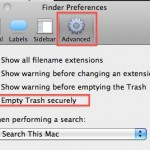
You can set Mac OS X to always securely empty the Trash and add a significant layer of security when removing files from the Mac. This is done just by adjusting a preference setting within the Finder, and it’s very easy to configure, here’s what you will want to do to use this option:
This is a very cool feature I had no idea existed but accidentally stumbled across while on a recent flight. If you have an iPhone, you probably know that the earbuds included with it have a button to adjust volume and what not, well guess what, you can control the volume level in iTunes and … Read More
Hey look it’s raining out of the snow! That’s something I don’t see everyday. But the Dashboard Weather widget in OS X has plenty of unique weather conditions that can be shown, and if you want to see them all you don’t need to wait until the seasons change.

Many Mac users are fond of the Mac startup sound that chimes on system boot, but there are definitely times when booting that you’d rather just be quiet, say a library or coffee shop. Thus, we’re going to show you how to mute that boot up sound on any Mac, MacBook model (Pro, Air), iMac, … Read More

You can delete specific pages from a PDF file with the built-in Mac Preview app, available in all versions of OS X. This is really useful for paring down large PDF documents if you only need a few select pages, and learning how to delete specific pages from PDF files is bound to make any … Read More

You may already know that you can use a keystroke to make a Stickies Note from Safari app in Mac OS X, but did you know that same keystroke works in many more apps on the Mac? Yes, it turns out you can instantly create a Stickies note from almost anywhere and any application in … Read More

It’s Sunday funday again… and though this doesn’t really fit into a ‘fun’ category it’s sure interesting anyway… we bring to you a rather unfortunate incident that caused a MacBook Pro to be pierced with a bullet hole, right through the screen! Yikes!

The above image was generated with ShapeCollage, which is a great free Mac software program that allows you to create some pretty fancy photo collages, fitting into various shapes (even ones you define yourself) and text barriers. It’s surprisingly quick and very easy to use, basically you just drag and drop images into the application … Read More

If you’ve ever wondered what your Mac Multitouch Trackpad is doing, download this fun little application. It tracks multitouch input and shows you just how sensitive the multitouch surface really is, detecting up to 11 input points, and also knowing the surface area.
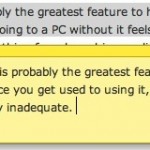
Want a block of text to float over your Mac desktop so that you can reference it easily? That’s a perfect usage for the Stickies app in OS X, and using a little known trick you can instantly create a new Stickies note from within Safari. The secret to this trick is quite simple: you’ll … Read More
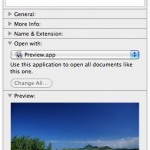
Did you know the Mac has a little file inspector tool that can be used in the Finder for quickly getting information about files, folders, and anything else selected in a Finder window? The File Inspector is basically a dynamic “Get Info” window on the Mac, as it adjusts depending on what you select in … Read More
2 0 1 0 ! TWO THOUSAND AND TEN! Happy New Year to all of you from the writers of OS X Daily! It’ll likely be a slow day around here, but here are some of the more popular posts of 2009 to keep you busy for now: Install Snow Leopard from an External Firewire … Read More
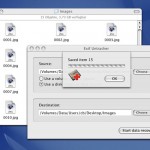
If you’ve ever accidentally deleted pictures from your digital cameras memory card, you’re not alone. That feeling of dread when you forever lose photographic evidence of memories and experiences in digital form can sometimes be resolved though – so don’t freak out quite yet! Using an excellent free tool called Exif UnTrasher, Mac OS X … Read More
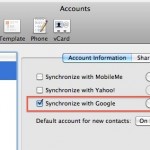
You can easily sync your Mac Contact list or Address Book contacts with your Google Contacts. This is quite easy to set up, we’ll show you how to do so in all versions of OS X.
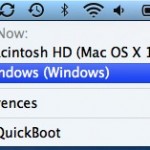
Need to quickly boot from Mac OS X to Windows? Don’t want to fiddle around in System Preferences or hold down the Option key during the Mac restart to access the Boot Loader? QuickBoot to the rescue! QuickBoot is a great little tool that sits in your menubar and lets you easily select boot volumes … Read More
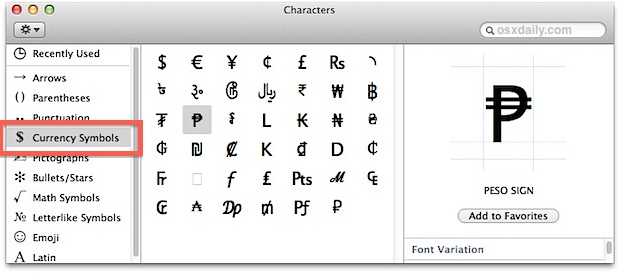
You can access and type foreign currency symbols in Mac OS X in much the same way that other special characters are typed out. That means you’ll use a keystroke combined with the “Option” key to type the respective character. A few common currency symbols are available on default keyboard layouts, including the $ dollar, … Read More




