Tips & Tricks

Tips and tricks for all things Apple! Whether you want to learn tips for a Mac, iPhone, iPad, Apple Watch, or much more, you will find many tricks, tips, tutorials, and excellent walkthroughs for Apple devices and software here.

Search Tips & Tricks

Run iPhone in James Bond Mode: Set your iPhone to Self Destruct and Erase All Data After Failed Password Attempts

Aug 12, 2010 - 26 Comments
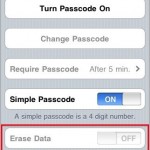
There’s a pretty interesting feature included in iOS that lets you run your iPhone in James Bond mode, causing the device to self destruct if an incorrect password is entered 10 times concurrently. Ok, well it’s not really called James Bond mode and it doesn’t actually self destruct, but it does erase all the data … Read More

How to Merge Directories in Mac OS X with ditto

Aug 12, 2010 - 6 Comments
Terminal in macOS

If you have two directories you need joined together, you can either drag and drop everything together, use the ‘mv’ command to move files manually, or, as we’ll show here, you can quickly merge any two directories within Mac OS X by using the command line tool ditto or ‘cp’. The command line is generally … Read More

How to Lock Files and Folders in Mac OS X

Aug 11, 2010 - 8 Comments

You can easily prevent changes being made on any files or folders in Mac OS X by locking the file or folder in question. This locking capability will also prevent the file or directory from being deleted, since the Trash will not empty while a file is in a locked state. Locking files and folders … Read More

Forgot Mac Password? How to Reset Your Mac Password (with or without CD)

Aug 10, 2010 - 508 Comments

So you forgot your Mac password… uh oh. Don’t worry, it happens and you aren’t out of luck. You’ll need to reset the forgotten password and there’s several ways to do this, we’ll focus on the three best methods; the first is dirt simple and will utilize the Apple ID (yes, the same on you … Read More

Select Sections of Non-Contiguous Text in Mac OS X with the Command key

Aug 9, 2010 - 8 Comments

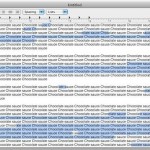
If you’ve ever needed to select and copy portions of a text document that are non-contiguous, in other words, sentences or words that are not right next to one another and do not touch, you can do so with a little-known text selection shortcut trick in Mac OS X.

Get your LAN IP Address in Mac OS X

Aug 8, 2010 - 7 Comments

Anytime you are connected to a local area network (LAN) you’ll be assigned an IP address for that network, and often it’s important to know what this IP address is. There are two quick ways to get your LAN IP address in Mac OS X, one is more user friendly using the GUI, and the … Read More

Get Emoji Icons on Older iPhone & iPad with Emoji Free App

Aug 6, 2010 - 5 Comments

While new iPhone and iPads have the Emoji keyboard built in to iOS and ready to be enabled, older devices may not. But if your iPhone, iPad, or iPod touch does not have the Emoji keyboard available because it’s running an older version of iOS (like iOS 5 or older), you can still use Emojicons … Read More

Find the iPhone MAC Address

Aug 5, 2010 - 6 Comments
MAC address

All iPhone devices have a unique hardware identifier known as a MAC address, or as iOS refers to it, a Wi-Fi Address. Sometimes you need to know what the iPhone MAC address is so that you can connect an iOS device to a specific router, provide it to a systems or network administrator, using Wake … Read More

Unjailbreak an iPhone

Aug 3, 2010 - 260 Comments

So you’ve decided that you want to reverse the jailbreak on your iPhone, no big deal. All jailbreaks are reversible, but what most users don’t know is that you can easily unjailbreak an iPhone by using the Restore functionality within iTunes, and then you can restore your apps, contacts, and iPhone customization to the device … Read More

Easy iPhone Jailbreak with JailbreakMe

Aug 2, 2010 - 43 Comments

JailbreakMe is an extremely easy method to jailbreak your iPhone or iPod running iPhone OS 3.1.2 or higher, yes this includes iOS 4 on an iPhone 3G, iPhone 3GS, iPhone 4, and iPod touch. JailbreakMe is entirely browser based and probably the easiest method around to jailbreak any compatible iOS device, if you still aren’t … Read More

Remove a System Preference Pane in Mac OS X

Aug 2, 2010 - 1 Comment

If you have added any third party system preference panels to the Mac, you can easily remove them if you no longer have a need for that system preference panel.

Want a prepaid iPhone? Setup an iPhone for a pay-as-you-go plan

Aug 1, 2010 - 276 Comments

You can use any iPhone, iPhone 3G, or iPhone 3GS as a pay-as-you-go phone through AT&T’s GoPhone program. AT&T doesn’t officially support using GoPhone with iPhone but that doesn’t mean you can’t do it, and it’s actually much easier than you might expect. You will be able to make calls and use prepaid data, and … Read More

Disable Momentum Scrolling on a MacBook Pro

Jul 30, 2010 - 4 Comments

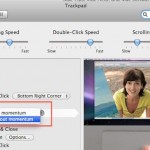
Scrolling with momentum is a feature that is included with some MacBook Pro trackpads (and MacBooks thanks to a recent software update from Apple). The behavior is very much like the iPad or iPhone, when you are scrolling through anything you can give the trackpad a swipe and the speed of your gesture will determine … Read More

How to Add a Trash Icon to the Desktop of Mac OS X

Jul 29, 2010 - 14 Comments
Mac OS X trash can icon

Long ago in a time far far away, OK really it was just prior to Mac OS X, there used to be a Trash icon on the Desktop. Yup, earlier versions of Mac OS didn’t have a Dock at all, and the Trash was just another item on the desktop, sitting in the bottom right … Read More

How to show FPS in Starcraft 2

Jul 28, 2010 - 23 Comments

Starcraft 2 is out and it’s pretty much eating all my free time at the moment. I’m still in the process of tweaking my graphics settings for optimum performance, and the easiest way to benchmark Starcraft 2 performance on machines is to check the FPS (frames per second). Here’s how to do that on both … Read More

Safari Extensions Gallery now on Apple.com

Jul 28, 2010 - 3 Comments

Apple has launched their official Safari Extensions Gallery, at this time it features 100 extensions out of the roughly 300 out in the wild. All of the extensions on Apple’s gallery have been digitally signed and sandboxed so you don’t have to worry about security problems like some of the Firefox extensions have had in … Read More

Find Out Type and Model of LCD Panel in an iMac, MacBook, MacBook Pro, etc

Jul 28, 2010 - 15 Comments

You can find out what the manufacturer, model number, and type of LCD panel you have in any of your Macs, including the iMac, MacBook Air, MacBook, or any model MacBook Pro by using a fairly complex looking terminal command. If you’re unfamiliar with the command line, just copy and paste the line below into … Read More

Service Battery Indicator in Mac OS X: What It Means, & How to Fix It

Jul 27, 2010 - 5 Comments

Modern versions of Mac OS have a feature for MacBook Pro, MacBook Air, and MacBook that will report to you the condition of your battery, as shown through the battery menubar item. Usually charging messages are shown there, but there are two other messages you may see in that menu, and they are “Replace Now” … Read More

Subscribe to OSXDaily

Subscribe to RSS Subscribe to Twitter Feed Follow on Facebook Subscribe to eMail Updates

Tips & Tricks

News

iPhone / iPad

Mac

Troubleshooting

Shop on Amazon to help support this site