Tips & Tricks

Tips and tricks for all things Apple! Whether you want to learn tips for a Mac, iPhone, iPad, Apple Watch, or much more, you will find many tricks, tips, tutorials, and excellent walkthroughs for Apple devices and software here.

Search Tips & Tricks

Boot a Mac from a CD / DVD

Apr 12, 2010 - 18 Comments

If your Mac has a SuperDrive or Disc drive, you can boot the Mac from any bootable DVD or CD by using a special keyboard shortcut. The bootable disc can be an OS X system restore disc, an OS X installation disc, or even a third party OS disc like Linux.

Precisely Adjust Volume Levels on your Mac

Apr 11, 2010 - 11 Comments

You can precisely adjust the volume levels on a Mac by holding down the Shift+Option keys while pressing the Volume Up / Down keys. This lets you adjust the sound level by 1/4 of each notch (as opposed to a full notch), offering precise incremental control to how loud or soft output is from the … Read More

Stop the iPhone from Skipping Songs When Running / Walking

Apr 9, 2010 - 50 Comments

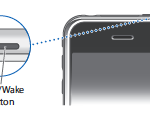
The iPhone and iPod Touch have a built in motion sensor that lets you shake the device to shuffle music, which is a really cool feature… unless you’re running. There are two solutions to this problem, the immediate one is to simply hit the sleep button on the top of the iPhone after you have … Read More

How to Eject a Stuck CD / DVD from a MacBook Pro

Apr 8, 2010 - 89 Comments

Is a DVD or CD stuck in your MacBook or MacBook Pro? Having a disk jammed in your Mac is really frustrating, but you can usually get it out by using a few different tricks. The methods outlined below are for when a disc is truly stuck in the Mac. Eject a stuck CD/DVD from … Read More

How to Boot a Mac in Target Disk Mode

Apr 7, 2010 - 13 Comments
Using trimforce to enable TRIM in Mac OS X

Target Disk Mode is a very handy feature available to use with Mac’s that have Thunderbolt or Firewire ports, and it allows you to use one Mac as an external drive on another host machine. This incredibly useful feature makes troubleshooting, installations, large file transfers, and critical backups extremely easy and very fast. Before beginning, … Read More

Use Command Key to Open Folder in New Window or Tab in Mac OS X

Apr 5, 2010 - 6 Comments

You can open a folder into a new window (or tab) by holding down the Command key when you double-click on the folder to open it within the Finder of Mac OS X.

Dramatically increase your productivity by adding a second monitor to your setup

Apr 4, 2010 - 14 Comments

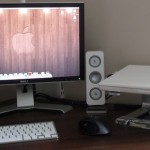
Want to dramatically boost your computing productivity? Get an additional monitor. Whether you have an iMac, MacBook, MacBook Pro, Mac Pro, or Mac Mini, you will love it once you have it. I can’t think of a single other addition to a Mac setup that will increase productivity like a second monitor does. You instantly … Read More

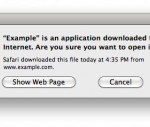
How to Disable the “Are you sure you want to open this file?” Warning Dialog in Mac OS X

Mar 29, 2010 - 15 Comments

“[Name] is an application downloaded from the internet. Are you sure you want to open it?” Starting in new-ish versions of Mac OS X, you may have noticed that when you download a file from the web and go to open it, you will get a prompt saying something along these lines, warning that an … Read More

Fix for Photo Booth Running Slow in Mac OS X

Mar 26, 2010 - 3 Comments

I was recently asked to do some maintenance work on a relatives iMac, and one of their chief complaints was the speed of Photo Booth, the fun application that takes pictures and distorts them with your iSight. Upon inspection of the machine, I found that Photo Booth was running extremely slow, launching the application would … Read More

How to Set the Default Column Size in Mac OS X Finder Windows

Mar 25, 2010 - 21 Comments

The Mac OS X Finder column view is really handy, letting you see multiple folder contents side by side in a hierarchical view. But unless you set the default column width yourself, anytime you launch a new Finder window, the columns size will be reset on a per window basis.

Instant & Cheap Cable Organization: The Most Useful Thing I’ve Seen All Week

Mar 24, 2010 - 6 Comments

Computer cables are always getting in the way, falling on the floor, getting tangled up, or otherwise becoming some form of hassle, right? Well rather than go crazy, you can use this really neat binder clip solution to organize each cable. There’s not much to this trick, the binder clips are the same ones you … Read More

When and How to Reset Mac SMC (System Management Controller)

Mar 24, 2010 - 167 Comments
Retina MacBook Pro

“Ahhhh my Mac isn’t working! I need to reset the SMC!” You have tried rebooting, you’ve reset the PRAM, you’ve done it all, but your Mac is still behaving strangely. What next? In certain circumstances, resetting your Mac System Management Controller (SMC) can be a solution. This is sometimes necessary to restore normal lower level … Read More

Show File & Folder Info Directly in Finder & Folders of Mac OS X

Mar 22, 2010 - 1 Comment

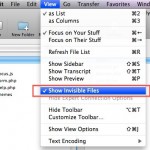
You can set Mac OS X to automatically display file and folder information directly within the Finder windows of the file system, much like the desktop of OS X.

Copy iTunes Library from a Windows PC to a Mac

Mar 21, 2010 - 22 Comments
iTunes

If you’re moving from a Windows PC to a Mac, then you’ll probably want to move your iTunes library with it. This lets you keep all of your music, apps, and downloaded media, and you won’t skip a beat. This article will cover moving an iTunes library from a PC to a Mac OS X … Read More

How to ReName a File or Folder in Mac OS X

Mar 18, 2010 - 39 Comments
Finder of Mac OS X

Renaming a folder in Mac OS X is very easy, and there’s a few different ways you can do it. We’ll focus on the three most common tricks to quickly rename any file or directory folder on the Mac, two of which are done through the familiar graphical interface of the Finder file system, and … Read More

Compare Versions of a Word Document with Microsoft Word

Mar 15, 2010 - 1 Comment
DOCX files

Do you have two Word doc files that you need to see the differences between, and compare the two easily side-by-side to review changes? You can easily compare Word documents against each other with the Microsoft Word app in Mac OS X and Windows, Word of course is part of the Microsoft Office Suite, and … Read More

How to Enable the Firewall in Mac OS X

Mar 12, 2010 - 6 Comments

If you want to beef up the security on your Mac with a simple settings adjustment, you can enable the built-in software firewall. This offers a layer of protection by blocking many ports for common protocols, incoming connections, and other potential attack vectors. Generally, the Mac OS X Firewall is not necessary to use for … Read More

How to Access the iPhone Equalizer

Mar 10, 2010 - 15 Comments

The iPhone default audio settings are a little flat for some types of music, and if you’re not thrilled with the way it sounds you will find it remarkably easy to adjust thanks to the iPhone’s built-in equalizer option. Technically the iPhone equalizer is part of the Music app, it’s not an equalizer in the … Read More

Subscribe to OSXDaily

Subscribe to RSS Subscribe to Twitter Feed Follow on Facebook Subscribe to eMail Updates

Tips & Tricks

News

iPhone / iPad

Mac

Troubleshooting

Shop on Amazon to help support this site