
How to Quit Multiple iPhone Apps Simultaneously in iOS with Multitouch
Jul 20, 2014 - 13 Comments
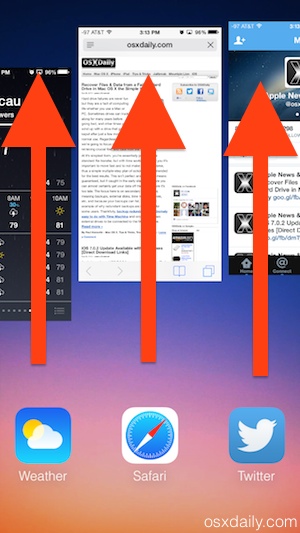 If you ever need to quit out of more than one app on the iPhone, or quit a bunch of apps quickly in iOS, using a handy multitouch swipe gesture at the iOS multitasking screen is enough to quit apps simultaneously. This works really well to quickly clear out the multitask bar of all running apps if you need to for whatever reason, and you can quit as many apps at a time as that fit on screen (and that you can fit fingers onto), which usually means killing running apps in groups of three.
By Paul Horowitz - iPad, iPhone, Tips & Tricks - 13 Comments
 The iPhone Clock app has replaced many bedside alarm clocks out there, fitting since many of us sleep with an iPhone on a bed stand anyway. While most users know that you can snooze / sleep the iPhone alarm by just tapping on the screen or pressing one of physical buttons on the phone (volume buttons, home, power), fewer know this handy little trick to quickly turn off the alarm completely.

 If you regularly
 Call Waiting is the feature that allows you to hear another incoming call when you’re already on active phone call, often referred to as a ‘beep’. On the iPhone, you can then look at your screen and the incoming callers number or contact details will be shown. Call Waiting is obviously very useful for many situations, but if you’re annoyed with the beep while on a phone call you can easily turn the feature off with an adjustment of an iPhone setting.
  If you share a computer, or when someone else just needs to use your web browser for a while, you probably know the dread of worrying about a million saved web logins, history, saved searches, and whatever other customizations and personal data you have in the browser. Common solutions are often to use a
  The first time you set up a Mac or
 I don’t know about anyone else, but I always have a very different volume level for my headphones than for my speakers, and if you’re anything like me than this tip is great news. You can actually set headphone-specific volume levels on your Mac, so you won’t have to be constantly toying with the volume levels. That means no more embarrassing moments where your headphones accidentally get pulled from your Mac in a quiet library, and you proceed to blast music for all to hear.
  Have you ever had someone pass you their headphones to hear a song, and had your ears blasted by an outrageously loud volume level? Well, by default, anyone can crank the volume up on music played from an iOS device to 100%. That may sound like no big deal, but there are situations where listening to music that loud could potentially be problematic, leading to inattentiveness to the outside world or even theoretical hearing issues. This is particularly important for kids, who may not realize that the volume level is harmful. Thus, if you or your kids listen to a lot of music with headphones on from an iPhone, iPod touch, or iPad, you may want to consider setting a maximum volume limit for the Music app.
 Mac Safari users who have the Adobe Flash plugin installed are likely to find it disabled automatically by Apple, due to a recent security issue with the Flash plugin. That basically means if you don’t have the very newest Flash version installed already, and most people don’t yet, you’ll see the a



