Network Utility is a great tool that has been around on the Mac since the very first version of Mac OS X. It provides a variety of helpful networking tools and details, the “Info” tab includes general network info on a per interface level showingIP address, MAC address, link speeds, and sent/received data transfer statistics, and you’ll also have easy GUI access to what are otherwise command line tools, like netstat, ping, nslookup, trace route, whois, finger, and a port scanner.
Sharing files between Macs and NAS drives and Windows PC’s has always been very easy, but Mavericks brought a slight change that has caused some problems for certain users in mixed PC and Mac environments. Without getting too geeky, Apple adjusted the default protocol for SMB (Samba, the Windows file sharing ability) from SMB1 to SMB2, and the SMB2 implementation apparently carries a bug which is incompatible with many NAS (Network Attached Storage) devices, and some versions of Windows. The issue is pretty obvious when you encounter it: Many Windows PC’s, NAS drives, and Linux machines won’t access or mount from the Mac, and instead will try to connect or mount forever and ultimately time out, preventing connections, mapped drives, and general access.
Fortunately there’s a very easy workaround to connect to SMB and NAS shares from OS X Mavericks, OS X Yosemite, and OS X El Capitan: Read more »
App Nap is a great feature that arrived with OS X Mavericks which automatically pauses applications once they have gone unused for a period of time, helping to reduce energy consumption and saving battery life for portable Macs. Though App Nap can make a big difference in extending the battery life of MacBooks, there are some unique situations where users may not want an application to pause itself when unused, inactive, or otherwise in the background. For these situations, you can selectively prevent App Nap by disabling it on a per-application basis. Most users should not disable App Nap without a compelling reason to do so.
All of the latest versions of OS X have opted for a conservative approach to showing the users ~/Library/ directory, a folder which contains a variety of important files, settings, preferences, caches, and many specific files that are required for apps to run as intended. Because of the possibility of unintentional harm to a users Mac, OS X defaults to hiding that folder, with the intention on preventing novice users from making changes to it. OS X Mavericks is no different, but with the release of 10.9, all Mac users have an easy option to permanently show the User Library directory without having to result to the command line or other tricks that were previously required for access to the ~/Library folder. Read more »
Many of us rely on the iPhone as an alarm clock these days, but unless it has been changed, the default alarm clock sound effect is usually the same as the default iPhone ringtone. That can cause some frustration and confusion as you’re half asleep and the alarm goes off, sounding like you’re getting a phone call, but fortunately if you would rather hear something else play it’s really easy to change the alarm clocks tone to be another sound, or you can even pick a song if you want to as your iPhone alarm clock sound.
Automatic Updates is a feature that came along with modern iOS versions which allows updates to installed apps to download and install themselves, allowing for a very hands-off approach to the app updating process on an iPhone or iPad.
For many users this is a good thing to leave on, since it takes the hassle out of updating and managing your apps, and you’ll only have to use the App Store to download new apps instead.
But automatic updates are not always a desirable feature for all users for a variety of reasons, whether you’re trying to squeezes maximum performance out of a device, reduce overall network bandwidth used by an iPhone or iPad, or perhaps you’d just prefer to control the app updating process yourself.
If you’d rather have apps not update themselves in the background, you can take a moment to turn the feature off in iOS.
For Mac users who use external screens, multi-display support has been greatly improved in new versions of OS X, but one feature that is either loved or hated is the addition of the secondary menu bar that is visible on the external display(s). The secondary menu bar serves the obvious purpose of providing easy access to menu items, but it also functions as an active focus indicator, letting you know which of the multiple displays has the currently active focus for windows and the mouse cursor. When one screen is active, the menu bar on that display will be shown at normal brightness, whereas the display that does not have focus will show a dimly faded translucent menu bar, as shown in this screen shot:
The default solution for installing OS X Mavericks is to download it free from the App Store and then perform an upgrade from a previous version of Mac OS X, whether that’s from Mountain Lion or Snow Leopard. Upgrades are fast, efficient, and most important, very easy, and that’s the recommended option for the vast majority of Mac users. Nonetheless, some users may want to start fresh with a blank slate, using what’s known as a “clean install” and that’s what we’re going to cover here. Performing a clean install can be desirable for a variety of reasons, from ditching years of built-up cruft on older Macs from many years of OS X upgrades, to troubleshooting difficult issues, to transferring ownership of a Mac to a new owner.
Want to quickly search the web or Wikipedia from the Home Screen of iOS? Just turn to Spotlight, the built-in search engine.
Sure, the Spotlight search is often used as an application launcher or a way to quickly find old emails, notes, and contacts in iOS too, but you can also type more generic queries into it the same search box to immediately search either the web or Wikipedia for those terms. Tapping on a result from wikipedia or the web will open the Safari web browser on iPhone or iPad to complete the return of the search query.
Photo Stream is undoubtedly a useful part of iCloud for those with multiple iOS devices, but it has a feature that often goes unused which may be wasting your preciously small iOS device capacity. This love-or-hate feature is the “My Photo Stream” album, it’s enabled by default and intends to automatically sync your most recent 1000 photos between your iOS devices, or to a Mac with iPhoto. Sounds great, right? It is, if you have a handful of devices and want those recent photos automatically syncing between your iPhone, iPad, and Mac. In these multi-device situations, you’ll be smiling like the Apple promo image of the feature as it seamlessly is syncing your pictures back and forth:
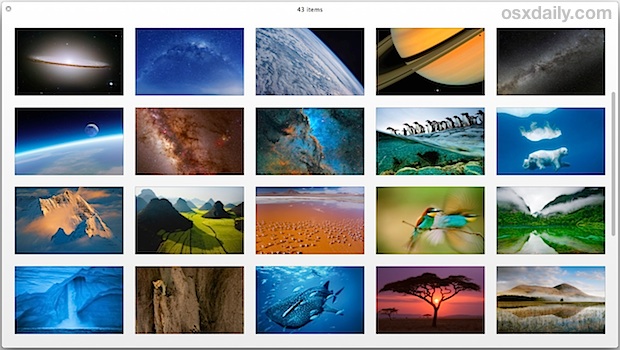
Some of you may recall that a series of beautiful new screen savers were introduced with the OS X Mountain Lion, and we here at OSXDaily showed you how to uncover the amazing images from those screen savers with a little bit of digging to use as your desktop wallpaper. It turns out you can still find these high-res pictures in OS X Mavericks, OS X Yosemite, and OS X El Capitan too. We’ll show you how to dig up those beautiful wallpapers and use them as wallpaper for your OS X Mac (or iOS device, Windows PC, Android, whatever you want to decorate).
OS X Mavericks is an excellent update for Mac users that has tons of great features, but even though the free update is aimed at power users with many advanced behind-the-scenes improvements, that doesn’t mean that all the tricks are complex. In fact, some of the best features new to Mavericks are some of the easiest to use, and we’re going to cover six of the absolute best simple tips you can start using right now.
Have you ever noticed that iOS moves around a lot? With lots of zips, zooms, motions, parallax, there’s a lot going on with the animations on iPhone and iPad
If all the crazy user interface zooming in-and-out effects of iOS 12, iOS 11, iOS 10, iOS 9, iOS 8, & iOS 7 aren’t your cup of tea, you will be thrilled to discover there is an alternate subdued option available now which transforms the zoom effects into much more subtle fading transitions.
OS X Mavericks is now available to everyone as a free download, and while you can update as many Macs as you want by downloading the installer repeatedly from the Mac App Store, a better option for many is to create a simple bootable USB install drive. We covered this some time ago using a fairly technical process, but Apple must have realized that method was overly complex for many users and has included a much simpler method to create OS X Mavericks install media. Users will still need to turn to the Terminal to finish the job, but this time around only a single command needs to be executed, making it much easier and faster than the manual approach. We will show you exactly how to create a Mavericks boot installer in four simple steps, even if you have no experience with the command line you’ll be able to do it.
Apple surprised everyone when they announced that OS X Mavericks would be released for free to Mac users, and that download is now available from the Mac App Store.
Don’t forget to prepare your Mac for the Mavericks update, but if you’re impatient, at the very least you need to start a Time Machine backup manually before installing the OS X 10.9 update. This insures that your important documents and data will be backed up in the unusual event that something goes wrong during the updating and installation process.
When you’re ready and you have at least 8GB of hard disk space available, you can grab the download right from the App Store:
Apple has released iOS 7.0.3 for iPhone, iPad, and IPod touch users. The update includes iCloud Keychain support, which syncs your login and password data between iOS and OS X devices, fixes problems with iMessage, and also includes many bug fixes, feature enhancements, and security updates. iPhone 5S users will find an update to the accelerometer which allows it to calibrate accurately as well. Full release notes are at the bottom of this article.
iOS 7.0.3 is versioned as build 11B511. As usual, it remains a good idea to back up your device before installing new software updates, and you can do so to iCloud or to a computer with iTunes. Read more »
Apple has released a new iPad Mini with Retina display. Announced alongside the the new iPad Air, it shares much of the same impressive hardware internals and specs, but unlike the iPad Air, the iPad Mini Retina is slightly more expensive.
iPad Mini Retina Specs
7.9″ Retina display with a resolution of 2048×1536 pixels
326 PPI (pixels per inch) display
A7 64 bit CPU
802.11n MIMO Wi-Fi
10 hour battery life
The Mini Retina has a higher screen PPI than the full sized iPad Air, but otherwise much of the hardware is the same.
iPad Mini Retina Prices
16GB – $399
32GB – $499
64GB – $599
128GB – $699
As usual, LTE cellular models are available in each size at an additional $129.
iPad Mini Retina Release Date Scheduled for “Late November”
Apple has announced the new iPad Mini Retina will be released sometime in “Late November”, and though it’s unspecific, it should be available in time for the holiday shopping season. The full sized iPad Air is coming earlier, on November 1.
The original iPad Mini also sticks around at a slight price drop to $299, but the screen quality and performance is considerably lacking when compared to the new iPad Mini Retina model, and thus we think just about everyone who prefers the 7.9″ display should opt for the new Retina model, despite the price increase.
Apple has announced the all new iPad, and rather than naming it iPad 5, it has been renamed to iPad Air. Featuring a thinner screen bezel, a 20% thinner unibody aluminum enclosure, and as the iPad Air name suggests, it’s quite a bit lighter in weight tipping in at barely one pound.
iPad Air Specs
9.7″ Retina display
A7 64 bit CPU
M7 motion processor
5MP iSight camera
1080p HD video
FaceTime HD camera
Dual microphones
10 hour battery life
802.11n MIMO Wi-Fi, optional LTE model
1lbs weight
iPad Air is available in two different color options, a silver and white option, or a space grey and black model.
iPad Air Pricing
iPad Air pricing is consistent with prior iPad models:
16GB Wi-Fi model – $499
16GB LTE model – $629
32GB – $599
64GB – $699
All models will be available in an optional LTE version for an additional $129.
iPad Air Release Date Set for November 1
The iPad Air will be released on November 1 in a wide variety of countries, including the USA, much of Europe, and China.
Also still in the line up is the iPad 2, available at $399, but it would be hard to recommend for most uses. The difference in performance specs is so considerable between the older iPad 2 model and the iPad Air that just about everyone should opt for the iPad Air model, which will not only have a much longer shelf life, but also significantly improved performance. Also available starting at $399 is the all new iPad Mini Retina, which features much of the same hardware as the full sized iPad Air, but with a smaller display and enclosure.

 Network Utility is a great tool that has been around on the Mac since the very first version of Mac OS X. It provides a variety of helpful networking tools and details, the “Info” tab includes general network info on a per interface level showingIP address, MAC address, link speeds, and sent/received data transfer statistics, and you’ll also have easy GUI access to what are otherwise command line tools, like netstat, ping, nslookup, trace route, whois, finger, and a port scanner.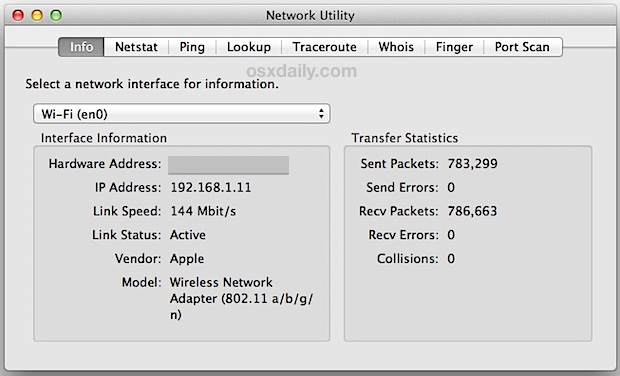
 Sharing files between Macs and NAS drives and Windows PC’s has always been very easy, but Mavericks brought a slight change that has caused some problems for certain users in mixed PC and Mac environments. Without getting too geeky, Apple adjusted the default protocol for SMB (Samba, the Windows file sharing ability) from SMB1 to SMB2, and the SMB2 implementation apparently carries a bug which is incompatible with many NAS (Network Attached Storage) devices, and some versions of Windows. The issue is pretty obvious when you encounter it: Many Windows PC’s, NAS drives, and Linux machines won’t access or mount from the Mac, and instead will try to connect or mount forever and ultimately time out, preventing connections,
  App Nap is a great feature that arrived with OS X Mavericks which automatically pauses applications once they have gone unused for a period of time, helping to reduce energy consumption and saving battery life for portable Macs. Though App Nap can make a big difference in extending the battery life of MacBooks, there are some unique situations where users may not want an application to pause itself when unused, inactive, or otherwise in the background. For these situations, you can selectively prevent App Nap by disabling it on a per-application basis. Most users should not disable App Nap without a compelling reason to do so.
 All of the latest versions of OS X have opted for a conservative approach to showing the users ~/Library/ directory, a folder which contains a variety of important files, settings, preferences, caches, and many specific files that are required for apps to run as intended. Because of the possibility of unintentional harm to a users Mac, OS X defaults to hiding that folder, with the intention on preventing novice users from making changes to it. OS X Mavericks is no different, but with the release of 10.9, all Mac users have an easy option to permanently show the User Library directory without having to result to the command line or other tricks that were previously required for access to the ~/Library folder.
 Many of us rely on the iPhone as an alarm clock these days, but unless it has been changed, the default alarm clock sound effect is usually the same as the default iPhone ringtone. That can cause some frustration and confusion as you’re half asleep and the alarm goes off, sounding like you’re getting a phone call, but fortunately if you would rather hear something else play it’s really easy to change the alarm clocks tone to be another sound, or you can even pick a song if you want to as your iPhone alarm clock sound.




 Apple has released iOS 7.0.3 for iPhone, iPad, and IPod touch users. The update includes iCloud Keychain support, which syncs your login and password data between iOS and OS X devices, fixes problems with iMessage, and also includes many bug fixes, feature enhancements, and security updates. iPhone 5S users will find an update to the accelerometer which allows it to calibrate accurately as well. Full release notes are at the bottom of this article.