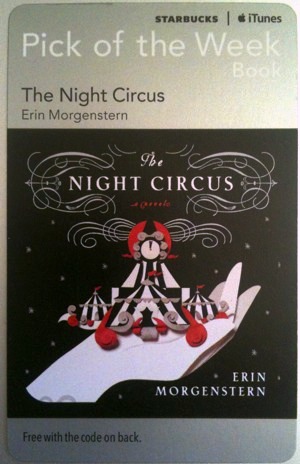
Apple and Starbucks have expanded their “Pick of the Week” program to offer free iBooks, the redemption codes for which will appear on cards just like the free app and free song offerings that currently exist in Starbucks stores.
The first iBook offered through the program is “The Night Circus“, a popular novel about a magical circus that otherwise retails for $12.99 on the iBook store or $15 on Amazons Kindle.
Technically this was announced yesterday by Starbucks, but I’ve visited different Starbucks stores yesterday and today and didn’t see the book cards offered yet, so the current availability seems to vary by location. The picture of the card on the right shows what you’re looking for, via MacRumors, and they should be sitting near the register and the place where you put sugar in your drinks.
Renowned jailbreaker i0n1c, aka Stefan Esser, has put together a rather extensive presentation titled “iOS Kernel Exploitation” that explains exactly how jailbreaks work, ranging from how the exploits are found, how new code is injected into the iOS devices, how untethers work, and so much more. It was presented live at last months Black Hat security conference, but now the slides are freely available on the web for all to see.
The 97 slide presentation includes the following main topics and dives into very specific details:
Introduction
Kernel Debugging
Kernel Exploitation
Stack Buffer Overflows
Heap Buffer Overflows
Kernel patches from Jailbreaks
This is a fairly technical read with plenty of code samples, making it an extremely interesting look into the world of jailbreaking and iOS security. It’s pretty much a must read for anyone interested in security, development, iOS, Mac OS X, or just jailbreaking in general.
Some MacBook Pro or Air users may want to disable their internal screen when the laptop is connected to an external display, this is generally achieved in two ways but ever since Mac OS X 10.7, 10.8, and 10.9, OS X 10.10 Yosemite, and OS X 10.11 El Capitan, the internal screen is more persistent and wants to stay on.
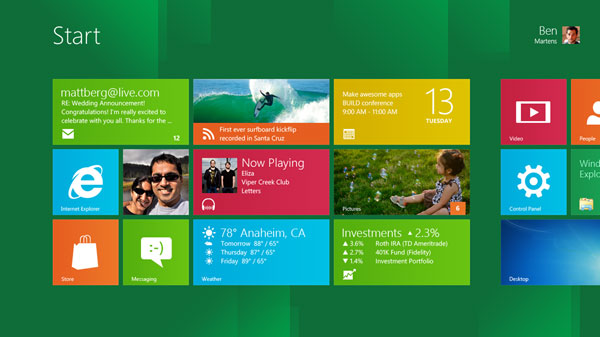
Windows 8 is Microsofts future operating system that is intended to share aspects of Windows 7 while also competing directly with iPad, iOS, and Android thanks to it’s Metro user interface. We’ve praised some of the Windows 8 features before, and also criticized the freakishly cluttered Ribbon UI, but now you can try it out yourself and come up with your own conclusion of Microsofts future OS, completely for free.
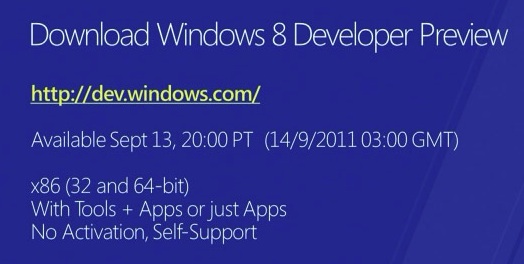
The Windows 8 Developer Preview comes as a free download from Microsoft:
There is no product activation required. The .iso files weigh in between 2.8GB and 4.8GB depending on what you’re looking for and you can install it in a Virtual Machine if you want, here are a few guides on how to do this:
These methods work to run Windows 8 atop Mac OS X 10.6 and 10.7, Linux, and Windows, just be sure you have adequate RAM and disk space available.
If you want to install it separately, you should have about 16GB of disk space to try it out, and without a touch screen you won’t be able to enjoy all the funky Metro UI features. Official system requirements are as follows:
Windows Developer Preview works great on the same hardware that powers Windows Vista and Windows 7:
1 gigahertz (GHz) or faster 32-bit (x86) or 64-bit (x64) processor
1 gigabyte (GB) RAM (32-bit) or 2 GB RAM (64-bit)
16 GB available hard disk space (32-bit) or 20 GB (64-bit)
DirectX 9 graphics device with WDDM 1.0 or higher driver
Taking advantage of touch input requires a screen that supports multi-touch
If you don’t have a spare PC to install Windows 8 DP on and you don’t want to bother dual booting with a separate partition, go the aforementioned virtual machine route.
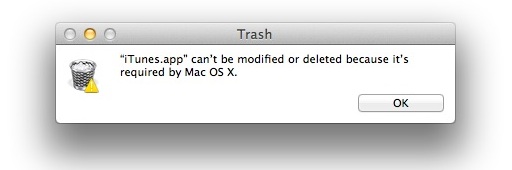
If you’ve been using the iTunes betas and want to downgrade back to a stable iTunes build, or you just want to remove iTunes for another reason, here are two ways to delete the app under Mac OS X 10.7: the easy way using the GUI, and a quick way for advanced users using the command line.
Remove iTunes Using the Finder
Quit iTunes
Navigate to /Applications and locate iTunes app
Select iTunes and hit Command+i to “Get Info” on the application
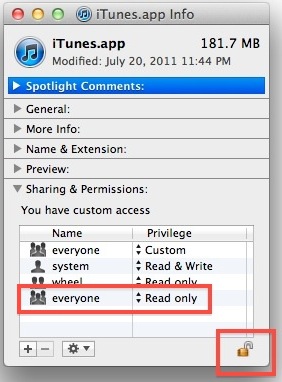
Click on the Arrow next to “Sharing & Permissions” to reveal the access panel
Click on the lock icon and authenticate with your administrator password
Under “Privilege” set both instances of “everyone” to “Read & Write”
Close out the Get Info window and drag iTunes to the Trash, and then empty the trash
Remember that without another version of iTunes available for Mac OS X to use, you will likely encounter errors in various places, plus it will make it impossible to sync and backup iOS hardware like an iPhone or iPad. Basically, if you don’t have a good reason to be removing iTunes, such as to downgrade or ditch the colorized version, than you should keep it around.
Delete iTunes via the Terminal
This is a quicker method for users who are comfortable with the command line:
Launch the Terminal (located in /Applications/Utilities/
Type the following commands to kill iTunes:
killall iTunes
Now kill the Helper process:
killall "iTunes Helper"
Now to delete the actual application, use this command:
sudo rm -rf /Applications/iTunes.app/
Authenticate the sudo command, note there is no warning for the actual deletion of the app
As usual, be careful with the rm command because if you mistype the file path, you will delete other things without warning. This is why we recommend the command line for more advanced users only.
Note: this does not delete your apps, backups, books, media, or the iTunes library, which is located at ~/Music/iTunes/ (unless you moved it elsewhere)
Who better to spill the potential launch date of iPhone 5 than an executive of a leading telecom company? That’s exactly what Stéphane Richard, CEO of France Telecom, seems to have done at a conference in France today, with the following:
“If I believe what we heard, the iPhone 5 [is] out Oct. 15,”
Assuming a corresponding US launch, the US release date may be October 14. This little quote comes from Mac4ver, where it was presumably overheard by whatever crowd was attending the BFM Business conference.
October 15 (or 14) corresponds well with past reports of a mid-October release, but it is also possible the France Telecom CEO is only repeating speculation from news agencies.
Apple typically releases new software prior to the launch of new iOS hardware, so the above date corresponds well with some separate information regarding iOS 5.
iOS 5 & iCloud to Arrive on October 10?
Separately, AppleInsider has learned that AppleCare specialists are anticipating a significant increase in call volume related to iOS, possibly in anticipation of iCloud and iOS. This corresponds with a tip we received earlier in the month that Apple has been ramping up hiring at call centers for iCloud and iOS specialists.
Apple has only mentioned ‘Fall’ as a vague iOS 5 release date, but new information points to a GM build arriving at the end of the month for a launch early in October.
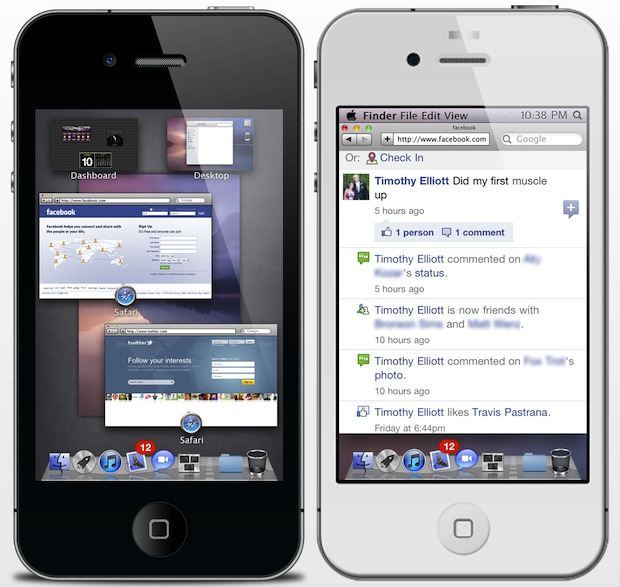
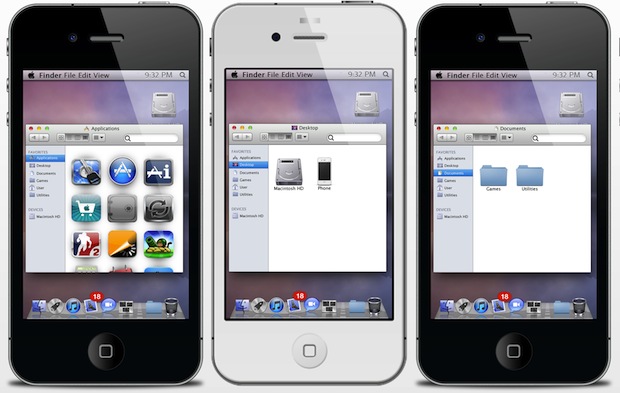
We’ve shown you how to make Mac OS X look like iOS, but what about going the other way? If using a jailbreak doesn’t freak you out, this winterboard theme makes an iPhone look and behave freakishly similar to Mac OS X Lion and includes a variety of features that are borrowed from OS X 10.7, including:
OS X Lion style login screen
Mac OS X style Dock
Usable Finder menu bars
Draggable Finder windows that contain your apps and data
LaunchPad shows all your apps
Stacks for quick app launching from the Dock
Mission Control gives quick access to social apps and Dashboard widgets
Safari is reskinned to look like OS X
Called “OS X Lion Ultimatum”, it may be one of the most advanced iOS themes that’s available out there. It’s currently in beta but will cost $3.50 and require Dreamboard and a jailbreak.
Update: Here’s how to install OS X Ultimatum on the iPhone:
Open Cydia
Tap Manage Sources
Tap Edit, then Add, then add source fnetdesigns.com/cydia/repo
Go to the Changes section and install Theme Outlet
Close Cydia, go to your home screen, and open Theme Outlet
Browse for OS X Ultimatum and download it from there
Open up Dreamboard, browse for the OS X Lion Ultimatum theme, and install it.
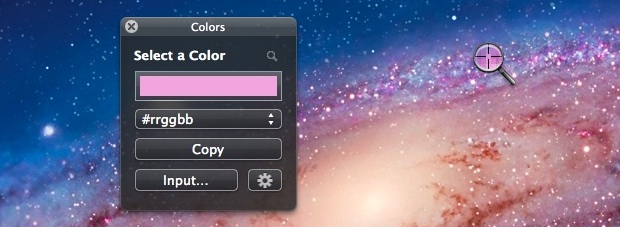
Apple’s Digital Color Meter utility took a turn for the worse in Mac OS X Lion, inexplicably removing the ability to view color values in commonly used formats like hex. This is a pain for graphic and web designers, and nobody but Apple knows why they removed that feature, but thankfully there’s a handful of free apps out there to pick up the slack.
Colors is the app of choice I’ll go with because it’s tiny, simple, and free, which is basically the opposite of most App Store choices. Much like the classic DigitalColor Meter, you just launch the app, click the magnifying glass, select your color, and select the output you want copied to your clipboard.
The apps UI is slightly outdated but does the job in Mac OS X 10.7, and for free we can’t complain much. If you’re fed up with Lions new and unimproved Digital Color Meter, get it.
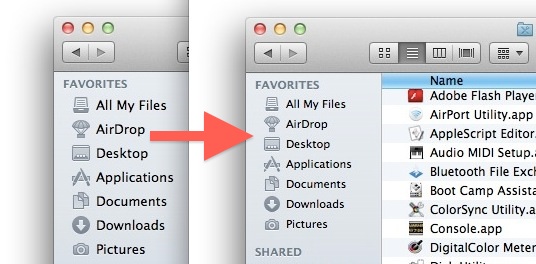
The font size of the Mac Finder window sidebar is customizable, allowing you to adjust to a larger or smaller font size of both the text and icons found in the Finder sidebars of OS X.
If you’ve been busy customizing the Favorites folders and colorizing the Finder sidebar icons, you might want to change the font and icon size of that sidebar text while you’re at it. This is possible in all semi new versions of OS X, but oddly enough, this isn’t in the “Finder Preferences” or “View Options” where you might expect to find it, and instead the option to toggle sizes is in the general System Preferences.
Apple is planning on having iOS 5 GM provided to it’s overseas suppliers sometime during the week of September 23 to September 30, which is in line with the only publicly announced “fall” release date specified by Apple. The GM build, which stands for Golden Master, will be then be preinstalled on all iPads, iPod touch, and iPhone models, including whatever the next-gen iOS devices happen to be.
This information comes from a reputable analyst who supplied a research note to AppleInsider, which also reemphasizes that next month will be the public release of the next iPhone:
A release of iOS 5 to assemblers the week of Sept. 23 means its likely finalized hardware units for the new iPhone and iPod touch will begin to ship at the end of September. With an estimated 10 to 12 days for shipping, the two new devices are likely to be available by mid-October
Releasing the GM at the end of this month would also give app developers plenty of time to ensure compatibility with the finalized version of iOS 5. The current iOS 5 dev release is beta 7, which is considerably more stable and speedy than prior versions.
iOS 5 adds over 200 new features to the platform and has significant ties to Apple’s upcoming iCloud service, which is expected to launch alongside the new mobile operating system.
Apple’s secrecy is the stuff of legends, and if you’ve ever wondered how Apple went about keeping the iPad a secret prior to it’s launch, this story from BusinessInsider is quite interesting.
Relayed from an anonymous but successful developer who worked with the iPad prior to the the products official launch, it’s a fascinating look at the efforts Apple goes through to keep a product under wraps:
Now that it’s over a year, I can talk about it.
I was probably the sixth person to get an iPad.
We got two of them flown out.
The criteria was that we had to have a room with no windows. They changed the locks on the door.
Three developers and I were the only people allowed to go in the room. Apple needed the names and social security numbers of the people who had access.
Apple needed to be able to drill a hole in the desk and chain the devices to desk. They used those bicycle cables.
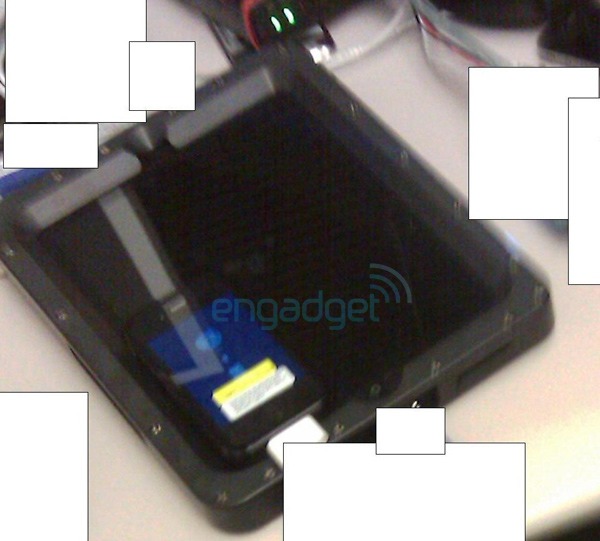
They had these custom frames built around them so we couldn’t even tell what the iPads looked like. We could plug into them so we could code to them and we could touch the screen and play with that, but we couldn’t see the form factor.
Then they took pictures of the wood grain. If any pictures leaked out, they could trace it back to which desk they came from.
I wasn’t allowed to tell our CEO. I wasn’t allowed to tell anybody anything about what we were doing. I couldn’t even tell my wife. She was like, “You’re going to get fired if this doesn’t work.”
I hadn’t thought about that but she was probably right.
Luckily, it worked out very well.
The heavily masked image at the top came from Engadget a few days prior to the official iPad unveiling in January 2010, and is likely an accuruate representation of the custom frame that masked the iPads appearance in the developers tale.
Stories like this really make you wonder what Apple is currently cooking up somewhere in some dark window-less room…
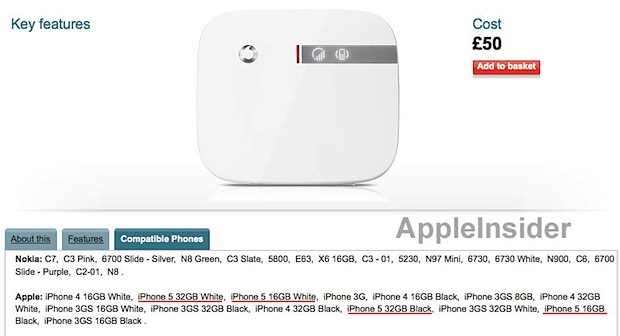
iPhone 5 may be available in both black and white colors, and be offered at the same 16GB and 32GB capacities as iPhone 4, if a product listing on UK’s Vodafone is to be believed. AppleInsider discovered the product page for a signal booster which makes direct references to four distinct models; “iPhone 5 32GB White”, “iPhone 5 16GB White”, “iPhone 5 32GB Black”, and “iPhone 5 16GB Black”.
It could be presumptive or simply a typo, but the iPhone 5 language has since been removed from the listing, which also references current iPhone 4, 3GS, and 3G models. It would not be surprising for both black and white iPhone 5’s to be available from the get-go, but many rumors have anticipated, or hoped for, a 64GB iPhone model, the necessity of which may be questionable thanks to iCloud.
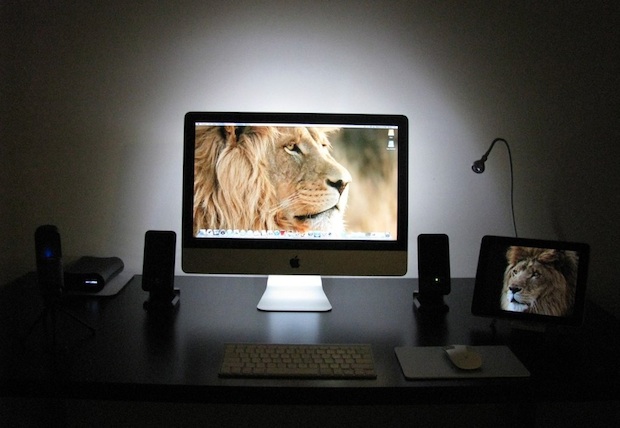
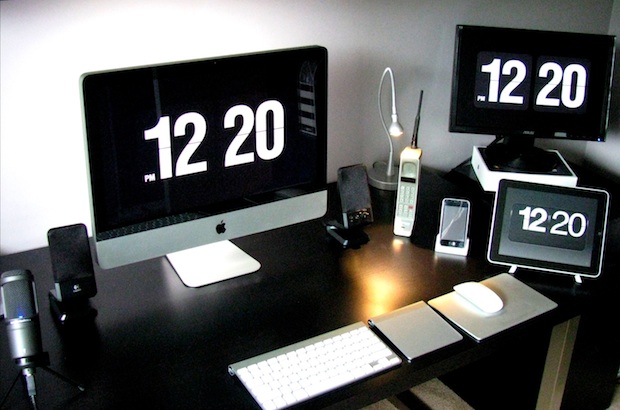
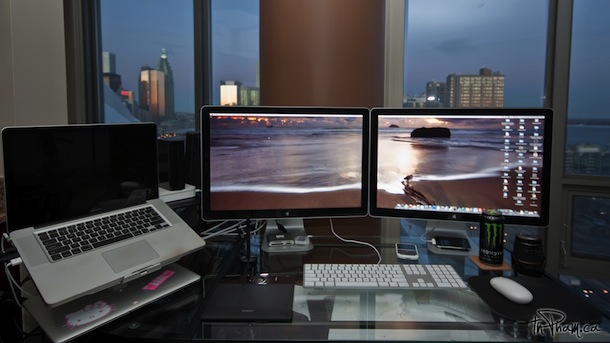
This great reader submitted setup comes from recent Mac switcher Brian D and features an iMac 27″ that is backlit with some Ikea LED strip lighting, an iPad 2, and an external 18″(?) display atop the iPads box. All of the screens are running the classic Flip clock screensaver, Fliqlo, which is one of my personal favorites. Elsewhere you’ll spot an iPhone, a retro cell phone, Apple’s classic wireless keyboard, Magic Trackpad, and Magic Mouse, but few cords thanks to a customized Ikea desk with grommets drilled to hide all the cables.
Congrats on the switch to Mac and thanks for sending in this great setup Brian!
You can submit your own Mac setups to: osxdailycom@gmail.com
If you’re going to run something like OpenSSH or MobileTerminal on your iPhone or iOS device so that you can SSH in to it, you’ll want to change the root password for obvious security reasons. Without doing this, anyone can use the default ‘alpine’ password and connect to the hardware, assuming they know an SSH server is running and have the devices LAN IP address.
Note: this only matters for users who have jailbroken an iOS devices and then are running an active SSH server like MobileTerminal. This is not a necessary procedure for other iPhone or iPad users because no server runs open by default and there is therefore no security risk.
Looking for a fun game to play this weekend on the iPad? Grab Crimson: Steam Pirates, an action-strategy game where you can battle through a series of pirate voyages with over a dozen different boats, subs, and airships. The turn-based game is getting raving reviews which isn’t too shocking considering it’s coming from Bungie, the creators of the Halo franchise and Marathon. Here’s the games description from iTunes App Store:
In Crimson: Steam Pirates, plumes of black smoke fill the blue Caribbean sky as Thomas Blood’s pirate fleet steams ahead—over, above, and below the waves. On the surface, ships bristle with swivel cannons and lightning guns. Above, zeppelins drip with incendiary bombs. And below, silent and deadly, submarines stalk their targets, torpedoes at the ready.
Command your fleet and your Steampunk crew using an elegant action interface. Crimson: Steam Pirates’ turn-based gameplay provides an addicting mixture of strategy and action as you anticipate your enemies’ moves and counter them, luring them into a deadly hail of weapons fire while uncovering the mystery brewing in the Caribbean.
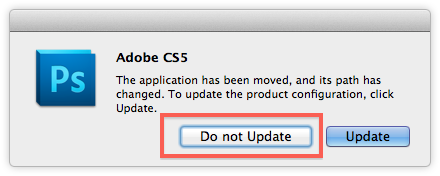
If you dual boot Mac OS X 10.6 and 10.7 then you may have noticed that some apps installed in one OS don’t necessarily work in the other. Some of these are because of 10.7 Lion specific features or Rosetta, but others throw random errors that don’t make much sense. Case in point: Adobe Photoshop.
Launching Photoshop installed within Snow Leopard from Lion, you get the nondescript “Error 6” telling you to reinstall Photoshop. Instead of installing PS on both partitions, you can skirt this error by using a symbolic link to access the 10.6 installations App Support folder. This will save disk space and the hassle of managing multiple Creative Suite installations.
From Mac OS X Lion:
Quit Photoshop
Launch the Terminal (/Applications/Terminal)
Enter the following command – this assumes your OS X 10.6 drive is called “Macintosh HD” be sure to change that if it’s not:
From time to time we like to post some unusual or fun stuff, but this is really out there. A Japanese manufacturer has created what has to be the creepiest iPhone case in existence, it’s a disembodied hand that you have to hold in order to use the iPhone. WTF. As if that concept wasn’t strange enough, the sales pictures are even more peculiar, like this guy putting a wedding ring onto the iPhones hand and cuddling it to his face:
I’m not sure if these are intended to be a joke or are serious, but if you actually want one they run about $65, or ¥5000, and can be ordered through Rakuten.co.jp.
Note: this is obviously geared towards more advanced users who are comfortable with the command line and understand what changes they are making. Read the full article to see if these adjustments are right for you. If any of this seems confusing, you probably shouldn’t be making these changes or at least using this method, and the aforementioned LionTweaks utility may be a better fit. Proceed at your own risk.
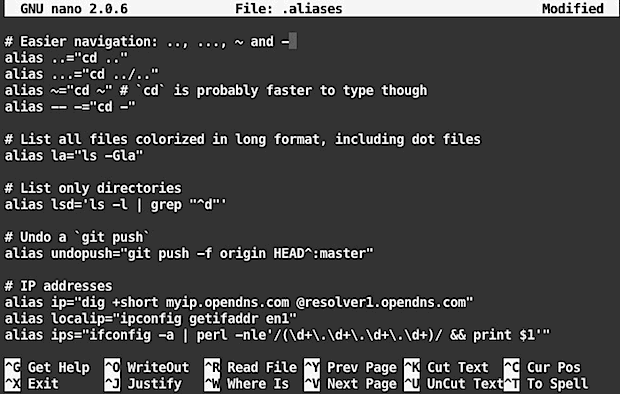
Option 1) The Full Suite: customize .bash_profile, .bash_prompt, .aliases, git, and Mac OS X with defaults writes
If you want to make a ton of settings adjustments to .bash_profile, .aliases, .gitconfig, and all of the below defaults write commands, you can use this git command in the Terminal to do everything. Before jumping into this one, it’d be a good idea to review the files yourself to make sure the changes are things you want.
git clone https://github.com/mathiasbynens/dotfiles.git && cd dotfiles && ./bootstrap.sh
The .aliases file is pretty useful, but includes some commands like ngrep that are not preinstalled by default, so you’ll need homebrew or otherwise to install those.
Option 2) The defaults write changes to Mac OS X only
If you’re not interested in all of the terminal adjustments and aliases, you can just also just get the .osx file from this link
In either case, after git is finished or you have grabbed the .osx file yourself, you can execute the script with:
./.osx
This will activate all of the commands listed below at once. We’ve covered just about all of these before but having them in a centralized location and easily writable from a bash script is very useful when you’re setting up a new Mac.
Option 3: Selectively customizing OS X by entering the defaults write commands yourself
Here’s the full list of defaults write commands that are contained within the .osx file, review this before launching the script or just pick and choose which ones you want to use by putting them into the Terminal:
# Enable full keyboard access for all controls (e.g. enable Tab in modal dialogs)
defaults write NSGlobalDomain AppleKeyboardUIMode -int 3
# Enable the 2D Dock
defaults write com.apple.dock no-glass -bool true
# Disable menu bar transparency
defaults write -g AppleEnableMenuBarTransparency -bool false
# Expand save panel by default
defaults write -g NSNavPanelExpandedStateForSaveMode -bool true
# Automatically open a new Finder window when a volume is mounted
defaults write com.apple.frameworks.diskimages auto-open-ro-root -bool true
defaults write com.apple.frameworks.diskimages auto-open-rw-root -bool true
# Show the ~/Library folder
chflags nohidden ~/Library
# Disable local Time Machine backups
sudo tmutil disablelocal
# Kill affected applications
for app in Safari Finder Dock Mail; do killall “$app”; done
# Fix for the ancient UTF-8 bug in QuickLook (http://mths.be/bbo)
echo “0x08000100:0” > ~/.CFUserTextEncoding
If you’re making manual changes, many of these will require either the Finder, Dock, or other applications to be relaunched before they are activated. This is generally handled through the script with the second to last command (“Kill affected applications”) but with so many changes being made, it may be easier to just reboot your Mac to insure everything is working properly.

 Apple and Starbucks have expanded their “Pick of the Week” program to offer free iBooks, the redemption codes for which will appear on cards just like the free app and free song offerings that currently exist in Starbucks stores.
 “, a popular novel about a magical circus that otherwise retails for $12.99 on the iBook store or $15 on Amazons Kindle.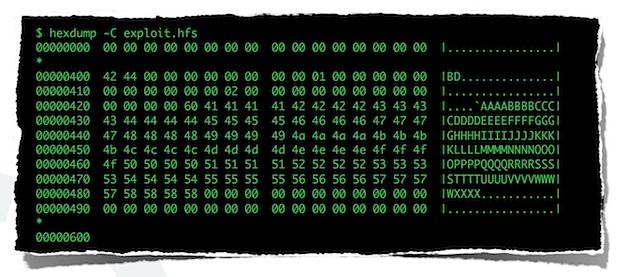
 Who better to spill the potential launch date of