
How to Rearrange the Menu Bar Icons in the Mac OS X Menu Bar
Aug 11, 2009 - 7 Comments

The Mac menu bar contains icons for things like the status indicators and toggles of various apps, including a clock, date, time, battery, wi-fi status, sound and volume levels, displays, Time Machine backup status, user account, Spotlight, a Notifications toggle, and much more. There’s a lot of data and status details in those menu bar items of Mac OS X, and you can generally choose to order them or rearrange icons however you want.
By William Pearson - Customize, Mac OS, Tips & Tricks - 7 Comments
 Here’s something that’s bound to be popular. The University of Washington is offering a Certificate program in iPhone Development, the coursework covers Cocoa too but there’s plenty of Cocoa development programs out there so it’s really the iPhone development that makes it stand out. For now the program is only offered at the University of Washington Seattle campus, but
  available from Amazon.com
 I’ve been on a bit of a retro and minimalism kick lately, preferring simplified apps that take me back to the good old days of BBS’s and 2400bps modems (ok maybe not the modems), and when I saw that GLTerminal has a new release I was pleased since I can finally run it in a modern version of Mac OS X.

 This is a particularly handy trick for when you have limited screen real estate and want to fit more of a windows display on screen. A perfect example of this are the
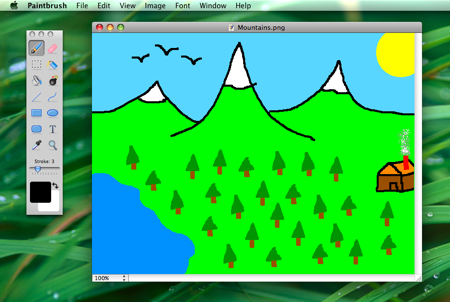 Paintbrush is a Microsoft Paint clone of sorts for Mac OS X, it’s an absolute joy to use in it’s simplicity and we are pleased that a new version is available with even more MS Paint type functions for your Mac. And we mean it, this thing is awesome at simple pixel drawing and is sure to remind you of what it was like to use the paint program way back when.
 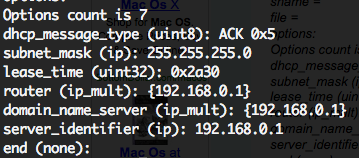 If you’ve ever needed to troubleshoot a network or internet connection, you know how frustrating it can be (particularly when you’re on techsupport with various broadband providers). This quick tip can make the job a little easier on yourself by retrieving all relevant DHCP information, like DHCP server IP, client, subnet mask, router, DNS servers, everything – directly from the command line.
  I like Safari but find myself in Firefox nearly always because of a multitude of reasons. One thing I’ve long missed though is the ability to view PDF’s within the browser within Firefox, which Safari does wonderfully. If you’re tired of Firefox launching the Preview app (or even worse if you’re settings are different: Acrobat), then try this great little Firefox extension, which will pop open the PDF file into a new browser tab. Note this requires Firefox 3

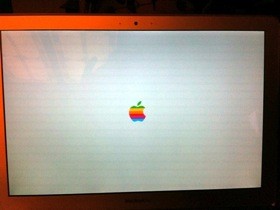 I’ve been bored with the standard Mac OS X boot up screen and it’s grey Apple logo, and a few times I have scoured around trying to change it manually to no avail. Today though, I stumbled into a post on my friends blog that makes changing the Mac OS X boot image a snap with a nice little program fittingly called BootXChanger.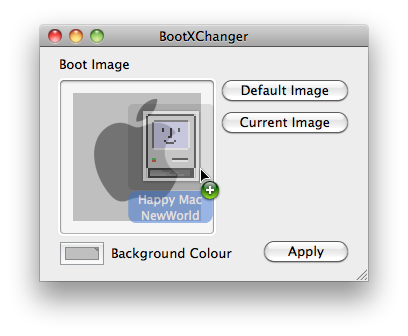
 I just found out about Skim and I find it to be wildly useful for personal use, but I can imagine this could be a huge productivity booster for anyone in academia in particular. In short, Skim views any PDF files quickly as expected, but more importantly it allows you to take notes and annotate sections of the PDF file itself, how cool is that? If you’re a student, teacher, researcher, educator, or anyone using PDF files regularly, you absolutely have to try out Skim and you will thank me later.
 Creating your own cheap Mac Hackintosh out of a PC Netbook is pretty popular right now, so I compiled a list of various how-to guides mostly for myself but figured I would share it with our readers as well. The guides rank from reasonably easy (Dell Mini 9) to an arduous hack, and it’s technically against Apple’s OS X EULA agreement, so whether or not it’s worth proceeding with making one of these frankenstein Macs is entirely up to you.
 I really enjoy videochatting with friends and family using iChat, so I was pretty frustrated when seemingly out of nowhere iChat video started freezing completely after a video chat session was initiated. I searched around a bit and noticed other people having the same problem and symptoms – iChat video freezes but iChat audio still works, so I know this isn’t a rare thing. While I don’t know the cause, I did manage to find a solution, and here it is:



