Mac users are largely immune to the world of virus and trojans, but it’s not uncommon for you to be a Mac user in a LAN sea of Windows PC’s. The Conficker Virus is Windows only but it’s garnering a lot of attention, so if you’re on a Windows LAN at home, work, or school, you may want to check if the Windows machines are vulnerable or infected with Conficker. You can do this from your immune Mac OS X machine pretty easily with a cool command line utility called nmap. Here are the steps:
It’s very easy to mirror an entire web site on your local machine thanks to the terminal command wget, this tutorial will show you how to do it via the command line. wget is available for Mac OS X, Linux, Unix, and many other popular operating system platforms, thus this is universally applicable assuming you have wget anyway.
Need to show hidden files on a Mac? This is pretty common if you find yourself needing to access hidden files on your Mac, like an .htaccess file you downloaded, a .bash_profile, a .svn directory, – literally anything preceded with a ‘.’ indicating it is invisible by default – you can run the below command from the terminal to set hidden files to become visible throughout Mac OS X.
For some quick background to fill in those who don’t know, files that are hidden in Mac OS are determined so by preceding the filename with a single period symbol (.), you can actually make any file hidden by placing a period in front of the name, thus making it invisible to the Finder. Let’s walk through making all hidden files become visible in Mac OS X, regardless of what system software version is on the Mac.
If you are anything like me, you may struggle to keep up with a years worth of Hollywood releases. One easy way to sort through the noise is to focus on what the awards and festivals determine are worthwhile investments for your time, and you can further narrow the movies down by looking at the trailers for them. But Apple and iTunes makes it easier.
MAMP: It stands for Mac Apache MySql PHP, and it’s a fantastic setup for Mac based web developers. Basically, think LAMP but for Mac OS X users, and in a pre-packaged, simple to use environment, which also indludes PHPMyAdmin, perl, python, and SQL Lite.
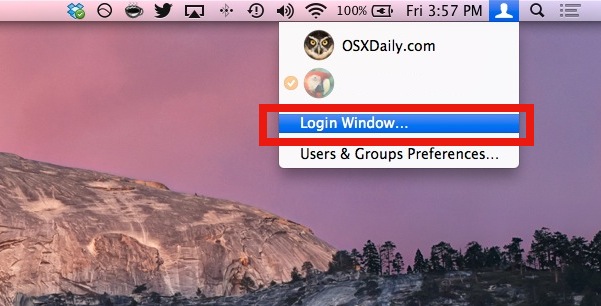
A quick way to lock your Mac desktop is to hit Shift-Command-Option-Q to do a fast user log out. This logs the current user out of Mac OS X, which is one way to initiate a login screen when the Mac needs to be used again.
Another method is brought to us by inaminit who left the following in our comments: “If you have Fast User Switching enabled through the System Preferences/Accounts, you can just click on Login Window in the drop down menu from the menu bar to do the same thing.”
What inaminit is referring to is the Fast User Switching menu bar item, which is in the upper right corner of OS X if you use the feature. Pulling it down and finding “Login Window” is what immediately logs out and password protects the computer.
Have you ever wanted to listen to Pandora from a Mac, but without opening a web browser like Safari? Some of us just use Pandora on our iPhone or iPad as we work on a Mac, but what if you could stay on the computer entirely? While there is always Pandora.com and there are a few tools out there that allow you to stream Pandora on a Mac, if you want a simple approach to accomplishing this, you may be interested in a tool called PandoraBoy.
Available as a free download, and totally open source, PandoraBoy offers “Pandora.com on your mac … without a web browser.”. If this sounds good to you, then check out the Github project below:
The PandoraBoy project is available as source code, so you’ll want to build the project yourself in Xcode.
For many, listening to Pandora is as routine as brushing their teeth in the morning, so it’s always nice having additional ways to stream your music.
PandoraBoy vs PandoraMan
PandoraBoy offers a newer solution to another app that has ceased development called “PandoraMan”, which likely doesn’t work on the latest Mac OS X releases. PandoraMan is another option you may have come across by browsing through the the various Mac application downloads related to Pandora.
According to the developer, PandoraMan is “a small Cocoa app to run the Pandora mini player using WebKit. Created so you can quit Safari, Camino, etc. without killing your music stream.”
Excellent! No longer do you need to spawn an entire web browser just to hear your favorite Pandora stations. Place this app in your dock, launch, and you are one click away from listening to Pandora radio!
You can still grab the PandoraMan download by heading over to the IntraArts development studios website for a closer look if you’re interested, just note that that’s a bit more limited in compatibility.
Of course you can always just listen to Pandora on your iPhone, iPad, Android, or other phone or device too, but that’s obviously not going to be on your Mac.
As always, feel free to chime into the comments below with recommendations for your own solutions for alternative methods of listening to Pandora on a Mac or computer!
Spaces. Personally, it is my favorite addition to Apple’s Leopard operating system. I have become very accustomed to working with Spaces and have long desired the ability to set a different background for each virtual “space”. That is now possible thanks to SpaceSuit. Installation of SpaceSuit is a breeze and setting your backgrounds involves a simple drag and drop. The only downside or complaint I have thus far is that I can not figure out how to set unique backgrounds across my multiple monitors. Maybe a reader out there has figured out how to do this and can chime in. Anyways, Enjoy.
I have been a long time user of Skype and recently some of the features unique to the beta have caught my attention. In particular, I am enjoying the new screen sharing functionality. Frequently, I work remotely and find screen sharing crucial to collaboration. If you haven’t already, I encourage you to cruise over to skype.com and download the new beta. In addition, you can now use your SkypeOut credits to access participating public wifi hotspots across the globe!
Wallsaver is a freeware utility that allows you to easily take a screensaver and make it your desktop background, creating a nifty interactive effect that’s pleasant to look at. Aimed at older versions of OS X however, it’s not going to be for anyone, and furthermore, the Wallsaver app is basically a front-end to the command line tool that turns screen savers into wallpapers. The latter is probably a better approach but because it doesn’t require any additional downloads, but because it uses the command line it’s not going to be ideal for everyone.
The application makes use of your Mac’s GPU (graphics processor) which leaves plenty of CPU power left over to carry on with your desktop tasks, though if you’re on a slower Mac you will notice a performance hit, so whether or not that is important to you is going to be a matter of personal opinion and what activities you’re participating in on the Mac. For example, you wouldn’t want to run such an app when you’re trying to play a game or maximum battery life.
Using the app is simple and pretty self explanatory. If you get sick of it, removing the screensaver background and reverting to your previous choice of desktop decor is as simple as right clicking and selecting “restore”.
To get WallSaver to work, you will need a Quartz Extreme capable graphics card with at least 32 MB of memory and, obviously, a screensaver to use it with. This covers literally just about any Mac around these days, but again, older Macs may have issues with the requirements and CPU toll on older hardware.
Updated on 12/18/2012 with additional comments and recommendations
Recently I connected my Mac to my linux based NFS server at home. I use NFS to access files from two other Linux boxes and on each server my UID (unique id) is set to 1000. In order for me to easily have full access to my NFS shares from OS X I changed my UID to match: dscl . -change /Users/will UniqueID 501 1000 chown -R 1000 /Users/will
Remember to run the chown command afterwards, or you will not be able to access your home directory. Finally, log out and log in.
These days there are no shortage of ways to backup your Macintosh. Probably the most popular method available to an end-user is Apple’s Time Machine which is handled automatically after a simple setup through the GUI, or can be triggered to start at any time. Personally, I was very impressed with the ease of use offered by Time Machine, but I am a command line junkie so I must report on the alternatives available, four of which reside in the very command line of Mac OS X.
Read on for a few different methods that you can use at the Terminal to back up your Mac, using the ditto, rsync, asr, and hdiutil.
Is Windows 7 really the Mac OS X slaying OS that so many claim it to be? Is it the greatest thing since sliced bread? There is all sorts of hooplah in the tech world about Microsofts Windows 7 beta, so why not see what the fuss is all about using your Mac? Rather than get a dual-boot setup going, it’s probably best for most users to run Windows 7 in a virtual environment within Mac OS X, and setting it up really isn’t too difficult. Here are several great walkthroughs on getting Windows 7 installed and running on your Mac.
DownloadSquad: Installing Windows 7 on a Mac – Getting Windows 7 running in Mac OS X using either Parallels, VMWare, or VirtualBox – you decide. Lot’s of screenshots to guide you.
Photo Booth is a really fun app that comes with all macs that have a built in iSight / FaceTime front facing camera.
Here are a couple tips that make using Photo Booth on your mac even more enjoyable; the ability to disable the ‘white screen’ flash and the ability to disable the 3 second countdown.
Try them out yourself, if you want to disable flash or the countdown in Photo Booth for Mac, here’s all you need to do:
This post references software that no longer exists, notably the AIM (AOL Instant Messager) service, and cellular plans that are no longer relevant. Nonetheless we are keeping this post up for posterity sake. Long live AIM!
The iPhone 3G is awesome, we all know that, but the rate plans are not necessarily awesome for everyone, and some of the cellular plans may be cost prohibitive for the amount of text messages that you get. Wouldn’t it be great if you could send text messages (SMS) for free with iPhone?
Well guess what, you can get free SMS text messaging on your iPhone by using the AIM protocol. Yes, AOL Instant Messenger!
First you’ll need some kind of AIM client for your iPhone, so you can either download the AIM client for iPhone from the App Store, or even use Meebo.
Here’s the most important part, add a new buddy to your list, but use the full phone number with a + sign in front of it, like so: +18085551212.
The plus sign is crucial because thats what tells the AIM protocol that it is an SMS message.
Now you can SMS any phone on any carrier from your iPhone, without using any SMS messages or without having an SMS message plan!
If you’re confused, check out the screenshot which shows adding a cell phone number in iChat.
It’s a good idea to secure your Mac from prying eyes, and it doesn’t take a lot of work to set some basic security to Mac OS X. This will help protect a Mac and the important files you have on it, and I consider the following three tips to be 100% necessary for almost all Mac users, particularly if you’re either in a shared computing environment, an office, school, public place, and especially if you have a laptop.
Each of these three security tricks can be enabled via the System Preferences with the Account pane and the Security pane, respectively. What you’re going to be doing is requiring a password if the computer is woken from a ‘sleep’ state, including a screen saver, and also preventing the automatic login process, thus requiring a password to be entered if a Mac has been booted up or restarted. Finally, you’ll learn a simple keystroke to lockdown everything anytime you step away from the computer, thereby increasing the protection by restricting access.
Don’t worry if you’re not sure where to begin, we will walk you through the simple steps and you’ll have some added protection and security added to your Mac in just a few minutes.
Like many other power users, I’m addicted to the Mac OS X command line, any reason at all for me to launch the terminal I take as an opportunity to learn more about the powerful backend of our favorite operating system.
Here I have gathered 5 useful commands that will make your life easier when you’re working in the command line interface of OS X, so launch the Terminal and try them out on your Mac! If you have any others that you think should be added to this list, feel free to post them in the comments, and be sure to check out 10 Mac OS X Command line utilities you might not know about for more.
Life is officially easier for front-end web developers, you can now easily test browser compatibility by running Firefox 2 and Firefox 3 concurrently with a great utility called MultiFirefox. Simply install MultiFirefox, then rename one of the Firefox applications (to say, Firefox 3), and upon launch you can select either application version to run. MultiFirefox is fast, free, and simple to use, so check it out. Mac web developers rejoice!


 It’s very easy to mirror an entire web site on your local machine thanks to the terminal command wget, this tutorial will show you how to do it via the command line. wget is available for Mac OS X, Linux, Unix, and many other popular operating system platforms, thus this is universally applicable assuming you have wget anyway.
 Need to show hidden files on a Mac? This is pretty common if you find yourself needing to access hidden files on your Mac, like an .htaccess file you downloaded, a .bash_profile, a .svn directory, – literally anything preceded with a ‘.’ indicating it is invisible by default – you can run the below command from the terminal to set hidden files to become visible throughout Mac OS X.


 Spaces. Personally, it is my favorite addition to Apple’s Leopard operating system. I have become very accustomed to working with Spaces and have long desired the ability to set a different background for each virtual “space”. That is now possible thanks to SpaceSuit. Installation of SpaceSuit is a breeze and setting your backgrounds involves a simple drag and drop. The only downside or complaint I have thus far is that I can not figure out how to set unique backgrounds across my multiple monitors. Maybe a reader out there has figured out how to do this and can chime in. Anyways, Enjoy.
 I have been a long time user of Skype and recently some of the features unique to the beta have caught my attention. In particular, I am enjoying the new screen sharing functionality. Frequently, I work remotely and find screen sharing crucial to collaboration. If you haven’t already, I encourage you to cruise over to skype.com and
  Wallsaver is a freeware utility that allows you to easily take a screensaver and make it your desktop background, creating a nifty interactive effect that’s pleasant to look at. Aimed at older versions of OS X however, it’s not going to be for anyone, and furthermore, the Wallsaver app is basically a front-end to
  Recently I connected my Mac to my linux based NFS server at home. I use NFS to access files from two other Linux boxes and on each server my UID (unique id) is set to 1000. In order for me to easily have full access to my NFS shares from OS X I changed my UID to match:
 Is Windows 7 really the Mac OS X slaying OS that so many claim it to be? Is it the greatest thing since sliced bread? There is all sorts of hooplah in the tech world about Microsofts Windows 7 beta, so why not see what the fuss is all about using your Mac? Rather than get a dual-boot setup going, it’s probably best for most users to run Windows 7 in a virtual environment within Mac OS X, and setting it up really isn’t too difficult. Here are several great walkthroughs on getting Windows 7 installed and running on your Mac.
 Photo Booth is a really fun app that comes with all macs that have a built in iSight / FaceTime front facing camera.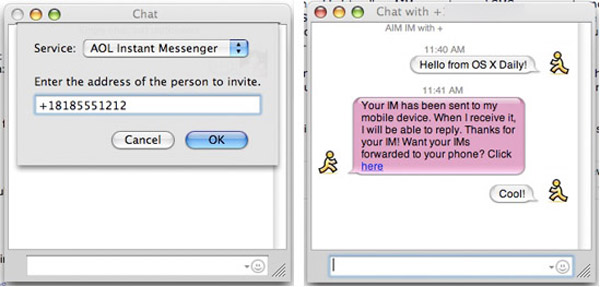

 Life is officially easier for front-end web developers, you can now easily test browser compatibility by running Firefox 2 and Firefox 3 concurrently with a great utility called MultiFirefox. Simply install MultiFirefox, then rename one of the Firefox applications (to say, Firefox 3), and upon launch you can select either application version to run. MultiFirefox is fast, free, and simple to use, so check it out. Mac web developers rejoice!



