How to Enable Bold Text on Apple Watch
Ever wished the text on Apple Watch was easier to read? You can increase legibility while looking at your Apple Watch by enabling bold text on your Apple Watch.
Do you find the menu bar items on your Mac’s display to be too small or difficult to read? If you’d like to make the menu bar size larger (or smaller), you can change the menubar size, which impacts the size of the fonts in the menu bar on the Mac.
Did you know that your Mac is capable of reading highlighted text out loud? This is a feature that could come in handy for many reasons, whether you prefer to have some particular text read, for accessibility reasons, if you’re focusing on something else, for dramatic effect, or myriad other purposes.
One of the interesting recent additions to iPhone and iPad is Apple’s own Translate app, which allows for translation of speech and text right from iOS and iPadOS. This is Apple’s take on real-time language translations that competes against the likes of Google, Microsoft, and other third-party developers. By default, translation requires the usage of … Read More
Did you know that your iPhone can announce the calls you receive so that you don’t have to see the phone, or take it out of your pocket to know who’s calling? That’s right, with this feature enabled, Siri will speak the name of the person calling you out loud, so you will know exactly … Read More
Do you want to use subtitles or closed captioning on a Mac? Whether you watch a lot of foreign-language movies, TV shows, and other video content, or you simply want to use closed captions for accessibility reasons, you can easily enable these on the Mac.
Did you know you can use your Keyboard as a mouse for Mac? This is an excellent accessibility feature, but it has some other uses too. For example, did your MacBook’s trackpad stop working all of a sudden? Or did your Magic Mouse battery go out? Whatever the case, you can control your Mac with … Read More
Did you know that your Mac is capable of reading alerts for you, in addition to displaying them on the screen? This is a handy Accessibility feature that’s a bit buried in system settings.
Did you know that your iPhone and iPad can read Safari content displayed on the screen out loud? This is a feature that could prove to be quite useful if you’re busy focusing on something else, you want an article or webpage read to you, or for accessibility purposes.
Some iPhone and iPad users are sensitive to PWM flickering on the latest devices OLED displays. PWM, which stands for Pulse Width Modulation, can cause some users to have eye strain, feel nauseous or dizzy, or have headaches from the screen flickering when using an OLED screen device with PWM. All new model iPhone and … Read More
How’d you like the LED camera flash on the back of iPhone to flash when a notification or phone call comes into the device? Do you place your iPhone face down on the desk? Or, do you keep it in silent mode most of the time? In any case, you might be interested in taking … Read More
Do you make use of the various accessibility features on your iPhone or iPad? If so, you may be surprised to know that you can add shortcuts and toggles for these features to the iOS and iPadOS Control Center, in order to access them faster.
Did you know that your iPhone and iPad can read highlighted texts out loud? This is a feature that could come in handy for any number of reasons, but it may be particularly useful if you’re busy focusing on something else, want to know how to say or pronounce something, want something read to you, … Read More
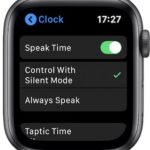
How’d you like your Apple Watch to speak the time to you? Sounds convenient, high-tech, and useful, right?
Do you frequently take advantage of Siri to perform various tasks on your iPhone? If so, you’ll be pleased to know that you can now use Siri without taking your phone out of the pocket, or in other situations where the iPhone screen is covered.
Did you know you can send iMessage effects by using only your voice? Thanks to the Voice Control accessibility feature, you can not only control every aspect of your iPhone or iPad hands-free, you can also send those fun iMessage screen effects without touching your device too.
What if we told you that your iPhone or iPad can listen for sounds such as doorbells, fire alarms, car horns, dogs, cats, sirens, door knocks, water running, babies crying, and more? Whether you have any sort of hearing impairment, or perhaps just a device sitting in another room or part of the house, you … Read More
How would you like to be able to tap on the back of your iPhone to perform a specific action on your device? That’s what Back Tap offers.