macOS

Search macOS

How to Speak Selected Text with a Keystroke in Mac OS X

Sep 15, 2012 - 1 Comment
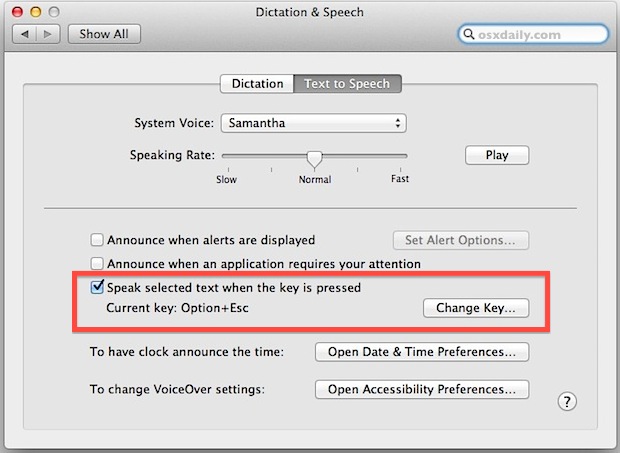
Keystroke to speak selected text

Want to initiate Text to Speech with a keyboard shortcut on the Mac? The excellent Mac OS text to speech function can be activated with a simple keystroke, but first you have to enable the feature. This is a great trick because it allows you to quickly speak what is in on the Mac screen … Read More

Turn Off Notification Center in Mac OS X Temporarily

Aug 10, 2012 - 9 Comments
Turn Off Notification Center alerts and notifications in OS X on a temporary basis

Looking for some temporary peace and quiet from alerts and notifications but don’t want to completely disable Notification Center on your Mac? There are two quick ways to temporarily hush all notifications in Mac OS X, silencing and stopping both the pop-up alerts and sound effects with the notifications, these two methods last until the … Read More

Copy Keychain Logins & Passwords from One Mac to Another

Jul 5, 2012 - 21 Comments
Copy stored Keychain logins and passwords to a new Mac

Most Mac users are best served by using the easy Migration Assistant tool to copy all files, folders, preferences, and login data from one computer to another. This isn’t always an option though, perhaps because a hard drive is failing, or maybe you just prefer to manually migrate only very specific data from an old … Read More

Get Extended CPU Information from the Command Line

Apr 28, 2012 - 5 Comments
Get extended CPU information from the command line

Using sysctl we can get extended information on a Macs processor, covering everything from CPU brand and identifier, clock speed, number of cores, thread count, thermal sensor data, cache size, and some significantly more technical information. This is a handy way to get detailed processor specs and info without turning to the system profiler in … Read More

Find Large Files in Mac OS X with Search

Apr 17, 2012 - 25 Comments
Find Large Files in Mac OS X with Search

Whether you’re feeling the pinch as hard drive space runs low or you’re just wondering where all your disk space went, it’s easy to find large files in Mac OS X by using the built-in search tools. You don’t need to use any third party tools here, instead you’ll rely on search operators and the … Read More

Disable Inertia Scrolling in Mac OS X

Nov 29, 2011 - 11 Comments
Disable inertia scrolling in OS X Lion

Flick down with two fingers on a trackpad or Magic Mouse in Mac OS X and you’ll experience inertial scrolling, where after your finger has stopped moving the page continues to scroll in the intended direction until it slowly stops. This fluid and natural scrolling experience comes from the iOS world, and while it works … Read More

Find System Preferences Easier in Mac OS X by Sorting Alphabetically

Nov 12, 2011 - 8 Comments
System Preferences

Mac System Preferences are grouped by categories by default, basically into Personal / iCloud, Software, and Hardware. For most of us this is intuitive and easy enough to navigate, but with modern versions of macOS they’ve been condensed down from more category separation, from Personal, Hardware, Internet & Wireless, System, and Other, to just the … Read More

Make an Invisible Folder and Hide Files in Plain Sight on Mac

Sep 30, 2011 - 29 Comments
Make an invisible folder in Mac OS X to hide files in plain sight

Want to hide some files in plain sight on a Mac? This walkthrough will detail how you can make an invisible folder on the Mac that features some unique properties; the invisible folder will be invisible to the eye when browsing in Finder, but the folder will not be invisible to the click. Instead, you’ll … Read More

Switch Between Desktop Spaces Faster on Mac with Control Keys

Sep 6, 2011 - 30 Comments
Switch between Desktops faster in Mac OS X Lion

Switching between active Desktops/Spaces in MacOS with the three fingered sideways swipe is very quick, but an even faster method is by using the Control keys to jump instantly between Spaces. The first option is to use the Control + Arrow keys, which is enabled by default. As you might expect, Control + Left Arrow … Read More

Create a New Folder Containing Selected Items in Mac OS X

Aug 7, 2011 - 13 Comments
Make a new folder out of selected items in Mac OS X Lion

You can now select any number of files from the Mac OS X desktop or a folder and create a new folder containing those selected items. This is a wildly useful Finder trick for file management and organization, since you can quickly group a collection of files by selecting however many you want to within … Read More

How to Get Lynx for Mac OS X

Jul 26, 2011 - 7 Comments
Terminal in macOS

Mac users can easily install and use the Lynx web browser in the Terminal. Lynx is a text based command line web browser, it’s relatively popular within unix communities but it also has a variety of general uses too; it’s great if you want to discretely browse the web and read articles at work or … Read More

How to Add New Voices to Mac OS X

Jul 25, 2011 - 34 Comments
Add new text-to-speech voices to Mac OS X Lion

Mac OS X includes many high quality voices for it’s text-to-speech abilities, they’re in a wide variety of languages and accents and are probably some of the best computer rendered voices out there. But guess what? Many of these incredible voices are not installed by default on a Mac! Thankfully that’s easy to change, and … Read More

Uninstall Mac Applications

Jun 20, 2011 - 58 Comments
Uninstall a Mac App

Uninstalling applications from Mac OS X is probably the easiest method of removing apps from any operating system, and it’s far easier on a Mac than anything you’ll encounter in the Windows world. Deleting apps is so simple that some new Mac users are left wondering what else they’re supposed to do, I have received … Read More

Disable Automatic Downloading of Malware Definitions List in Mac OS X

Jun 1, 2011 - 3 Comments

A recent anti-malware Mac OS X security update was released that defaults to automatically downloading and maintaining an active definitions list of known Mac OS X malware threats. This list comes from Apple and is likely a very small file that is transmitted to your Mac, imposing minimal bandwidth usage. For 99.99% of users, you … Read More

Enable and Disable AirPort Wireless from the Command Line in Mac OS X

May 31, 2011 - 12 Comments
AirPort Wireless icon

Sometimes the easiest fix when troubleshooting an AirPort wireless connection problem is to just turn AirPort on and off. Instead of using the menu item or System Preferences, we can enable and disable AirPort very quickly directly from the Mac OS X Terminal.

Enable “Right-Click” on a Mac Laptop

May 24, 2011 - 29 Comments
Right-Click Mac Trackpad

If you or someone you know is coming to the Mac from the world of Windows and are accustomed to the concept of right-clicking, as in literally clicking on the right hand side of a trackpad or mouse, you’ll be relieved to find out this feature can be enabled in Mac OS X. This will … Read More

Boot into Mac OS X Verbose Mode

Mar 31, 2011 - 4 Comments

Booting a Mac with Verbose Mode can be a helpful troubleshooting trick for some obscure situations where users are trying to determine what is going wrong with a Mac during the system boot process. Just as it sounds, verbose mode is verbose, meaning it lists everything going on behind the scenes, and you’ll watch as … Read More

Check and Install Mac OS X Software Updates from Terminal

Jan 13, 2011 - 19 Comments

Want to update Mac OS software from the Terminal? You can check for available updates, ignore packages, and install any or all Mac OS X Software Updates directly from the command line. To see what updates are available for a Mac, or to install a software update from the Terminal of Mac OS X, amongst … Read More

Subscribe to OSXDaily

Subscribe to RSS Subscribe to Twitter Feed Follow on Facebook Subscribe to eMail Updates

Tips & Tricks

News

iPhone / iPad

Mac

Troubleshooting

Shop on Amazon to help support this site