Security

Search Security

How to Enable “Do Not Track” in Safari on iPhone & iPad

Feb 12, 2014 - 1 Comment
Safari Do Not Track in iOS

iPhone and iPad users have the option to enable a “Do Not Track” setting on their iOS devices for Safari, a feature that is aimed at limiting targeting and tracking of web browsing behavior by various web services. When turned on, this causes Safari to make a DNT request to each page it visits for … Read More

How to Disable Public Folder Sharing in Mac OS X

Feb 11, 2014 - 4 Comments
Disable Public Folder Sharing in Mac OS X

If you’ve ever joined a public wi-fi network and noticed the Finder sidebar is suddenly filled with other unfamiliar computers and network shares, and then curiously clicked on one of them, you’ve probably discovered that most of these computers have a user ‘Public Folder’ accessible to you and everyone else. This folder is included with … Read More

Block Specific Web Sites in Safari for iOS with a “Never Allow” List

Feb 10, 2014 - 12 Comments

The optional iOS Restrictions settings provides a way to limit access to adult themed websites from Safari on an iPhone, iPad, or iPod touch, but for some purposes those default restrictions may not go far enough. For those looking to gain additional control over web access, users will find that individual websites can be added … Read More

How to Add a User to the Sudoers File in Mac OS X

Feb 6, 2014 - 12 Comments
User added to the sudoers file in OS X

Advanced users may need to add a user account to the sudoers file, which allows that user to run certain commands with root privileges. To greatly simplify what that means, these newly privileged user accounts will then be able to execute commands without getting permission denied errors or having to prefix a terminal command with … Read More

How to Enable a Passcode for iPhone / iPad

Jan 22, 2014 - 15 Comments
The Enter Passcode iPhone Screen

Virtually all iPhone and iPad users should set an iOS passcode for their individual devices. This forces anyone attempting to use the device to enter a password before being able to unlock it or gain access to anything on the device, and it also requires the same passcode before any user is able to make … Read More

How to Block Cookies in Safari for iPhone or iPad

Jan 17, 2014 - 4 Comments
Safari

The Safari web browser for iOS provides for tremendous user control over how web cookies are handled on an iPhone, iPad, or iPod touch, allowing users to choose to block all cookies, allow all cookies, or selectively block only third party tracking and advertiser cookies.

Store Credit Cards Securely in Safari AutoFill on Mac

Jan 8, 2014 - 4 Comments
iCloud Keychain Credit Card storage and autofill

Do you use the Safari browser and shop on the web often from a Mac with Mac? If so, you can greatly speed up your checkouts and online ordering by storing credit cards securely within Safari’s AutoFill Keychain. This makes it possible to instantly autofill card information when ordering on any site, and if you … Read More

How to Set a Firmware Password on a Mac with macOS Mojave, Sierra, OS X El Capitan, Mavericks

Jan 6, 2014 - 14 Comments
Set a firmware password on a Mac

Mac users in higher security risk situations may wish to enable an optional firmware password on their machines,which offers an advanced level of protection. In short, a firmware password is a lower level layer of security that is set on the actual Mac logicboards firmware, rather than at the software layer like FileVault encryption or … Read More

Preventing Manual Password Resets on a Mac by Using FileVault Security

Jan 3, 2014 - 5 Comments
Secured Mac

Nearly all Mac users have a login and password required to access the Mac upon boot (and if you don’t, you should!), which provides a reasonable layer of password protection to keep out most prying eyes. Users with more advanced security needs may need to go further to protect their Mac from unauthorized access though, … Read More

How to See & Control What Apps Use Location Data in Mac OS X

Dec 28, 2013 - Leave a Comment
See when an app is using Location Data in Mac OS X

Do you want to control which apps can use your location on Mac? Want to see exactly what apps are using your location data on the Mac? Mac OS X now has the ability to easily view and manage which applications can access a users location data. This article will review first how to determine … Read More

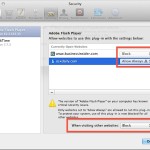
How to Enable Flash Plugin for Specific Web Sites Only in Safari for Mac OS X

Dec 18, 2013 - 7 Comments
Block or Allow Flash Player selectively per website

Safari now provides finely tuned controls over what websites can use which browser plugins, and there are few better uses for such a feature than selectively limiting the Adobe Flash Player plugin to only be enabled for specifically approved websites. Basically this means you can have the Flash player installed on your Mac, but blocked … Read More

Generate Secure Passwords in Safari with iCloud Keychain for Mac OS X

Dec 17, 2013 - 16 Comments
iCloud Keychain

iCloud Keychain is a password management feature that arrived to the Mac with Mac OS X Mavericks, and to the mobile Apple world with iOS 7 and remains available in all modern system software releases. Basically it stores encrypted passwords securely within iCloud, which can then be accessed securely through your Mac or iOS device, … Read More

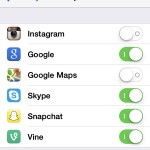
How to See & Control What Apps Have Microphone Access on iPhone & iPad

Nov 26, 2013 - 4 Comments
List of apps with microphone access in iOS

Wondering what apps have access to your iPhone or iPad microphone? Want to control and manage which apps can use the microphone on your device? Apple has added an additional security feature to iOS that allows users to control exactly which apps can have access to the microphone. Yes, the microphone that you speak into … Read More

How to Determine if a Mac Is Using FileVault from the Command Line

Nov 25, 2013 - 3 Comments
FileVault

FileVault is a security feature that offers full disk encryption for Macs. Identifying Macs that are using FileVault is fairly easy in person for machines that have a logged in user account, all you have to do is check System Preferences to see if has been enabled or not. But what if you the Mac … Read More

Create a Password Protected Text File with vi and the Command Line

Nov 22, 2013 - 6 Comments
Terminal in Mac OS X

It’s easy to create a password protected text file by using the command line text editor ‘vi’. This is infinitely useful for privacy purposes, whether the protected file is for containing login details, various passwords, personal information, a private journal, or just about anything else that you want stored securely in a single password protected … Read More

Use iPhone Lost Mode to Remotely Lock a Missing Device

Nov 19, 2013 - 45 Comments
Enter a call back number for Lost Mode

Lost Mode is an outstanding feature of Find My iPhone that allows you to remotely lock an iPhone with a passcode and an on-screen message, rendering the device unusable while in “Lost Mode” until the passcode is entered correctly. Making this feature even better is the ability to choose a contact phone number for the … Read More

Bypass Gatekeeper in Mac OS X with Security Preferences

Nov 8, 2013 - 14 Comments

Gatekeeper is an application level security feature on the Mac that aims to prevent unauthorized and unidentified apps from being launched in Mac OS X, thereby preventing potential security problems like exploits or trojans from running on a Mac. The feature is most often encountered when an app has been downloaded from the web, and … Read More

How to Tell if Someone Snooped Your iPhone / iPad & Read Emails, Messages, Call Log

Sep 7, 2013 - Leave a Comment
How to see if someone snooped on your iPhone, iPad, or iPod touch

If you suspect someone is snooping through your iPhone call log, messages, email, or through other apps, you can set a simple trap of sorts to potentially catch such intrusions on privacy. The idea behind this is pretty simple: quit out of all apps to leave the task bar empty, then check on the multitask … Read More

Subscribe to OSXDaily

Subscribe to RSS Subscribe to Twitter Feed Follow on Facebook Subscribe to eMail Updates

Tips & Tricks

News

iPhone / iPad

Mac

Troubleshooting

Shop on Amazon to help support this site