Troubleshooting

Search Troubleshooting

Understanding Why Terminal Doesn’t Let You Type a Password

Feb 4, 2015 - 33 Comments
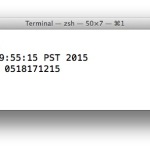
Typing a password into Terminal won't show up, this is intentional

Sometimes you need to enter a password into the terminal, usually for sudo or su commands, which lets users execute a command with super user privileges. This is fairly typical for allowing access to read or modify something that would otherwise not be possible with a standard user account. You’ll commonly see sudo prefixing another … Read More

How to Detach a Phone Number from iMessage if You’re Switching Away from iPhone

Feb 2, 2015 - 5 Comments

If you have ever switched from an iPhone to an Android or Windows phone, either temporarily, out of necessity, or for testing purposes, you may have noticed that a new phone will sometimes not receive inbound messages that have been sent from other iPhone users. Well, you probably didn’t notice it because you didn’t get … Read More

OS X 10.10.2 Wi-Fi Issues Continue for Some Mac Users

Jan 30, 2015 - 169 Comments
Wi Fi Troubleshooting in OS X Yosemite

Some Mac users who have been experiencing longstanding wi-fi issues with OS X Yosemite have discovered that updating to OS X 10.10.2 does not resolve their networking difficulties. Perhaps more troubling, some Mac users who had functioning wi-fi previously have discovered that new wireless difficulties have appeared on their Macs after updating to the OS … Read More

Detect & Remove Adware from Mac OS X Easily with AdwareMedic

Jan 29, 2015 - 30 Comments

Adware is generally something most Mac users won’t have to worry about, but that doesn’t mean that OS X is entirely immune to the potential nuisance, and nobody likes it when their browser has been hijacked by that type of junk. If you’re at all concerned about adware impacting your Mac and web browsing, you … Read More

Forgot a Mac Firmware Password? Don’t Panic, Here’s What To Do

Jan 28, 2015 - 137 Comments
Disable firmware password in Mac OS X

Users who require higher than usual security measures often set a firmware password on a Mac, which requires that a password be entered before the typical OS X boot sequence begins. While these low level passwords are quite secure, but that higher security also means a forgotten firmware password can be a significant problem. Nonetheless, … Read More

Workaround for Local Network Discovery Failures & Problems Connecting to Servers in Mac OS X

Jan 24, 2015 - 33 Comments
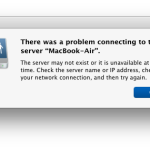
Problem connecting to Mac server, error message in OS X

Local networking usually works flawlessly on Macs, which is why some of the most aggravating issues that a select group of users may experience with Mac OS with OS X Yosemite (and sometimes with later releases) pertain to network connections. Some of these may relate to broader connection and wi-fi functionality problems, and others which … Read More

How to Set Speakerphone Mode to Automatically Activate on iPhone Calls

Jan 19, 2015 - 42 Comments
Phone icon

By default, all calls on the iPhone will play audio through the standard earpiece at the top of the phone, and if someone wishes to use speakerphone they enable it manually by tapping on the “Speaker” button during an active call. While that may be the desired effect for most users, in various situations some … Read More

Fixing Mac OS X Install Errors “can’t be verified” and “error occurred while preparing the installation”

Jan 19, 2015 - 253 Comments
Set the date and time manually in OS X to circumvent error messages during Mac OS X install

Two unusual error messages that can occur during the attempted installation of Mac OS X El Capitan or Mac OS X Yosemite are the “This copy of the Install OS X El Capitan application can’t be verified. It may have been corrupted or tampered with during downloading” error, or a “This copy of the Install … Read More

Troubleshoot Safari Freezes & Crashing in Mac OS X

Jan 18, 2015 - 87 Comments
Safari icon

Some Mac users have discovered the Safari web browser has become significantly less stable after updating to some versions of Mac OS X system software including OS X El Capitan, OS X Yosemite, and MacOS Sierra. This can range from periodic crashes of Safari that never happened before, to Safari freezing up entirely, to Safari … Read More

iPhone Won’t Stop Vibrating? Here’s How to Resolve the Endless Buzzing

Jan 17, 2015 - 53 Comments
iPhone won't stop vibrating? Fix it

Most problems with iPhone are fairly simple to explain and resolve, but a somewhat rare outlier is the case of the spontaneous continuously vibrating iPhone. You’ll know it if you encounter it, the iPhone will basically seize up and do nothing but vibrate with a black screen, and the vibrations aren’t even pulsed like a … Read More

What is “Other” Storage Space on Mac & How to Clear It Up

Jan 15, 2015 - 51 Comments
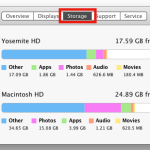
Other Storage in Mac OS X

Many Mac users check the About This Mac Storage tab to get a quick overview of their disk space usage, and many will see a rather large “Other” storage space taking up disk capacity on their drives. If this sounds familiar, it’s probably because iOS often has a rather large Other storage space, but that’s … Read More

How to Reset the Printing System in Mac OS X to Fix Annoying Printer Problems

Jan 9, 2015 - 13 Comments
How to Reset the Printing System in Mac OS X

Need to reset the entire printing system on a Mac? You can do that if you need to. Printer problems are notoriously frustrating for any computer user, and while Macs get off a bit easier than the alternatives out there, there can still be some pretty annoying issues that pop up with printing in Mac … Read More

Clear Font Caches & Font Databases in Mac OS X to Resolve Unusual Font Problems

Jan 8, 2015 - 20 Comments
Fonts displaying erroneously in Mac OS X

In some unusual and admittedly rare situations, fonts in OS X and various Mac apps may display erroneously, or outright fail to display. Typically this happens after a font has been modified or a font has been installed outside of the standard ~/Library/Fonts directory, but it can happen out of the blue in some situations … Read More

Disable Raise to Listen for Audio Messages in iOS to Prevent Weird Voice Text Behavior

Jan 4, 2015 - 8 Comments
Voice Texts and Audio Messages in iOS

Raise To Listen is a handy feature in modern versions of iOS that allow you to literally raise your iPhone to listen to a received audio message and to respond by sending a new voice text. But the feature is not entirely reliable for all users (particularly those who use an iPhone case, more on … Read More

Touch ID Not Working in Cold Weather? Here’s a Fix

Dec 31, 2014 - 17 Comments
iPhone Touch ID fingerprint unlock

Many iPhone users have noticed that Touch ID becomes finicky in cold weather, often not working at all when the temperatures drop in winter. Or at least, that’s what it seems like, but the real culprit is quite likely to be your skin and the effects of colder climates on fingerprints, which is what Touch … Read More

Fixing Bluetooth Discovery Problems in OS X Yosemite

Dec 30, 2014 - 56 Comments
Bluetooth device not being found in OS X Yosemite

Some Mac users running OS X Yosemite have discovered Bluetooth to become unreliable, either dropping device connections constantly or even simply not discovering a working Bluetooth device. For example, some users who are trying to use a PS3 controller with the Mac in OS X Yosemite may find that the Mac is unable to locate … Read More

How to Re-Download OS X Mavericks Installer from the OS X Yosemite App Store

Dec 30, 2014 - 43 Comments
App Store

In some specific situations, Mac users running OS X Yosemite may wish to re-download the complete installer application of a prior operating system like OS X Mavericks. This is typically something only advanced users would want to do, perhaps for making a bootable installer for the older OS X version, for upgrading a different Mac, … Read More

iPhone or iPad Not Charging? Pocket Crud Could Be Jamming the Port

Dec 26, 2014 - 12 Comments
Lightning port gunk could prevents charging on iPhone

If you’ve ever gone to plug in your iPhone or iPad and noticed that it’s not charging as it’s supposed to be, you might want to check the devices Lightning port. That’s because the little charger port on the bottom can be a trap for pocket gunk, and even fairly small pieces of lint or … Read More

Subscribe to OSXDaily

Subscribe to RSS Subscribe to Twitter Feed Follow on Facebook Subscribe to eMail Updates

Tips & Tricks

News

iPhone / iPad

Mac

Troubleshooting

Shop on Amazon to help support this site