
Restore Items From the Trash to Their Previous Location on your Mac
 You can restore the original location of a file that has been sent to the Trash very easily. This quite literally sends a file that is within the Trash back to where it was originally stored on the Mac OS X file system.
Using the “Restore to Previous Location” feature is really easy, you’ll need to open the Trash can and then do one of the following (one is a keystroke, the other is a right-click option, both work the same however):
- Keystroke: Select an item in the Trash and hit the Command+Delete keys to send that item to it’s location prior to the Trash
- Contextual menu: Select the item and then Right-Click on the file within the Trash and select ‘Put Back’ from the contextual menu (see screenshot)
Both tricks work the same, here’s what the right-click context menu will look like:
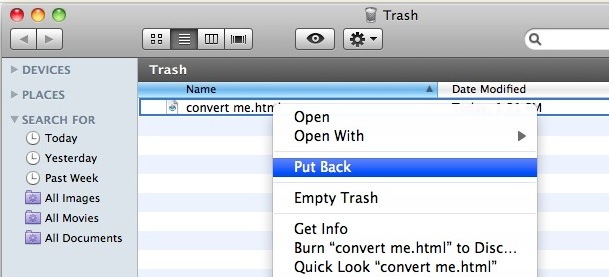
This is limited to fairly modern versions of OS X (think 10.6 and beyond, so yes it’s in OS X Yosemite 10.10, and Mavericks, etc) but how amazingly useful it is, it’s one of those tricks you want to know exists and it will undoubtedly save you time from navigating around deep file paths.
And yes, you can select one file, many files, or all the files in the Trash if you want to, it will put them all back in their respective original locations on your Mac.






Try and drag the files out of your trashcan. Make a new folder on your desktop and try and drag them directly into this folder from the ‘trash’ finder window you have open. Once in this folder, then you can return them to their original location.
Do you have a Time Machine backup? Time Machine would only help you in the future. Is your Mac set up with Time Machine? If so you should be able to get the deleted files that way. Click the Time Machine icon in the dock. Then go back to before you deleted the files, they are probably still available.
If you don’t have a Time Machine backup yet, then your best option would probably be uflysoft Data Recovery for Mac.
I to have many songs sitting in trash that I can’t drag back to i tunes.
Help??
I have Yosemite OS
i accidentally moved over 14000 songs to the trash bin. the “put back” option only seems to be available if i select a single file, not if i select several. im not gonna make that move fourteen thousand times, thats just stupid!
drag and drop is not possible, since itunes wont be able to find the files anymore if theyre not in their original place.
does anyone know a solution?
You can drag and drop them back into the iTunes Music folder
Ahh, I see. If a file is deleted using another program such as muCommander or XnView then the “put back” option is not available. Lame, bad design.
There is no “put back” button for me either.
I have this item but only for SOME files.
It took me some time to discover a file where this did work.
Any ideas on what makes this available or not available on certain items that are in the Trash?
it depends on the file’s location. If they are in the same folder, then you can select them all and right click, put back
Opps I’m sorry my bad, it does indeed work.
Th “put back” option is not available in icon view :-)
@Sami: The “Put Back” is there by default on any file that you delete using Finder. You do need to select the item in the trash to see it in the context menu.
@William: Keyboard shortcut for Put Back is CMD-DELETE, which is the same as the one you used to put it there in the first place. This is handy, although a little counter-intuitive.
Also, this option is not new… it is finally restored in 10.6… it was a feature of OS 9!! (not to mention every version of Windows for a very long time).
There is no such option on my version of installed Snow Leopard. I will appreciate if some one tell me how to enable this option.