
How to Access and Read the iPhone SMS Text Message Backup Files
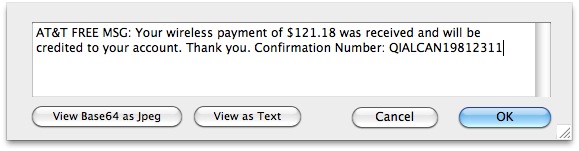
If you want to access and read the iPhone SMS backup file, you’ve come to the right place. We’ll walk you through how to access this text message file, which contains all of an iPhones text messages, SMS, MMS, and iMessages, and also show you how to read the files contents. This trick works for both Mac OS X and Windows.
iPhone SMS Backup File Location on Mac
First things first, let’s get to the backup file which contains the texts and imessages. Your SMS/text messages are backed up and buried deep within the standard iPhone backup location.
The file you are looking fo is located at the following location on a Mac:
~/Library/Application Support/MobileSync/Backup/
And the file is located on Windows at (more possible destinations further below in the article for other versions of Windows):
C:\Users\USERNAME\AppData\Roaming\Apple Computer\MobileSync\Backup
You are then going to explore the folders contained within these directories, looking for a randomly generated filename that is really long and full of hexadecimal, like: 9182749a9879a8798a798e98798798f9879877c98798. There is usually just one directory in here unless you have multiple devices synced to your computer.
Open that directory and look for the following filename:
3d0d7e5fb2ce288813306e4d4636395e047a3d28
This file will sometimes have a .mddata or .mdbackup extension, though if you don’t have extensions enabled you may not see it. That doesn’t matter much, just get access to this file.
How to Read the iPhone SMS Backup File
 Once you have located this file, make a copy of it to the desktop or some place easier to access. This will also serve as a backup of the imessage/sms database, which is important in case you somehow mess something up, you won’t compromise the original message backup database. You may notice that this file is actually a SQLite database, and the tables can be read and queried like any other database using SQL commands. If you have no SQL experience, it’s not too complicated, but first you will need to download an application that lets you open and read SQLite database files, in the screenshot below I used MesaSQLite for Mac OS X, it’s currently in beta and free to download. There are plenty of SQLite apps for Windows too if you need one.
Once you have downloaded your SQLite management app, launch the program and then open up the aforementioned SMS database file (yes, the 3d0d7e5fb2ce288813306e4d4636395e047a3d28 file) within the SQL app to see all your text messages:
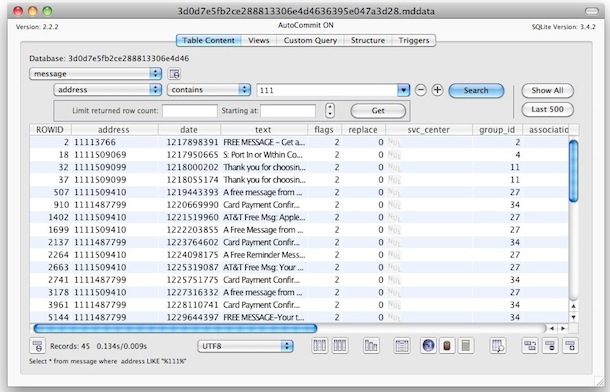
Now the best thing about this being a SQLite database is that it can be queried against easily, so if you’re looking for text messages just from a specific number, specify that in the query. For example, in MesaSQLite you just select this under “Table Content” then Message > Address > Contains > 1888
Replace 1888 with any other number prefix. Once you see the messages you want, just double click on them to be able to read the text message stored within the backup file that is now opened in the SQL manager:
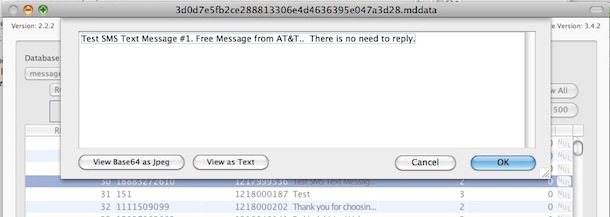
And yes, you can change the content of text messages through these backup files too!
It’s worth mentioning that you can also just drag the database file into a text editor like TextWrangler, but it’ll completely decimate the appearance of the file and it’s very hard to read. If you are looking for a very quick and dirty way of searching for an exact message though and you know the content, it works, but it’s not pretty.
iPhone SMS backup file location in Windows
Since there are multiple versions of Windows, here are the possible locations of the iPhone backup file:
%APPDATA%\Apple Computer\MobileSync\Backup\
Windows XP:
%APPDATA% = C:\Documents and Settings\[your username]\Application Data\
Windows Vista:
%APPDATA% = C:\Users\[your username]\AppData\Roaming
Windows 7 & Windows 8:
C:\Users\user\AppData\Roaming\Apple Computer\MobileSync\Backup
Windows 10:
C:\Users\USERNAME\AppData\Roaming\Apple Computer\MobileSync\Backup
Everything else is the same as above, look for the same file(s), and you’ll need to open them in a SQLite editor.






I am looking for a way to open a lnk file. I can’t even find a way to do this. It’s a video of the Belagio waterfalls.
So I have my SQLite file and opened it and there are several ways to view it. One way it is broken down into categories like text_message, chat_message, and chat_room_messages. How do I find out which “chat rooms” and which messages? Also there are other files from my backup I need help understanding. Can anyone one here help outside of this website? For instance, there are two whatsapp url and id links with a bunch of numbers and I’m trying to find out what that is all about. Another thing, on the call list there are several that are just letters and numbers in the phone number spot rather than an actual phone number. Anyone know what that might indicate?
Just use TextPad to view this file. Works a treat!
I was wondering how i will be able to read deleted iphone sms, now it helped me!
Does anyone know how to decrypt the iPhone backup file? I know the password used to encrypt the backup.
Yes, you decrypt the backup with iTunes. Restore the iPhone with iTunes and enter the encryption password during the restore process.
[…] a message has been deleted the only way to uncover it would be to manually sort through and read SMS backups, which isn’t the most user-friendly task in the world, and thus extremely unlikely to […]
Here is a simple method to backup your SMS messages and do a lot more with them. After registering at delighta.com, just send your SMS messages to the delighta phone number and they will be backed up to a Google spreadsheet that delighta will create for you. You will also get the SMS messages as an email sent to your Gmail account.
Or you can simply use a program called iPhone SMS + MMS Extactor to help.
I have an issue. Everything worked except, there is no “address” choice to select???
If it’s asking for the encryption key, make sure you aren’t encrypting your iPhone backups from iTunes.
I read the SQLLite documentation and found that the following formula works (for the East Coast — change the -5 to your particular offset from GMT to see your local time) directly in MesaSQLite v4.0.0:
datetime(date + (-5 * 3600), ‘unixepoch’)
A date value of 1356825363 returns 2012-12-29 18:56:03 using this formula.
Can you tell me exact sql command to convert it to common date/time?
I tried: datetime(date + (7 * 3600), ‘unixepoch’) and it show error
Problem solved. In SQLite, just query: SELECT datetime(date, ‘unixepoch’, ‘localtime’) as NewDATE from message
Or batch convert from unix epoch to regular datetime
Yeswaydude:
Thanks for the time conversion, that helped me out quite a bit. However, I’ve linked to the SMS SQLite database via ODBC drivers to MS Access 2013. I’m using the dateadd(“s”,[date] + (-5 * 3600), “01/01/1970 00:00:00”) for the conversion in the query. However, this does not produce the correct results for some reason (using the UNIX Epoch time conversion). I had to use “01/01/2001 00:00:00” to get the date I knew to be true (in my iPhone). Any idea why that is?
I’m trying to upload the data into the SQ Lite database program, but it’s just coming up as blank…
No one has answered the “encryption code” question.
Facing the same problem here. Great blog!! but please help with what to do or what other app to use if encryption cannot be bypassed with MesaSQLite. Thank you!!
Well, I had troubles with the encryption code myself.
Here is what I did and hopefully you’ll get the same results as I did.
1. You first need to turn off “encode iphone backups”.
You can do that just in iTunes. When you plug in your iPhone, you can choose whether to encrypt your back-ups or not. Once you’ve chosen to not encrypt your backups you make a new one.
2. Now try to open the database with the app shown in the turtorial. Make sure you load up the newest backup file. (Look at the date)
If this still doesn’t work, don’t panick, it’s because you probably have a newer iPhone like I do. I think the newer iPhone backups are written in a slightly different code which the app in the turtorial above isn’t up to date to read it.
Well, you just need to get an updated version from the app. You can get that updated version here:
http://www.macupdate.com/app/mac/26079/mesasqlite
Once you’ve got that up and running you open the most recent not-encrypted database in that app and normaly that should work.
I was wondering how you can see your sent messages in mesaSQLite? Is there a seperate database file you need to select or just a different input to see the results?
Thanks!
seriously what would happen if I lost my phone. This is a great idea to backup my iphone’s sms messages. thanks.
Thanks a bunch I’ve been looking for away to get my texts back since I always accidentally delete important ones.
found the file but it has no extension ??? :(
I have no file extensions. The backup was done without a encryption, but has a pass code to enter the phone. I have tried to enter that but it doesn’t work. Does anybody have any idea of a work around?
Does anyone know how would you go about deciphering the date of the message?
When you open the messages in a SQL browser the date is represented by a 10-digit code.
Can it be translated to real date?
Hi guys, thanx for the info about where to find the files for text messages and contacts. Im not so good at this so i hope no one gets offended and irritated but my stupidness =)
I did update my 4G yesterday and itunes doesn’t accept the backup. So my question is how to put them back in the phone. In old times (Iphone 2G) you could just overwrite “sms.db” with the new one and it was done. Do i have to use SQL to get it in?
Hi
Thanks for this but we have multiple iphones in the house. Where to find the other file? Anyone know please?
Thanks
UU
Ok so what is the encryption key referring to ? What password ?? Everyone seems to be avoiding the question.
When I try to open the 3d0d… file in MesaSQ it doesn’t show my text files, or anything for that matter. Help please!
same problem the directory is empty.
i put it into a txt doc and that workd but it’s messy. mesa shows nothing. what do we do?
can someone please give direction!!
Did you anyone figure this out? Mesa is showing up empty for me when I put in the 3d0d file. Thanks
Does anyone know if the sent messages are supposed to be in the same file as received messages?
Also, are ALL messages in this file or are they spread out over several different file names. Thanks!
I got halfway through the tutorial but ran into the encryption problem. Does anyone know what encryption this refers to? I have used passwords on my iphone in the past, and I also used to encrypt the backup to my computer, but do not any more. What should I do?
I have a mobilesync folder, with a backup sub folder, which is empty. But my phone is synced on a regular basis to this computer. Help?
It’s very gobbledeegook (what one reads) but I fluked on finding that number I was looking for. It was there .. just had to trawl a bit.
Thanks William.
Great post :)
This works great, Is there a way to view SENT messages? I’d imagine there be a different data file for the sent messages, any ideas? thanks
I could not upload the SQLite software, it keeps on saying about the firewall eventhough I’ve turned it off. Please help…
I tried to use SQLite software and found it a nightmare, with nonexistent encryptions, etc. Decipher Text Message (deciphertools) is perfect! I tried the free version first and found that it was exactly what I wanted. 10 bucks. Worth every penny.
I was able to open the backup 3d0d…, and I see 7 tables it loaded. However, none of the tables have data. If I open file using text editor I can find the messages, although it’s very hard to read. What am I missing in SQLLiteStudio?
I need directions as to get my phone info taken off of backup without having access to the computer it is going to. I have fallen into a situation that my text are being read by an unwanted reader and can not seem to find a way to stop it through my phone.
Dead Easy, worked perfectly just as in the instructions. Backed up two 3G iphones. Got all texts sent and received since got the phones.
Time and date conversion link worked great as well.
My phone was reset will I still find text and call history log
Once ive located the text im looking for, how do i open a picture that was with it?
this question has been asked many times without an answer.
Im looking for Viber and WhatsApp messages.
Could anyone help? is it stored the same way? if yes what file?
thanks.
I tried looking for the sms backup file in ~/Library/Application~. I found it but there is no extension file name (no .mddata or .mdbackup) after the hex code. Tried opening it using SQLite but nothing appears.
I also tried using iphone backup extractor twice and when I tried opening the sms.db file using SQLite, still nothing appears.
I’m using an iphone 3GS iOS 5. Help please. Thanks. :)
Did you figure this out? I am having the same problem. I found the 3d0d7e… file but when I open it in SQLite, nothing appears. Is there another .mddata file I should opening in SQLite and if so, where? Thanks
I have the sms.db and when I open it using SQLite, the recently deleted SMS’s (3 hours earlier) do not show up. However, when I open the sms.db in ‘Text Edit’ it does show the recently deleted texts in the bottom few paragraphs (obviously marked for deletion). Question is, how can I get these to show in SQLite. In other words how to I ‘undelete’ them ??
I’ve noticed exactly the same. I’ve purchased Decipher Text Message however it was only finding around 40% of the deleted messages!!
Simply opening the file 3d0d… in the backup using notepad and using the find quickly showed many messages were missing however whilst it is easy to read the messages it isn’t easy to put a time and date against them.
I’ve imported the data into SQL Lite and funny old thing none of the messages marked for deletion are showing.
Further observation, syncing an iPhone with iTunes does not in my experience purge deleted messages! I took a copy of the 3d0d file before and after a sync, no difference at all.
I too would like to figure out how to remove the deleted marker so SQL Light can view them.
Once you download and edit text can you then upload to iphone again with the editied version???
I have been using SQLite Database Browser, as it’s seem to be the simplest one for me to get to grips with. AnySQL Maestro and SQLite2009 Pro were just too complicated for me to understand.
I had two backup files in the location described. One from March of last year (2011), and my most recent from yesterday (4/1/12). The file from March is easily readable in the SQLite Browser, but for some reason the recent one is not displaying it’s contents.
I have tried removing one, or both of the files and creating a new backup. Restoring files from where they originated, moving them to the desktop, all with the same result. I can read the older file, but not the newest one.
Can anybody help at all? I’m on a Windows 7 PC.
*Update. Having re-read through these posts, I downloaded SQLiteStudio 2.0.22 and it seems to work. I can now access the most recent file.
will have to ask a friend to do this for me… I don’t know what I am doing wrong…seriously!
Can anyone help? I followed the instructions step by step but the file wont open. I cant even see an extension on the file.. ive tried all the obvious display options – FINDER displays it as a document. Any ideas?
Decipher Text Message will not show deleted text
To Nick:
If you still can’t open the files, try Decipher Text Message someone mentioned earlier in the comments. It’s totally worth the $9.99.
Hong
It doesn’t give me those options on my screen… the interface looks like this:
http://i43.tinypic.com/6fttev.png
These are the files in the location the instructions say to go to:
http://i43.tinypic.com/96yeep.png
They don’t have the file extension that the instructions say they should. When I open the specific one the instructions say to (3d0d7e5fb2ce288813306e4d4636395e047a3d28) it asks for an encryption key, which I type in as the password I used when I backed up through iTunes. It then gives me the screen shown in the first screen shot above. I’ve tried opening the other files too and same result. Am I doing something wrong or will this app just not work for my files? Thanks again for any help!
If the backup is encrypted, the encryption key its asking for is not the same as the password provided to iTunes. Your best bet is to decrypt the backup with iTunes first by removing password protection on backups, then read the text messages.
Make the following sections in the boxes: “Message”, “address”, “contains” and then in the box after that, put in the phone number of the person you are looking for, then click “search”. This will pull up all the messages with that person. If you click “show all”, it will show you all the messages with everybody in your back up file. No encription key was required for me.
Hope this helps!
I have found out how to open the file now. Thanks!
I’m having the same problem – when I open the file and type in the encryption code (which I assume to be the one I set through iTunes) no content is displayed. How did you figure out how to open the file? Thanks for any help!
Hello Red,
I’m facing the same problem that I cannot see any contents when I open the 3d0d… file with SQLite Database Browser/MesaSQLite. Mind if you share how you open the file? Many thanks!!!! I’m a Mac user by the way, thanks sooo much.
I found the backup file and downloaded MesaSQLite for Mac. However, when I tried to open the file, nothing happened (there is no content). What should I do? Thanks for your help!
Thanks. I was really frightened when my 3 y.o. son deleted a message/conversation I REALLY needed to keep (that survived the transition from my 3g to my 4s. It’s not as convenient as having it on my phone, but the data is definitely still available to me, and ultimately, that’s what I need.
Is the backup file called something different for iphone 4 backups? Because the 3d0d- file doesn’t exist…. I’ve done this before for my old phone so it works and I know how to do everything… the file just isn’t there!
I was using this without problems before but I installed iOS5 and was still able to open the 3d0d7e5fb2ce288813306e4d4636395e047a3d28 file with SQLite Database Browser once then when I did another backup, I suddenly couldn’t open the file anymore. Appreciate some help! Thanks!
Some messages in my sql done show the text. I see that there was a text send but it says “null”. What does that mean? and how can I fix this?
[…] that one with all the texts in between that other non legible stuff Posted via Mobile Device How to Access and Read the iPhone SMS Text Message Backup Files or you get this program instead iPhone Backup Extractor for Windows and Mac __________________ […]
Awesome….. it works like wonder for me. I used the SQLite tool “sqlitestudio-2.0.14.exe”. Also, the most fun part is, being a Database Admin, i love to see all my sms thru a query retrieval… lol !!
Hello , Could you retreive all your deleted Texts and call logs? I am interested to know how can I do that.Kindly explain step by step.
After copying the 3d0d7… doc to the desktop and creating a new database for it, nothing is showing up in mesaSQ.
Also in my backups, I have multiple devices. But also, there are “copies” of those backup folders acting like an original. Would that mess up what would happen? I’ve tried that same 3d0d7 from every folder in my backup. And none worked. Please help me. I’ve been trying to figure out how to do this and I feel so close! Thanks
Ok, so I found out which file it is.
But still, it isn’t opening up in mesa. Is there any other ones I can try it out on?
Did you figure this out? I copied the 3d0d7…doc to the desktop but nothing is showing up in MesaSQ. What did you do? Thanks
Awesome – thanks for this!!!!!!!
Where is the tutorial everyone is speaking about. I am trying to locate a deleted text that was sent to my iphone from iPod touch, the text had a picture. I have found the file name 3d0d7e5fb2ce288813306e4d4636395e047a3d28, but nothing populates when I try to open the file with the MasaSQLite application.
Once I get into the mobile sync back up file, the file that is supposed to have an extension doesn’t exist in my computer. I need to restore my 3gs to factory settings. Everything else I need is already saved on my computer but I want to save my SMS. Is there any other way to back them up on my computer to place on my iphone again after I restore it? There’s supposed to be a free program that will do it but all sites that give a link to it send me to a expired link. Help please
Any idea on how to do this with Lion? There’s no MobileSync folder in Application Support and a Finder search can’t locate any .mddata or .mdbackup files.
Super .. Duper..!!!
Thanks a lot buddy…
Just one Suggestion for other people.. one can use “SQLite Manager” Add-on on FireFox to open said file.
Thank you very much.
It helped me a lot.
Cheers!
Hey guys, just to tell you all, this works REALLY good on Mac, not so good on Windows. I’d recommend if you are using Windows (any versions) use Tansee iPhone SMS. Thanks =)
Answer to date question.
For those trying to figure out why the date column is unrecognizable, here is why. The date gives you the # of seconds the text was sent/received from the launch date of unix (01.01.1970 00:00:00, or 12/31/1969 23:59:59).
You can go to http://www.timeanddate.com/date/dateadd.html for an easy way to calculate this. Just enter the start date AND time (i.e., 12.31.1969 23:59:59), the enter the # from the date column in the seconds box, make sure you select to add the seconds, then submit the form. It will give you the date and time of the SMS (in GMT).
Hello, I see the same backup directory contains pictures sent/received by MMS with a modified name and extension (you can check the files wich size is around 1.5 MB). Does someone know how to link the database info that uses the real name of the picture (such as img1234.jpeg) and the new name (such as f3215ad21ddsjkf68po9kjdklqsd1235sd1s2dsd) ? Thanks
Great info here all has worked well. 2 things, 1. how to see SMS photo attachments. I found where the filename is referenced, but not the photos themselves. and 2. more info on the way to view deleted texts via hex.
Thanks
I was able to get the messages but only to a certain date. Does anyone know how to view all?
Thanks. Found an SQLite Manager add-on for Firefox and all I had to do was import the file and was able to access all my txt messages. Sweet!
Thank you so much !
I would not have found the location of the backuped text-messages alone…
Although the mes…SQL was not working on my MacBookPro, I still can see what I needed to look at.
Thank you again, really appreciated !!!
Bernie
I’m just trying to view deleted messages from my iphone 4, wether that be through backup or whatever and all this seems to be too confusing just need something easy to use. anybody please help!! I have downloaded like 4 of the freewares and look at the scripts and see no words and there is probably 60 files to look through, confused
I cannot find deleted messages in that file. Is there another file that keeps messages that were deleted or the entire conversation was deleted? Thanks.
any suggestions on where it is now?
I upgraded to lion and now I cannot find the file in application support. It worked great till i did that.
i have to format my phone……… but i have lots of messages. how can i get those messages back even after formatting. ???
i purchased and downloaded the program but dont know what to do when it asks for the encryption code, I tried everything nothing works what am i doing rwong please help!!!!!
Is there any way to back up the iPhone and bypass the encryption password or is there something to decipher it
thanks! worked.
aside from looking at the phone numbers, how can i look at the dates? the dates are in a different form.
thanks in advanced
Tried deleted in hex but cannot read them. Any other way to read deleted SMS?
This seemed to work OK, only problem I have is that if I look at this in a text editor I can pick out a few messages which are not present when I look in the SQL editor. SQL editor does not seem to retrieve all dbase rows. Any thoughts?
I have a question. There are no ‘live’ texts on the phone of a number I wish to retrieve texts from & the number no longer exists. Any ideas?
Nice trick, been looking for this information for quiet some time now and looks like you just answered my question..
I’m using MAC OS 10.6 and I synched and it created another another backup folder. What is the mddata file name. I tried looking for the previous name (3d0d7e5fb2ce288813306e4d4636395e047a3d28) but its not there anymore. Did it get renamed? if so what name should I look for? thx
Awesome tutorial, worked perfectly.
Question – I only see the following though:
1) Texts I received, not texts I sent. Can I find texts I sent?
2) Texts I received only from contacts that are still in my “Messages” app on the phone. So even though the texts should still be in the database, unless the contacts name is still showing in Messages (meaning at least one text is still “live”), the texts do not show in the database.
Correction – I do see texts I sent, but part two still applies. So if I sent a text but didn’t get a response, or deleted the message string, then no texts appear even though they should be in the database.
Is there a backup file that contains sms texts that the user “deleted” before the iphone was backed up on the iMac with iTunes?
Excellent,
Thanks for putting this together.
By the way all the iPhone files seem to be present in the iPod Touch backup as well.
89c7a48285ef233222ad794dcfba5756db1f011a is the base name for the iPod Touch backup folder
Hey! This was awesome tutorial! Excellent simple and easy to understand. Thanks for taking the time to share.
Hi
I also cant find the rigfht file with the correct extension. All my files are just ‘File’ types. Any advice?
Hi There,
I need to get some text messages from my iphone, however i have no clue what to do even after attempting to follow your instructions. Any chance you can contact me and I can send you my iphone file for you to do the business with ?
Hi there,
I downloaded this program so I could read the gibberish that is my text messages (trying to locate deleted ones) but its asking for an encryption key? It seems a few people have asked the same thing but no one has responded? anyone have ANY idea what I could do? how to find it?
hi… my wife is having an affair and I know she has a load of texts messages on her iPhone 3GS. I don’t know the passcode but her phone was syncd on my PC. is there a way I can gain access to her texts (current and deleted) via my PC? many thanks…
What will be the file name which holds the notes for iphone in the backup folder.
I have found the file but I cannot open it into SQlite. There is no extension on it (for example .mddata) so it is asking for an encryption key.
What do I do now? Is there a way to change it so that it doesnt ask for an encryption key?
Also…. if I was just trying to get rid of all old texts could I technically just delete the file inside the backup folder? as long as I made sure to re-sync it asap so not EVERYTHING was lost?
The Problem is.. on my backup folder, I can’t find filename with a .mddata or .mdbackup extension
So what’s should I do?
same here… did you find it?
C:\Users\Mama\AppData\Roaming\Apple Computer\MobileSync\Backup
is this the right place to look?
Did you figure this out? I am having the same problem. I found the 3d0d7e.. file but when I open it in Mesa SQLite, no texts or anything appears. Is there another .mddata file or backup file I should opening in SQLite? Where? Thanks
In order to view what you would like, go to the steps where you can filter according to a number. Under table content select messages > address > contains > (number) then click search. if you would not like to filter, just click show all or last 500. this will take up more time since it will be loading all texts
Hi Max, can you help me? I’ve opened the file. But then i don’t know how to proceed further. I don’t understand ‘under the table select choose message and you are all set’ What are the steps i have to take?
Hi,
Nice to see such help. if i want to access this database in my app,
Can i access this database programmatically.
Excellent Tutorial, and fabulous. I have the same question posted by someone else above…how do you read text messages that you deleted off the iphone..are they in a different filename 3d0d7e5fb2ce288813306e4d4636395e047a3d28
It’s info. required for a book I am writing. Thanks.
deleted text are not actually stored in a different file. They are stored in the same file, but they are flagged for deletion. Once they are flagged the metadata is deleted and that area becomes available to new messages. It is not until the phone is synced with itunes that it cleans out the records marked for deletion. That is why it is important to tell iTunes not to sync automatically.
The only way that I have found to recover these deleted messages is to use a Hex editor to view the binary file. I have done this successfully several times. I have not found a way to unflag them, but you can still view them.
JT
Can you tell us more about using a Hex editor to view the binary file to read the deleted texts?
Thanks
Can you explain how to use the Hex Editor to view the binary files for the deleted flagged SMS? I would really appreciate it.
I was able to open the file with a hex editor but it’s the same stuff. I know there is deleted messages within this file, any guidance on how to locate them?
I am unable to open the messages because it is asking for an encryption key. Where is this key located? or what is the key associated with–iphone password, itunes password?
how do i extract these smses into an excel format or .mdb format?
Ok i got to /Library/Application Support but there’s no /MobileSync/Backup/
i’m on a mac. Any tips?
You are probably in looking in the hard drive. Open a new finder window and look on the left hand side where it says places. The little house, which is your user account, will contain the Library/Application Support…MobileSync/Backup that you are looking for.
Contacts are in 31bb7ba8914766d4ba40d6dfb6113c8b614be442. There are two primary tables of interest … ABPerson and ABMultivalue. ABPerson contains the names and ABMultivalue contains the phone numbers, e-mail address, etc. Use ROWID in ABPerson and record_id in ABMultivalue to cross reference one record to the other
Still looking for attachments. lol
First off, in the formula above … =(((D2/60)/60)/24)+DATE(1970,1,1)+(-5/24)
D2 is the cell containing the date so if you created an Excel spreadsheet and put the uninterpreted date in cell A1 and the formula in cell A2 the formula would then look like =(((A1/60)/60)/24)+DATE(1970,1,1)+(-5/24). Also, don’t forget to format the cell to “Date”.
As to the person asking about Windows 7, I am using the tool at http://sqlitebrowser.sourceforge.net on Windows 7 without any trouble. Just download it, unzip it and run “SQLite Database Browser 2.0 b1.exe”. Find the file you want to open, under the table select choose message and you are all set.
Still working on finding attachments.
Just realised this is for Mac users. Any recommends for a way to do the above on Windows 7 on a PC. :( sorry.
Trying to read SMSs on my PC. Downloaded db software laboratory sqlite editor but do not know how to proceed. Please help. I had no idea it would be so difficult to do this. I am pretty ignorant about computers.
Thank you!
How do I find the SQL file which contains Notes?
thank you!
first website on google search. SQL file opened with Excel – a little more complex to find the message but as I was looking for just one message with a very specific word I could do a Ctrl+F.
Hi,
this method seems to be referring to backup made on a Mac only. What about PC backup? Last time I synched and backed up my iPhone 3G was onto my PC laptop so my most up-to-date texts would all be saved there, if at all. Is there a way to retrieve SMS from the backup archive on my PC or does it work only for Macs? I lost my phone and am desperate to retrieve my texts if possible. I checked and there’s no such file/directory as ~/Library/Application Support/MobileSync/Backup/ on my laptop. Does anyone know if there’s a way to get to my texts?
Thanks!
try – C:\Documents and Settings\(user)\Application Data\Apple Computer\MobileSync\Backup
Great tutorial. I got everything to work first time around. It seems to me that this database only has messages RECEIVED FROM others to the iphone owner, and not messages that the iphone owner SENT him/herself with the phone. In other words, only about HALF the conversation is in this database.
Anyone know how to get SMSs SENT from the phone? TIA.
[…] backups contain a surprising amount of personal data, from various account and service logins, to fully readable SMS conversations, anyone can easily dig around in the backups locally if they want to. For this reason, it’s a […]
Hi, is it possible to read messages that have been deleted from the iphone before backup was taken?
ok so i have tried the formula time and time again and everytime all that i get is it saying #NAME?…. did anyone else encounter this? if you did could you possibly tell me where i am going wrong.
I have checked the formula given by “someone” about the date column.
=(((D2/60)/60)/24)+DATE(1970,1,1)+(-5/24)
From the formula, it shows that the iphone actually record the date by seconds. Which means, the numbers shows in “date” column is seconds….. (how much seconds after a specific time)
From the formula, it shows that the time start counting from 1-1-1970. +DATE(1970,1,1)
To see the exact date, you have to change the unit of “date” from second to day which shows in the first part. (((D2/60)/60)/24).
The last part +(-5/24) is just to fix some time difference (due to time zone or whatever).
This formula might not correct for some country… so, feel free to add new part such as “+(xx/24)” to change the timezone. xx – any number that fix your date.
that MesaSQLite for Mac OS X is not available on the link provided. Do you have another location to download it? or maybe recommend another one (for mac)
Thanks
its not showing up a certain contact in my phone
why??
so it worked, but the one number i tried to open up the text messages isnt showing up? any help? please and thank you.
I like the decipher tools for backing up my text messages to my computer and then being able to print them out. Several folks in my office use print them daily for record keeping. Only $5 and you don’t have to jailbreak or mess with your phone.
http://decipher-media.com/iphone-tools/
This for MAC ONLY. There is NO WINDOWS VERSION available.
There is a Windows version. Also $10 now. Absolutely worth it to not mess around with SQL programs and encryptions.
Thanks John! Been trying to figure this out for a week. I deleted text that I will need for “proof” later. Had the files, but no way to read them.
The program worked great and there is a windows version N Kato. Just scroll down. It was so damn easy!
Just purchased the software. $10 dollars now but does everything we needed and does it very smoothly!!!!
OMG this Decipher media is perfect..i was so lost with the above program, couldn’t find the files, etc, this one is the absolute best and worth the $10…im going thru a divorce and had an epiphany that the computer my soon to be ex used to sync his phone on is also in my possession, so as i was trying to get access to my own text messages, i can get his off that other computer…im just elated knowing that God is on my side thru this messy ugly trying period in my life…im rambling but im so happy u guys don’t even understand..
Downgrading my iphone 3G and wanted all my text messages in an easy to view format…came across this golden nugget via google… thanks a ton! easy breezy!
Anyone know where or how to find encryption key?
This is a little bit techy.
Incredibly ignorant I know, but I seem to be incapable of installing any SQLlite app and using them to view the files. When I try the file it’s not SQLLite3 compatible. Basic stuff – what app to use, how do I set up database and then read the files?
Re: Thor
About the date thing, read this page (scroll down to the 3rd comment):
http://www.trickyways.com/2010/09/how-to-backup-iphone-text-messages-on-windows/
Note that the formula is almost correct, you need to change that (-5/24) at the end to whatever your time zone is in terms of GMT (for example, I’m in GMT +8 so I have to change it into (8/24))
But like I said previously, I can’t figure out how to edit the date field (or the address field).
Can’t help you with the printing thing.
Anybody tell me how to print of these messages i need to print about 600 from one number for my wife’s visa i have them listed,and the date thing has me puzzled??????
export to excel
Such a simple answer… it’s not that easy. whenever I ‘export to excel’ I lose all form of comprehension and I don’t get the full texts anymore… just one word per line? What EXACTLY is the process for exporting these texts once I have the query all done and all the texts I want on the screen? Basically I have done everything it told me to do above, but am annoyed because it stops at telling me how to extract the data from this SQL thing and put it as a text document (or whatever) on my computer. Can someone please just give detailed instructions in laymens terms?
Use this – https://smsmerge.homedns.org/
Figured out the date thing afterbanging my head against the keyboard for several hours, now something even more difficult:
When I try to modify the address or the date field, I keep getting the message “Data could not be updated”. What do I need to do to make it happen?
What I’m trying to accomplish here is to import old sms messages from my old cellphone. Since the iphone won’t read sms stored on the sim card, what I’ve done is forwarded all the sms from my old phone to the new iphone (can’t wait to see the bill at the end of the month). And I want to be able to edit the sms database so that the date/time and the sender phone number matches the original.
I’m using the SQLite Database Browser (http://sqlitebrowser.sourceforge.net/), not the MesaSQLite as suggested in the article. I only need to do this just once so I’d rather not have to spend money on a program.
What was the date format? I am still trying to figure that one out.
What format is that “date” field in? In the screenshot shown, the date for the first entry is “1217898391”. How do I translate that into regular date/time and vice versa?
I thought it was julian date but when I put those number into a julian day converter a date that doesn’t make sense comes up.
Hi kawaiix,
currently, I am facing the same problem like you: How can I convert the contents of the date field into something meaningful?
In a later post you mentioned that you had figured out the date thing after banging your head against the keyboard for several hours. Since I’d rather not do that to figure it out myself (and it would probably require me a couple of days) could you please give me a hint?
Best regards
Markus
Guys, I wrote MesaSQLite. If a file will not open, Mesa assumes it is encrypted, which in this case may not be true. I have looked at a couple files sent to me from a user and I can see that the internal structure of the file is not an SQLite 3 database format… Rick
hey rick… i need help.. its asking for encryption key? what it is it?
My backup file:
69a50408a4808b8b19ad5b41b7e317e3dc59b09a
can it still work????
Nobody knows what your encryption key is but you, that’s the nature of an encryption key.
[…] left with an empty phone. You can obviously easily resync your music but you’ll lose all your iPhone text message backups, contacts, apps, and pretty much anything else that made it your […]
Every file requires an encryption key and I need access within 24 hours for a court case Monday morning? Anybody assist?
I don’t understand
no matter which single file i Open …
it urges me to type the Encryption code…
what should I do?
thanks
Thanks for the awesome tutorial!
Does this work on the new Iphone 4?
there are 2 saved files
.info
and
.mddata
the .mddata doesnt require an encryption key
unfortunately, my iphone 3GS did require an encryption code for the .mddata and .mdinfo file. it is encrypted
Where can I find the encryption key? Anyone? Bueller?
i need help.. its asking for encryption key? what it is it? my backup file starts with 69a504 and ends with 9b09a can it still work????
downloaded the program but when i try to open the files in the backup folder it asks me for an encryption key.
???
Here is the answer for all of those who cant figure it out becuase the thing is asking for an encryption key. I figured i would answer it here even though this comment is 4 years old because it would still be useful. First, you navigate to the directory that he gives (not sure if its the same random number for everyone), but inside of that directory you will see hundreds of files with random numbers. When the author tells you to open this one:
3d0d7e5fb2ce288813306e4d4636395e047a3d28
he literally means to open only this file with exactly this name. none of other files will work. I don’t know why its this file in particular but im guessing apple obfuscated the file names so you wouldn’t be able to tell where the index is.
Now that i’ve answered some of the questions here, could someone tell me how to copy the sms attachments over into my local hard drive (on a mac)
It still asks for an encryption key when you try to access this file? You didn’t clarify why it is doing that. I have the correct file copied on my desktop and it was backedup unencrypted so why is it asking for a key?
If the encrypt box was checked when you made your backup then the file is encrypted and the key I would guess is created by apple and would be unknown to you. You need to make an unencrypted backup to use these instructions.
The reason it has to be that file is because the file is hashed by apple when it makes folders so the actual directory name is /private/var/mobile/Library/SMS/sms.db
after it gets hashed with SHA-1 it will be hashed to hex numbers “3d0d7e5fb2ce288813306e4d4636395e047a3d28” if the original back up is encrypted then you either need the key or you are screwed and can’t read it.
Then how do i open pictures from this??
I assume that this is the backup that iTunes Made??
I wanna open the pictures inside the backup if possible.
I have been looking for a way to read my texts on my computer, cool stuff thanks