
Set Up Text Substitution in Mac OS X
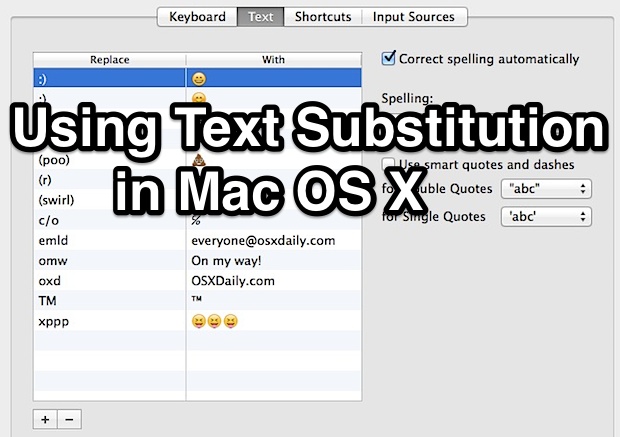
Using Text Substitution, you can easily write any special character or symbol like ™ or ® just by typing something like TM or (r). It can also be used to expand long phrases or particular words by typing shorter abbreviations, for example you could type “myeml” to instantly type out an email address, and it can also be used to quickly type out emoji rather than digging around in Character menus.
Everything is automated and the options are unlimited, in that you can have as many text replacement substitutes as you want setup. Getting this working is quite simple, but you’ll find that some apps in past versions of Mac OS also need the ability to use the substitutions enabled individually, not to worry, we’ll cover that as well.
Configuring Text Substitution on a Mac
First, let’s create a substitution or two:
- Go to the Apple menu and down to “System Preferences”
- Click the “Language & Text” preference pane
- Click on the “Text” tab
- Adjust text to replace with a symbol or other text, add more text to replace by hitting the + button
The column on the left represents the shortcut, the column on the right represents the expansion that becomes substituted.
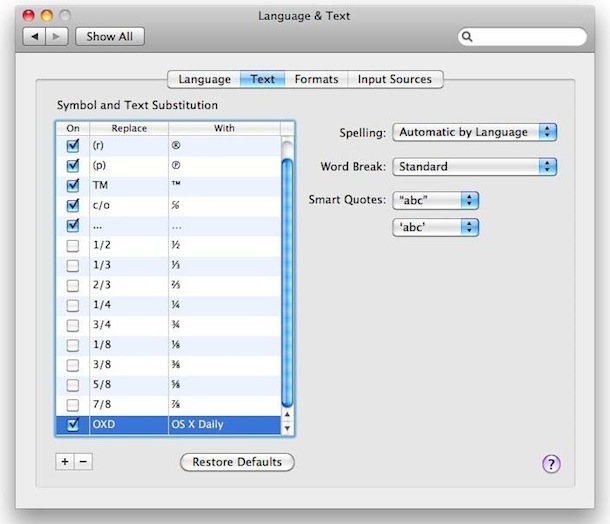
For an example shown in the screenshot below, “OXD” is set to be replaced with “OS X Daily”, so anytime the characters OXD are typed together and then followed by a spacebar or return key, the text will be replaced instantaneously. Generally, the substitutions are best used for phrases that are commonly used, sequences that are difficult to type, or for things like certain characters or alternate spelling thats are commonly flagged as typos. Usability wise, setting up a replacement for typing out email addresses is a great trick and goes for both Mac OS X and iOS on the mobile side of things too.
Note that in some apps prior to OS X 10.8 you will also need to enable Text Replacement individually. This is not always the case going forward, but if you are having trouble getting text replacement to work in some apps this is the first place you should look.
Enabling Text Replacements in Mac Applications
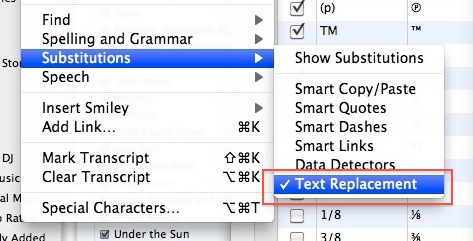
Now here comes the interesting part, the Text Substitution feature is not enabled by default in many Mac OS X applications and it has to be manually enabled on a per application basis. This is easy enough, but oddly Apple has named it something different once inside the application, it’s called “Text Replacement”, and here’s how to enable it:
- In most applications, open the “Edit” menu and scroll down to “Substitutions”
- Select “Text Replacement” and a check will appear next to it in the submenu, signifying text replacement is enabled for that application
- Now just type a shortcut that you had set earlier and your text will be replaced with the substitution set within the System Preferences
Text substitution (or replacement, whatever you want to call it) is an incredibly helpful feature, and I hope Apple allows you to enable it across all applications in future versions of Mac OS X with a simple ‘Enable for all applications’ switch within the Language & Text system prefs.
Note: New to OS X 10.8 and beyond is an ability to see Substitutions and to edit them directly, this can be found in the “Edit” menu of compatible apps, then pull down to Substutions and choose “Show Substitutions” to enable the pop-up hovering window. Checking the box within this window for “Text Replacement” toggles the feature on and off directly, and also lets you use a nice Replace All feature to go through documents where substitution did not take place and them implement those changes.
iOS also has this feature, though it’s called “Shortcuts” there, and we highly recommend using it there since it can make typing on the touchscreen keyboards easier and significantly faster, not to mention more accurate with some otherwise difficult words and phrases.






I’m running High Sierra 10.13.6
When I select substitutions under edit in mail the choices are not accessible. They are dimmed.
This works for me but i put a substitution in that i misspelled and now i can not get rid of it. Can anyone help with that. I’ve deleted the misspelled word which works until i restart my computer.
I’m running Yosemite
I am a small-time writer and sometimes would like to express a thought in slang of one country or another. If I want to write “makin’ bacon'” I will have to correct it two times before I get what I want. Must I disable spell check each time I use slang? Thanks in advance. jn
[…] trick was found by Macgasm, and they offer a nice little tip idea if you plan on using it often: text substitution. That allows you to type something like ‘mknotepad’ to expand out the entire code […]
Is there any way to import the 100s of shortcuts i have in a text file?
Mr. Man, your solution doesn’t work for me (I’m with Snow Leopard)
Followup: in MS Word, use Tools/Auto Correct to enable identical functionality.
Doesn’t seem to work in MS Office apps
Apparently this capability exists in the newer version of OS X because my 10.5.8 does not have this, at least I could not find it. If it is in 10.5.8, can anyone tell me how to find it?
Its a problem in big parts of Europe with 1/2, 1/3 etc it means February 1 and March 1 to
Arf. I am using texpander for those exact features.
Texpander allows you to paste pictures and formatted texts. But I never use those features.
You can enable them globally, just enter this into Terminal (/Applications/Utilities)
defaults write -g WebAutomaticTextReplacementEnabled -bool true
Oh, one more thing, this only works in Snow Leopard.
Thank you. Works on El Capitan.
This made it possible to make shortcut for web urls.
My case of use:
I want to visit a Reddit subreddit without needing to write the whole http://www.reddit.com/r/ thing every time.
Now I just have to write r / (without the space) and start writing the subreddit. This way it’ll expand the r / to reddit.com/r/