
How to Find iPhone Baseband Version
The baseband is basically the cellular modem of an iPhone, and knowing what the version is for an iPhone baseband can be useful for many reasons.
In fact, knowing which baseband version your iPhone is using can be crucial to seeing if you can unlock your iPhone with a variety of the unofficial unlocking tools available out there, including ultrasn0w or other software unlocks.
Let’s quickly show you how to find the baseband version of an iPhones cellular modem firmware, contained within the iOS settings on an iPhone or cellular iPad:
Find your iPhone Baseband Version
Checking your baseband is really easy, grab your iPhone and do the following:
- Tap on “Settings”
- Tap on “General”
- Tap onto “About”
- Slide down and look next to “Modem Firmware” – these numbers will be your baseband version
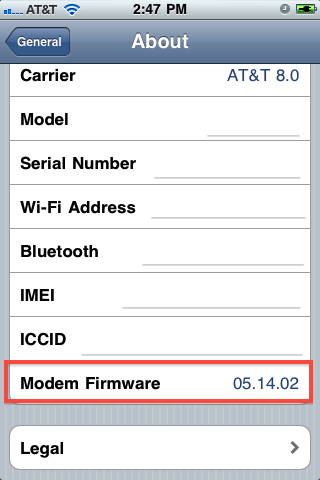
For instance, in the screenshot the baseband version is 05.14.02 which makes it compatible with the ultrasn0w unlock for iOS 4.2.1.
We’ve discussed what iPhone baseband is before, it’s just your iPhones cellular modem firmware and you’ll need to know what it is if you plan on using an iPhone unlock.






Hi I need help. A friend of mine sent me a an iphone 4 which he already used and its locked by their carrier. I cant get a simcard frm his carrier since hes in Canada and I am here in Singapore(which i cant find a good technician to unlock the phne so i can use it with the local sim card…
I asked myfriend and he doesnt knw about much about this phone…
HELP PLS!!! :(
send your iphone to me i will fix it and send it back to you when its done im from philipines..
Can anyone help me out? i have a iphone 3gs use to be on baseband 05.16.02 or 05.16.04. i have jb but it not showing any baseband now and itune will not let me do a custom restore with any ipsw files/ it also restarts itself. im on 5.1.1 anyway at all to fix this ? my phone 3gs thank you
Can anyone help me out? i have a iphone 3gs use to be on baseband 05.16.02 or 05.16.04. i have jb but it not showing any baseband now and itune will not let me do a custom restore with any ipsw files/ it also restarts itself. im on 5.1.1 anyway at all to fix this ?
my iphone 3gs won’t proceed off the config cuz i don’t have wi-fi and it isn’t connecting to itunes! i just upgraded to ios 5.1. what should i do?
Hey Ayzee,
did u get an answer for it,
I had the phone working fine, but today i upgraded to OS5.1.1 and its not going beyond config.I also dont have Wifi and in itune, it says no sim card.
Please share.
hey bro, can you please tell me how to do that? I have an Iphone 4g with IOS 5 i jst upgraded , i dont know my baseband.it now says i need a valid sim card without pincode to activate device… i dont even understand this
it because your phone is not unlocked that why it says i need a valid sim card without pincode to activate device. trust me i had the same problem
and what have you done guys? appreciate your answer. thanks !
ma iphone s crashed(stuck n recovery mode) so how can i know baseband ?
plz help me….!
@Sad Face
Please don’t thorw your iPHONE just send it to me :P
i need help.
i have an iphone 3gs. I jailbroke and updated to ipad baseband 6.15.00 in order to unlock with ultrasn0w.
and its not working. im on fw 4.2.3 and the ultrasn0w is 1.2.3.
please i am gonna throw my iphone out the window pretty soon. how do i unlock my iphone :(
hey sadface, I had the same problem but now it’s working. send me an email and I will help you out.
i need help in unlocking my iphone baseband 04.11.08 i run ios5
hey bro, can you please tell me how to do that? I have an Iphone 4g with IOS 5 , Baseband or Modem Firmware 04.11.08. can you please help me with this? I would really appreciate that :)
I have the same problem. I jailbreaked my phone with ultra snnow. I have an iphone 4 with ios5 baseband and moderm firmware 04.11.08. It is not reading my sim card. Help Please.
Dude I have the same problem, steps plz.
what if my baseband is missing.?how can i find it.?please help me
You can get a valid sim card at your local carrier. You don’t have to activate it after purchase, just stick it in and connect your phone to iTunes. The phone will activate and you can chec in Settings –> General –> About.
how do i get my baseband without unlocking the phone?
when i start it, it says i need to insert a valid sim card inside. without which i cannot do anything on my phone.
I have the same problem and I didn’t find an answer nowhere.
same here !!!