
Temporarily Prevent a Mac from Sleeping
For security reasons, it’s always a good idea to lock your Mac screen when you step away from the keyboard. On the other hand, there are times where you’ll be away from your Mac but you don’t want to have to re-enter your password to login, or you just don’t want your screensaver activating or your Mac sleeping.
Here’s three ways to temporarily prevent Mac OS X from sleeping or activating the screensaver:
1: Caffeine
Caffeine is a free menu bar utility that is available through the Mac App Store, it sits in your menubar and when you click on the cup of coffee, it prevents your Mac from going to sleep for a preset amount of time: from indefinitely to 5 minutes. I use Caffeine often and have it set to an hour, this is a really useful app.
- Grab Caffeine from the Mac App Store (App Store link)
2: pmset
If you don’t want to install another app, you can mimic the effects of Caffeine by using a command line utility called pmset. Launch the Terminal and type:
pmset noidle
This will prevent your Mac from sleeping indefinitely until pmset is no longer running. You can stop pmset from running by hitting Control+C in the same Terminal window. pmset is a power management utility that you can use to set sleep and wake times, but the noidle flag just provides a single use sleep prevention method.
3: Screen Saver Hot Corners
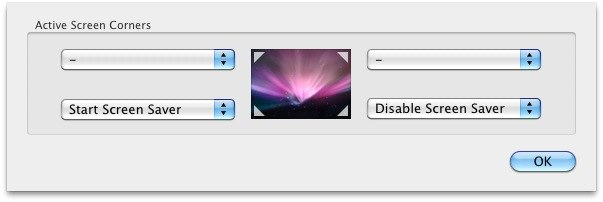
Another option is to set a screen saver Hot Corner from > System Preferences > Screen Savers > Hot Corners. Just specify a corner and set it to “Disable Screen Saver” and anytime you slide the mouse into that corner, the screensaver will not enable. This does not prevent the system from sleeping though.






Fantastic tip! I used Caffeine for years (since Snow Leopard), and definitely the most convenient. However, it stopped working on El Capitan (10.11) Beta, so the Hot Corner tip is a great second choice.
I want my glossy pill buttons back..
[…] are plenty of ways to prevent sleep, whether it’s the caffeinate command, the Caffeine menubar item, pmset, or hot corners, but […]
“pmset noidle” worked like a charm – thank you!
[…] always been able to temporarily prevent a Mac from sleeping by using the pmset noidle command or a hot corner, but with OS X Mountain Lion, Apple has bundled a command line tool dedicated to sleep prevention […]
Hi,
I tried the command line option on my macbook pro retina running lion and mountain lion and on both after 15 minutes the screen goes black. I don’t understand because in energy settings I have set to Never when hooked to the power adapter. So how to prevent the screen to turn off. What i want is to have the screensaver forever..
Thanks
I just tried pmset noidle and it didn’t work for me. My screen still went black after 15 minutes or so. My company set default energy saver settings and blocked me from changing them because I don’t have admin privileges on my machine. So I can’t force a no-idle from System Preferences at all. I was hoping pmset noidle would work.
You may need root/admin privileges to use pmset in your situation
[…] works a lot like Caffeine in that it’s activated only when clicked, there’s no other function to the menubar […]
An alternative to Caffeine is Jiggler: http://www.sticksoftware.com/software/Jiggler.html
Caffeine rocks I use it every day, by far the easiest way to do this
lol I just disable sleep manually from my power options then set it back when I’m done
Tried that, does not work. Will try pmset as seems the simplest solution.