
Check Download Progress on the Mac App Store
 Outside of watching the little progress bar on the downloading apps icon in LaunchPad or the Dock, there isn’t much of an outward display of how downloads are progressing from the App Store in OS X. Instead, more specific information about download progress and download speed is contained within the Mac App Store app itself, though it may not be completely obvious upon first glance. Here’s how you can check the transfer details in the Mac App Store:
How to See Download Progress of Apps Coming from the Mac App Store
Want a general idea of an app downloads progress? Here’s what to do:
- From the Mac App Store, click on the “Purchases” tab to see the active list
- Locate the app(s) you are downloading that you want to check
This will show you the download progress bar, the total downloaded out of the total download size, and an estimation of time remaining until the app has completed downloading and is ready for use.
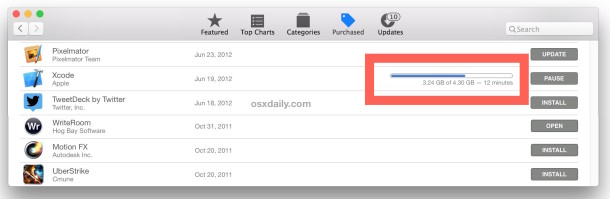
Here’s what it looks like in an earlier release of OS X:
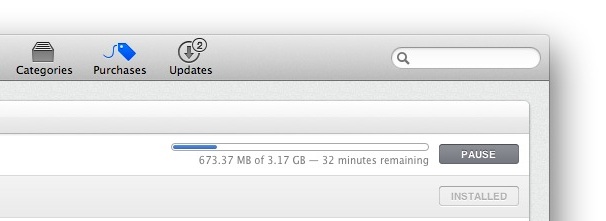
This is the same in all versions of OS X that have the Mac App Store, meaning anything beyond 10.6.
How to Determine App Store Download Speeds
You can also check the download speed of apps coming in through the Mac App Store, easily too:
- Click on the progress bar of the app in question to see the download speed
If you’re looking at multiple apps speeds, you’ll need to click on each progress bar per app separately. Thanks for that little tip Henry! Scratch this: Somewhat disappointingly, it doesn’t show you the actual download speed but you can always obtain that information elsewhere manually.






Hello! What about for mojave app store? Is it possible to see the download progress this way?
Does NOT work with macOS 10.12.6 (16G1408) Sierra. How to check App Store speed on it?
Apple has broken (what a surprise) the download progress indicator with the Mac App Store 2.1.1 update. There is no longer a download progress indicator showing when you are downloading an update for an already exciting app. I have no idea what those competent (cough cough) fake engineers doing at Apple. They keep breaking everything and introduce a load of bugs in everything lately.
Helped! tnx!
Not working on 10.6.8
Thanks, this helped.
Go to “Active Monitor” on Network tab and down you will see “Data received” it’s the download speed you download the app.
Thanks
This is silly, if you can see the progress bar, then you know how far along your download is… What i wanna know is, how can i check my progress if the bar isn’t there in the first place…?
If the progress bar isn’t there, there is nothing downloading. So that’s your answer.
No, this is a core design flaw in the AppStore app since version 1.
It frequently hides the progress bar for current downlaods (for various reasons, to do with Apple wanting to hide from the user what’s actually happening).
For instance, some downloads used to be visible only by alt-clicking. They are now ONLY visible in the Launchpad, not in AppStore app. It’s stupid, but there you go!
I did this. No progress bar appeared.
If you don’t see the progress bar that means you did this wrong.
i tried clicking everywhere while downloading Xcode in the mac app store but doesn’t show download speed.
I think you guys to better when it comes to the download time. Please try a little harder.
[…] works for the Mac App Store as well. stLight.options({ publisher:'fe5e0a84-1fac-40de-8014-9f89fc1cbe6a' […]
Thanks… i’m new to Mac and I’m downloading 2gb file…. wasn’t sure if it was downloading or hanging there … watching the bar… so this helped a lot!
I’m downloading it as a torrent, which turns out a lot faster than the app store and no problems with a progress bar.
It do not work for me either!!.
Clicking anywhere in the progress bar, below, end etc and nothing happen.
Doesn’t works! Post a screenshot to make us believe. :)
You can check the download speed, just click the below the progress bar where the size and time remaining appears and presto!!!
The same applies to iTunes.
I did not know either of these tips, thank you
I’ve tried clicking everywhere (the bar, the time, the size) and nothing happens.
Here is me clicking and double clicking pretty much everywhere: http://localhostr.com/file/I1KBsCV/Screen%20Recording.mov
Has anyone actually tried this? Can you post a screenshot? Where exactly should we click? The comment says below the progress bar and the article says on the progress bar som I’m guessing you didn’t actually try it before editing the article?
Haha, same happening to me, with exact same download, Xcode, isn’t it?
hahahah you’re right i’m downloading Xcode as well
it dosn’t work for me :(
i have also tried clicking everywhere with no sucess
This does NOT work at all … it’s a very bad tip cus it isn’t working … I use my dashboards app iStat to get an idea and see that it just STOPS downloading … CRAPPY APPSTORE !!!!
It does work. Downloading Xcode right now…
I’ve always wondered why they didn’t list mbps/kbps as well but I think it’s just Apple keeping it simple, that data means nothing to the average user.