
How to Gift an App from iPhone, iPod touch, or iPad
Want to give someone an iOS app as a gift this holiday season? You can gift apps directly from the iPhone, iPod touch, or iPad, without ever touching a computer and without the need for purchasing an iTunes gift card. This makes for a perfect last minute Christmas shopping or birthday present, since you can literally buy someone a present on the car ride over to their house Christmas morning. Gifting apps is very simple:
Gift an iOS App from an iPhone, iPad, or iPod touch from the App Store
This process is done directly on the iOS device within the App Store, but it can be repeated in iTunes as well.
- Launch the App Store
- Find the app you want to gift and tap on it
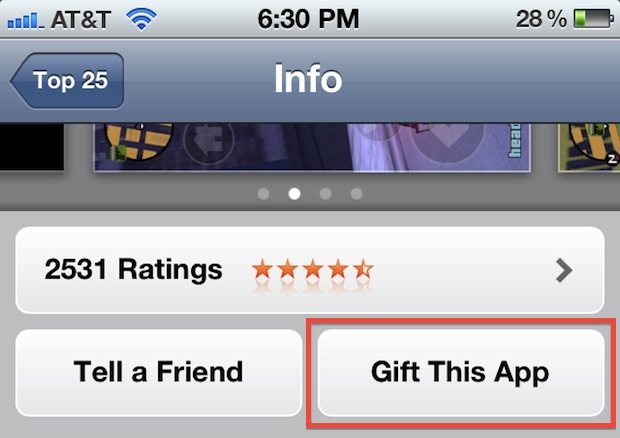
- Scroll down below the screenshots of the app and tap on “Gift This App”, then sign into the iTunes Store
- Tap “Next” on the app summary screen
- Fill in your name, the recipients name, and the recipients email address, as well as a note to attach to the gifted app (note: including several recipients email addresses will buy the app for each person)
- On the purchase summary screen, tap on “Buy Gift” in the lower right corner
The app will immediately be sent to the gift recipient, who receives an email with a link to download the iOS app to their iTunes library.
If you’d rather wrap the app as a physical gift, you can do so with iTunes by choosing to print a redeemable code instead of emailing the app. Gifted apps will appear in your purchase history, so if you or the recipient loses the redemption email, it can easily be retrieved again.
Note that you can not use redeemed credit from iTunes gift cards to purchase gifted apps, and the recipients iPhone, iPod, or iPad must be compatible with the app you are sending, which most are.






[…] ability to gift apps has long been around in the App Store, but it briefly disappeared before making a reappearance again with an additional […]
Plants vs zombies game doesn’t have this option though.
Can you gift an app to someone who doesn’t have iTunes? Can they download it straight from the link or does it have to be done through iTunes?
Is it me or did they nerf this feature in iOs 6 with its new AppStore??
I think the ability to gift an app is gone????
Hello. A friend of USA gave me a gift from USA Itunes, my Itunes is from Ireland, the iphone says that i can´t use this code because of is only in USA. What can I do?
My sister just gifted me a game for ipad that I already have. Will i get credit and can i pick another game?
Hi, sorry to bother but my girlfriend sent me an app I already had as a gift, is there any way to change it for another one or to get the cash back?
thanks!
[…] iPad? You can actually gift iOS apps from your device without even purchasing an iTunes gift card! Follow these instructions and brighten someone’s day with the latest business productivity app or must-have […]
Hi
So what about the update in future?
It needs password to update!!
If i gift to my friend… Then how will he update without my apple id and password??
Please let me know!!
Thanks in advance!
Is there any way to get a gifted app back if you restore your iPod?
Ok this is great, but I gifted an app to a friend with an LG smart phone and she can’t get it out of her iTunes onto her phone!!! Anyone know how to help her?
They need to have an iPhone/Pad/Pod, not some random smartphone.
hmm this sounds great, i’m going to send my dad the app that tells you your iphone has a 12MP camera :)) it’s gonna be hilarious, especially that he’s really going to believe it.
Also of notice, you may only gift within your country I do believe.
Hey! Wow, talk about timing, I was just trying to work out how this worked myself, then saw this and bam! answers. Thanks heaps! Am gonna buy apps I want my sisters (who have both just got iPhones) to have… lol
Please note, if you have a credit on your account, it won’t bill against the credit. Rather, it will charge your on-file credit card.
You just solved my ongoing Christmas present crisis, thank you.
Really? This is a tip?
Yes it is. Christmas is around the corner.