
Fix Stuck Podcast, Music, and Video Downloads in iOS
Jul 21, 2012 - 4 Comments
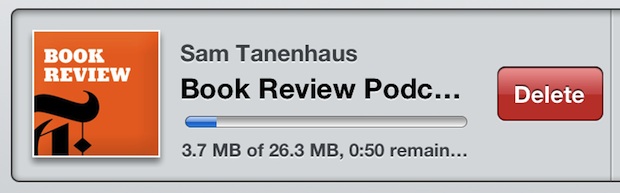
Though you can usually fix stuck app downloads by double-tapping the stuck icon, that doesn’t work with things downloaded from iTunes like podcasts, music, audio books, and video. If you find yourself forever waiting for a stuck media download from iTunes, the solution is very simple:
- Launch iTunes and then tap on “Downloads”
- Find the stuck download, swipe right on the item and delete it
- Redownload as necessary
The file should download again without a problem.
This usually seems to happen when restoring an iOS device, regardless of whether the restore is from backups or a device is configured as new.
This helpful tip comes to us in the comments from Dave Brown, thanks a bunch to Dave and everyone who pointed out how effective this is.






iTunes
Every time I purchase a new video on my iPad Apple air it stalls and says retry.ive got 6 gb space,tried reboot it,it won’t let me delete the video either .its just stuck and I keep getting pop ups that it isn’t working,I tried to download a movie because my storage was so messed up I had 4 emails and it said 500 gb and nothing basically on iPad and now I have 6 gb .but now I have this problem????
Also somehow a video from Justin Timberlake besides rehab with Rihanna got purchased and I can’t see it now it’s under my hidden purchases,can you please credit my account .thank you.
Hi.
I try to swipe but nothing happens. The red delete button never appears.
Restart iTunes- no good
Restart IPad- no good
I erased the movie from videos, but the drive space is still used by the partially dowloaded movie (altought I can’t see the movie in the “use” menu in settings).
Thanks,
This does NOT work when a podcast is stuck “processing”. You cannot swipe them when they are in that state. The only way I have been able to fix it is by a restore. I sure hope Apple fixes this. Until then, I am not downloading podcasts automatically.
Did this the other day, it works.