
Eliminate the Spaces Transition Time on MacOS

Spaces are the Mac implementation of virtual desktops, an incredibly useful feature that allows you have multiple virtual desktop environments for organizing workflows and reducing screen clutter, enabling you to quickly switch between different tasks and workspaces. Many power users rely on Spaces heavily for keeping things organized, and to help focusing on a particular task or project, but one complaint of some users is that it takes nearly a second to switch between Spaces using the traditional three-finger side swipe gesture.
There are a few ways to go about speeding up your movement between Spaces on MacOS; one is using Control keys for instant switching, but the other is for users who prefer the swipe method of switching Spaces and that’s where you can achieve the complete removal of the Spaces transition via a free third party app.
You’ll obviously need to have at least two different Spaces available or full screen apps open to test out this capability and use this app, if you don’t use Spaces and the swipe gesture to switch between them, there’s not much utility here.
Instant Spaces Switching with Control Keys
One approach you can take to dramatically speed up the Spaces transition time is to enable Control Keys switching between Spaces on Mac (a tip we covered a decade and a half ago but still works great today on MacOS!). That method is basically instantaneous and allows you to just hit Control+1, Control+2, Control+3, etc, to immediately move to another virtual desktop within the Spaces feature.
But if you rely on the three-finger left/right swipe to switch between Spaces, the time delay still exists, and to get rid of that you’ll have to turn to a free third party too.
How to Remove Spaces Swipe Transition Time on Mac with Space Rabbit
There are a few third party utilities out there that remove the Spaces swipe gesture transition time, but the primary one we are going to cover here is called Space Rabbit. It’s a free download, super easy to use, and has a fun little feature where it keeps track of your total Spaces switching and time saved by eliminating the nearly one-second long transition.
Space Rabbit is just a simple menubar app with simple toggles to turn the feature off and on, so there’s not a whole lot of complexity to it, and there’s not a complicated setup necessary. Just download the app and run it, enable the feature, and use Spaces as usual. The longer you use Space Rabbit, the more the fun little time saved and total switches feature becomes.
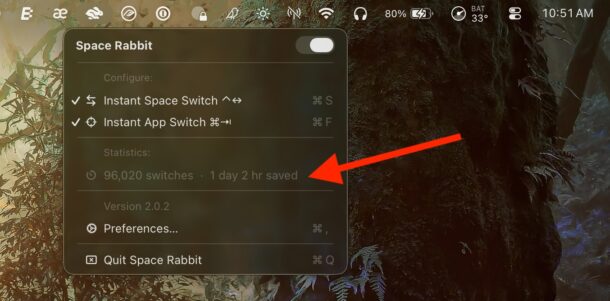
(Screenshot via developer, since their time saved stats are much more impressive than mine having just started using this tool)
The developer @valeriansaliou on X has a little before and after video of Space Rabbit in action, see that embedded below if you want to take a look before giving it a run yourself:
I'm using macOS for more than 14 years now, in a single laptop screen setup with lots of windows open, and I'm using macOS spaces everyday to organize my windows. Switching between spaces is easy: I hit CTRL+arrow left/right, it takes no time. What takes time however, is this… pic.twitter.com/iDv8aWzA70
— Valerian Saliou (@valeriansaliou) August 5, 2026
If you use Spaces on a Mac to create and manage multiple virtual desktops for task switching, focus, reducing screen clutter, or general workspace organization, try out the Space Rabbit app, it just might save you some time in the long run too.