
MacOS Golden Gate 27.2.1 Update with Security Patches & Bug Fixes Released
MacOS 27.2.1 Golden Gate has been released by Apple as a system software update for Mac users. The update includes non-specific bug fixes and security patches, and is recommended for all Mac users running Golden Gate to install.
Separately, Apple has released MacOS Tahoe 26.7.3, MacOS Sequoia 15.8.3, iOS 27.2.1, iPadOS 27.2.1, watchOS 27.2.1 update, and more.
How to Download & Install MacOS 27.2.1 Golden Gate Update
Don’t forget to backup Mac with Time Machine prior to installing any system software update.
- From the Apple menu and go to “System Settings”
- Go to “General”, and then go to “Software Update”
- Choose “Update Now” to install MacOS 27.2.1 in software update
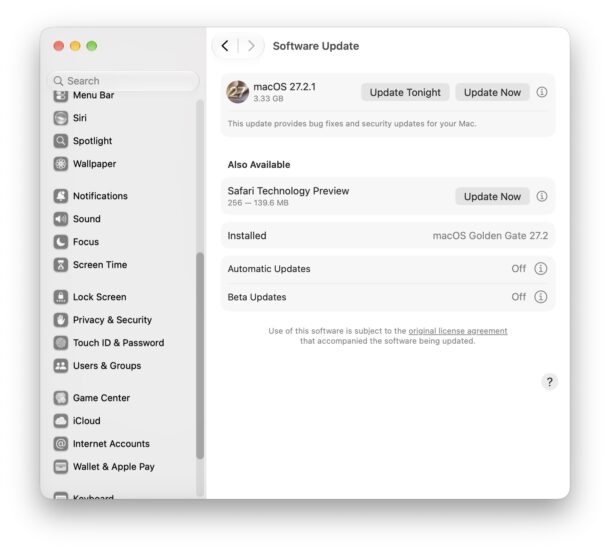
The Mac must restart to complete installation.
The update is a bit over 3GB in size, and can take a while to install.
If you are not currently running MacOS 27 Golden Gate then will instead find an update to MacOS Tahoe or MacOS Sequoia available instead.
MacOS 27.2.1 Golden Gate Full Installer & IPSW Direct Download Links
You can download the full installer or IPSW file for MacOS 27.2.1 from the Apple CDN links below:
MacOS Tahoe 26.7.3 & MacOS Sequoia 15.8.3 Full Installer Download Links
You can also refer to our updated list of available MacOS installers and IPSW files here as a helpful resource.
MacOS 27.2.1 Golden Gate Release Notes
Release notes are short and nonspecific:
This update provides bug fixes and security updates for your Mac.
Don’t forget to update your other Apple devices as well, as basically every Apple device has an update available, including iOS 27.2.1, iPadOS 27.2.1, watchOS 27.2.1, and more.