
iOS 27.2 Update for iPhone & iPad Released

Apple has released iOS 27.2 for iPhone, and ipadOS 27.2 for iPad. These updates include new Siri AI features, along with Siri AI support in new languages, unspecified bug fixes, and security patches, making them recommended for all iPhone and iPad users to install.
Additionally, Apple has also released MacOS 27.2 for Golden Gate users, MacOS Tahoe 26.7.2 update, HomePod OS 27.2 with support for Sound Glow on HomePod Mini and HomePod second gen, iOS 26.7.2, iPadOS 26.7.2, iOS 18.7.11, and iPadOS 18.7.11, tvOS 27.2, watchOS 27.2, and more, so you will want to update all of your Apple devices.
How to Download & Install iOS 27.2 and iPadOS 27.2 Update
Always backup iPhone or iPad to iCloud before beginning system software updates.
- Open the “Settings” app on your iPhone or iPad
- Go to “General” and then go to “Software Update”
- Choose to “Update Now” for iOS 27.2 or iPadOS 27.2
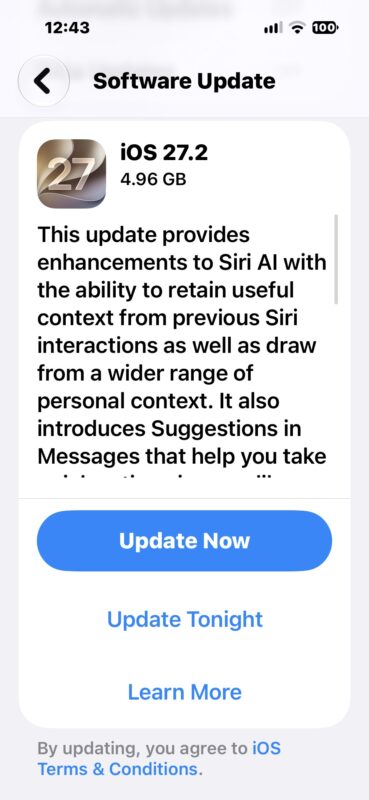
The iPhone or iPad will download, restart, and install the update.
Users can also choose to update manually, or with IPSW files.
iOS 27.2 Update Release Notes
Release notes included with the iOS 27.2 update download are as follows:
iOS 27.2
Siri AI (All iPhone 16 models and later, iPhone 15
Pro, iPhone 15 Pro Max)
– Siri AI can recall your past conversations, so you can ask Siri about something it told you before, like the restaurants it recommended last week
– Siri AI can draw from more sources to give you a great answer, including photos attached in Messages, Calendar event attendees, your voicemails, and better results from Safari history and Reading List
– Excluded Apps lets you choose which apps Siri, Search, and suggestions can access, all from one setting
– Granular text selection lets you select and copy just the part of a Siri response you need
– Siri AI is available in more languages, with support tor French, Japanese, Korean, Portuguese, and Spanish. Siri AI is not available in the EU or mainland ChinaOther
– Suggestions in Messages help you take action based on the context of your conversations, like adding a Calendar invite for a dinner
– Shared Albums in Photos adds the ability to edit captions and comments, to avoid adding duplicate photos, and can display a reminder before albums expire so participants can save important photos and videos
– Support for SynthID watermarking to help identify whether an image was generated or modified with generative tools in Photos and Image Playground
– The Home tab in the Podcasts app offers two separate sections for New Episodes and Continue Playing, letting you find the latest updates from your shows and then pick up where you left off
– Friends tab in the Games app provides context on friend suggestions and shows recent games played on friends’ player pages
– Simple Profiles in the Apple TV app lets everyone in your household have their own profile, with recommendations that fit what they like to watch
– FaceTime supports adding a third party sign language interpreter or live captioner to a call
iOS 27.2 IPSW Firmware Download Links
The links below point iOS 27.2 IPSW on Apple CDN servers:
- iPhone Duo
- iPhone 18 Pro Max
- iPhone 18 Pro
- iPhone Air
- iPhone 17 Pro Max
- iPhone 17 Pro
- iPhone 17
- iPhone 17e
- iPhone 16 Pro Max
- iPhone 16 Pro
- iPhone 16 Plus
- iPhone 16
- iPhone 16e
- iPhone 15 Pro Max
- iPhone 15 Pro
- iPhone 15 Plus
- iPhone 15
- iPhone 14 Pro Max
- iPhone 14 Pro
- iPhone 14 Plus
- iPhone 14
- iPhone SE (3rd generation)
- iPhone 13
- iPhone 13 mini
- iPhone 13 Pro Max
- iPhone 13 Pro
- iPhone 12 Pro Max
- iPhone 12, iPhone 12 Pro
- iPhone 12 mini
- iPhone SE (2nd generation)
- iPhone 11 Pro Max
- iPhone 11 Pro
- iPhone 11
iPadOS 27.2 IPSW
- iPad Pro (M5)
- iPad mini (7th generation)
- iPad Pro 11-inch (M4), iPad Pro 13-inch (M4)
- iPad (A16)
- iPad (A16)
- iPad Air 11-inch (M4), iPad Air 13-inch (M4)
- iPad Air 11-inch (M3), iPad Air 13-inch (M3)
- iPad Air 11-inch (M2), iPad Air 13-inch (M2)
- 11-in. iPad Pro (4th generation), 12.9-in. iPad Pro (6th generation)
- iPad Air (5th generation)
- 10.9-in. iPad (10th generation)
- 11-in. iPad Pro (3rd generation), 12.9-in. iPad Pro (5th generation)
- iPad mini (6th generation)
- 10.2-in. iPad (9th generation)
- iPad Air (4th generation)
- 11-in. iPad Pro (2nd generation), 12.9-in. iPad Pro (4th generation)
Don’t forget to update your other Apple devices as well, most of which also received software updates today.
Wait, iOS 27.2? What happened to iOS 27.1?
As far as versioning and numerical releases go, you may have noticed this is iOS 27.2 and iPadOS 27.2, along with MacOS 27.2 and other OS 27.2 updates… and yes that means iOS 27.1, iPadOS 27.1, MacOS 27.1, and all OS 27.1 releases, were skipped by Apple. Why that is the case is not clear, but if you are confused by missing that interim update, don’t be, OS 27.2 is where we are all at with these updates.





