iOS 7 Beta 2 Available for Download Now, Includes iPad & iPad Mini Support

Jun 24, 2013 - Leave a Comment
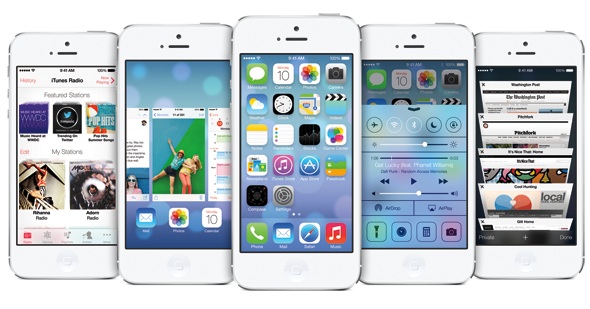
iOS 7 Beta 2

The second beta of iOS 7 is now available to download for registered developers. Arriving as build 11A4400F, this update includes many bug fixes and improvements to the beta release, and is available for iPhone 4, iPhone 4S, iPhone 5, iPod touch 5th gen, iPad 2, iPad 3, iPad 4, and iPad Mini. This is … Read More

How to Boot a Mac from an External Drive or Alternate Startup Disk

Jun 22, 2013 - 23 Comments
Boot a Mac from an External Drive

Certain situations require a Mac to be booted from an external boot volume, rather than the primary startup disk. There are plenty of reasons for booting from external volumes, whether it’s to troubleshoot problems, repair disks, partition, format everything, update, or even reinstall Mac OS X. We’ll cover the two easiest ways to do this, … Read More

Turn Off Automatic Video Playing in Instagram & Save Cell Data Bandwidth

Jun 21, 2013 - Leave a Comment
Instagram settings

Instagram, the popular photo sharing app for iOS, recently added video support that allows users to post filtered videos to their picture collections. Browsing through an Instagram feed now results in quite a few videos that auto-play by default, an aspect which can be pretty obnoxious if you want to keep quiet. Perhaps worse than … Read More

How to Enable & Use the Virtual Keyboard in Mac OS X

Jun 21, 2013 - 30 Comments
Enable the virtual keyboard input in Mac OS X

The Virtual Keyboard feature of Mac OS X is exactly what it sounds like, it’s a software-based keyboard that can be used as an auxiliary onscreen keyboard to type anything on a Mac. These virtual keys are pressable by clicking on them with a cursor, rather than tapping the physical keys on a hardware keyboard. … Read More

3 Best Free Video Converter Apps for Mac OS X

Jun 20, 2013 - 9 Comments
Miro converts video in Mac OS X with ease

There are tons of video converter apps out there for the Mac, many of which are free, and some are paid but priced all too high. We’re cutting through the chafe and giving you three of the best video converter apps that are completely free. Each app also sits at a different complexity and skill … Read More

Unlock iPhone in 30 Minutes: Unlocking is Faster than Ever with AT&T

Jun 20, 2013 - 33 Comments
Fast unlocking an iPhone through AT&T for free

Unlocking an iPhone through AT&T is now lightning fast, and in some cases you’ll have an unlocked iPhone in under 30 minutes. I recently had the chance to experience this directly while writing this article on checking the unlock status of devices, and was impressively surprised by the result. From filling out the initial unlock … Read More

Quickly Copy a File or Folder Path to the Clipboard in Mac OS X

Jun 19, 2013 - 63 Comments
Create a "Copy Path" Service in Mac OS X

There are a few ways to retrieve a file or folders full path from Mac OS X, and we’ll cover the two easiest methods here, and also a third option that utilizes a Service to instantly copy any path to the clipboard. First, we’ll use the Get Info panel to pull any items complete path, … Read More

Watch ESPN, HBO GO, Sky News on Apple TV with the 5.3 Update

Jun 19, 2013 - 1 Comment
Watch ESPN on Apple TV

A new update to Apple TV brings streaming access to several popular TV services and networks, including HBO GO, ESPN, Sky News, Qello, and CrunchyRoll. Versioned as 5.3, the update requires a second or third generation Apple TV, and can be downloaded through iTunes or by using the direct firmware links included in this article. … Read More

11 Simple Tips for Maximizing iPad Battery Life

Jun 18, 2013 - 1 Comment
iPad battery life tips

The iPad already has very impressive battery life and regularly lasts all day, but who wouldn’t want to have their iPad last even longer? With a group of simple tips, you can extend an iPads battery life even further and get the absolute most out of your tablets battery for as long as possible. These … Read More

What the iPhone Symbols & Status Bar Icon Indicators Mean

Jun 18, 2013 - 64 Comments
iPhone status bar icons and symbols and what they mean

Ever wondered what all those status icons and symbols mean that sit in the iPhone status bar, along the top of the screen? You’re certainly not alone, and while some of those little symbols make perfect sense, others can be a bit of a mystery even to longtime iPhone users. Sure, the obvious ones like … Read More

How to Check if iPhone is Unlocked or Not

Jun 17, 2013 - 34 Comments
Check if an iPhone is factory unlocked

An unlocked iPhone means it can use any cellular network, so long as you have a compatible carrier SIM card. Due to this, unlocked iPhones are more valuable and highly desired for both local and international users, because it allows you to use any GSM carrier whether at home or abroad just by swapping out … Read More

3 Ways to View Zip & Archive Contents Without Extracting in Mac OS X

Jun 17, 2013 - 10 Comments
View Archive contents without extraction with BetterZipQL

Wondering what is in that zip file or archive you downloaded, but you don’t want to extract it to find out? Maybe you are hunting around in a see of archives for a specific file you zipped up a while ago, but you’re not quite sure which archive contains it? You can easily peer into … Read More

Dual Boot OS X 10.9 Mavericks and OS X 10.8

Jun 15, 2013 - 3 Comments
Create a dual boot partition for OS X Mavericks

Setting up a dual-boot environment for OS X Mavericks and OS X 10.8 (or even 10.7 and 10.6 if you’re still running an older version of Mac OS X) is easy and allows for a fresh installation of Mavericks to test and develop with. Because the original OS X installation remains untouched, it’s also the … Read More

Set Network Connection Priority in Mac OS X

Jun 15, 2013 - 2 Comments
Change network locations quickly in Mac OS X

For those of us who use several different types of network connections to get online, you may want to take a moment to set the networking service priority in OS X. This insures that a Mac isn’t connecting through the wrong networking interface when multiple network services are available. For example, if you have a … Read More

Evolution of the iPhone & iOS Home Screen

Jun 15, 2013 - 1 Comment
Evolution of iOS iPhone Home Screens

The visual change between iOS 7 and iOS 6 is obviously significant, and this graphic does a great job of showing just how the iOS home screen has evolved over time with the iPhone. Covering versions 1.0 through 7.0 and a time period of 2007 to 2013, it gives an interesting look into how things … Read More

Resolve a “Couldn’t Unmount Disk” Error in Disk Utility for Mac

Jun 14, 2013 - 40 Comments
Disk Utility in Mac OS X

Disk Utility usually works trouble-free, but a frustrating “Couldn’t Unmount Disk” error can halt whatever the attempted task is right in its tracks. This can happen during partitioning, disk verification and repair, and even during formatting, and there’s usually little to no additional information provided as to how to resolve the problem or even what … Read More

Grab the iOS 7 Default Wallpapers for iPhone & iPod touch

Jun 13, 2013 - Leave a Comment
iOS 7 Wallpapers from Beta 1

The visually overhauled iOS 7 beta includes a handful of nice new default wallpapers, two of which are static (the left pink blue dots and galaxy image), and two are animated (the right two varieties of blue and purple vector bubbles). Obviously without iOS 7 you won’t be able to get the animated wallpapers, but … Read More

How to Dial & Convert Vanity Phone Numbers on iPhone Easily

Jun 13, 2013 - Leave a Comment
Dial a number quickly with a tap and hold

Need to dial a vanity number from iPhone? You know, the phone numbers that are listed as letters rather than numbers? These phone numbers are mnemonic and listed as letters and are often called vanity numbers, typically they will be in a format like 1-800-COMCAST, 1-800-MY-APPLE, 1-800-SOS-APPLE, etc, and they are not always automatically detected … Read More

Subscribe to OSXDaily

Subscribe to RSS Subscribe to Twitter Feed Follow on Facebook Subscribe to eMail Updates

Tips & Tricks

News

iPhone / iPad

Mac

Troubleshooting

Shop on Amazon to help support this site