Safari maxing out 7,909.9% CPU – WTF?
Sep 20, 2009 - 12 Comments

Here’s something you don’t see everyday, Safari in an epic freakout and taxing 7,909.9% CPU usage. WTF?

Mac OS, Mac OS X, or macOS, is the operating system that resides on Apple’s desktop and portable computer lineup. Built upon a Unix core, it is easy to use yet highly advanced, extremely stable, and an excellent OS for productivity and creation. Browse through our articles or use the search feature to look for something specific that is pertinent to the Mac operating system.
Here’s something you don’t see everyday, Safari in an epic freakout and taxing 7,909.9% CPU usage. WTF?

MouseOver popups, self-starting blasting audio, auto-refreshing webpages, random sound effects, obnoxious flash ads, resizing of your browser window… oh the web is filled with all sorts of things that are sure to annoy web browsers a world over. Lifehacker came up witha great list of fixes that you can implement in Firefox to reduce the … Read More

Though the Mac is fairly error free and tends to run much more stable than some of the competitors out there, many of us will find a bug or two in day to day usage anyway. Sometimes the bugs are minor, sometimes they’re fairly major and can dramatically impact how Mac OS X or iOS … Read More
For anyone looking to have a great desktop Mac without paying a small fortune, creating a Hackintosh is becoming an ever-popular solution, and building a Hackintosh just got even easier. Assuming you have the supported hardware, this awesome tool from LifeHacker makes creating a Hackintosh Mac even easier by eliminating some of the more complex … Read More

We know that Snow Leopard added some features to Mac OS X, but what about the things that Snow Leopard took away? Waffle has an updated list of things known to be removed from Snow Leopard, and there’s some interesting stuff on there. Here’s what I found to be most interesting (and surprising) that was … Read More

Bonjour is a great service that runs in the background of your Mac to auto-discover network resources, that is, it’s great until mDNSResponder goes haywire. I was recently in a very creatively crafted network environment that made Bonjour absolutely freak out and tax my CPU with a million processes, so I opted to just disable … Read More

Squid is a web caching proxy that is wildly useful for those of us on slower internet connections or anyone that has reduced bandwidth availability, it reduces bandwidth by caching and reusing frequently accessed web pages and works with http and https. Squid has been particularly useful to me on business visits to places where … Read More

Need a PDF Editor for Mac? I did too, and this is what I learned. Adobe Acrobat Pro is great software with some killer features, but it’s expensive. Acrobat is hard to beat in it’s functionality, but if all you’re looking to do is make small changes and edits to PDF files, spending $350 for … Read More

If you’ve looking for the location of your iPhone Backup files in the file system of a computer, then you’ll be pleased to know they’re easy to find even if a bit hidden. Whether you use Mac OS X or Windows, the iPhone backup process is basically the same; iTunes backs up all of your … Read More
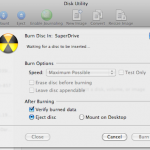
Burning an ISO in Mac OS X is very easy thanks to the built-in Disk Utility application that is included from Apple on every Mac. With Disk Utility being bundled with Macs directly from Apple, it also has the huge added bonus of being free, and although there are plenty of paid options out there, … Read More

The new version of the Remote app for iPhone [iTunes link] has a great social feature that allows party guests with the app installed to connect to iTunes shares, see what’s currently playing, add songs to playlists, vote on songs to be played, and make requests. As the linked posterous blog states: “This is the … Read More

iTunesHelper or iTunes Helper, is a program from Apple that runs in the background and monitors for the connection of any iPod or iPhone to the computer, if an iPod or iPhone is detected it will automatically launch the iTunes application. The functionality is the same on both Mac OS X and Windows PC’s, and … Read More
By default, Mac OS X Snow Leopard boots using a 32 bit kernel. But did you know you can switch between the 64-bit kernel and 32-bit kernel upon boot? This should be useful to advanced users who may need to perform such a feet, though the average Mac use likely has no business forcing one … Read More

Have you ever needed to convert a DMG file to ISO in Mac OS, or wanted to convert an ISO file to DMG on your Mac? Converting image files on your Mac is easy thanks to a command line utility included in Mac OS X called hdiutil.

So you want a small lightweight portable Mac OS X machine, the closest thing Apple has in this area is the MacBook Air which is $1600 or more. No doubt about it, the MacBook Air is a great machine but I don’t want to spend anywhere near $1600 for another laptop when I already have … Read More
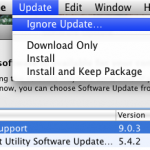
Apple certainly means well with the Software Updates, but sometimes I get update notifications I just don’t care about, or just don’t want to install for whatever reason. If you’re in this situation and you have a version of OS X before the App Store that ran exclusively in a native Software Update window, like … Read More
Ever wanted to know if your Mac is using a 32-bit or 64-bit kernel? It may seem geeky and in the weeds, but it’s now relevant. Snow Leopard 10.6 is the first Mac OS X version to ship with a 64 bit kernel, and obviously your Mac has to have a 64 bit processor to … Read More

TechCrunch has an interesting op-ed piece today about why Snow Leopard is seen as disappointing to some casual Mac users who upgrade. The readers digest version? It doesn’t look or feel different enough. TechCrunch author MG Siegler basically argues that to the average user, changes in the look and feel of an operating system are … Read More




