Tips & Tricks

Tips and tricks for all things Apple! Whether you want to learn tips for a Mac, iPhone, iPad, Apple Watch, or much more, you will find many tricks, tips, tutorials, and excellent walkthroughs for Apple devices and software here.

Search Tips & Tricks

Clear History, Cache, and Cookies from Safari Browser on iPhone & iPad

May 16, 2011 - 23 Comments
Clear History, Cookies, and Cache from Safari Browser on iPhone & iPad

Knowing how to clear browser history, cookies, and cache are absolutely essential for all web users, and this is no different for anyone using an iPhone, iPod touch, and iPad. This is particularly true when you’re using a someone elses hardware or when you’re testing out iterative changes on websites. Keeping this in mind, here’s … Read More

Sort top by CPU Usage to Make it More Useful

May 13, 2011 - 4 Comments
sort top processes by CPU

The top command is a great way to get a quick overview of how your system is performing and how apps are using your resources. If you are unfamiliar with it, it’s basically a command line task manager like Activity Monitor and it shows processor usage, memory usage, disk activity, load average, and other helpful … Read More

Drag & Launch Apps from Finder Window Sidebars

May 13, 2011 - 5 Comments
Drag Apps to Finder Window Sidebar

Just like you can drag your own folders into the sidebar, you can also drags apps into Finder window sidebars for quick access. Once apps are in the sidebar, if you click on them they will launch, which makes desktop windows serve a dual purpose as both file manager and a quick application launcher.

Relaunch Finder… from the Mac OS X Finder

May 12, 2011 - 5 Comments
Relaunch Finder from Mac OS X

Don’t want to dig out the Terminal or Activity Monitor to relaunch the Finder? No sweat. Hold down Option and then right-click on the Finder icon in the Dock. You’ll now see an otherwise hidden “Relaunch” option, select it and Finder will quit and relaunch. It only takes a few seconds to reload. Relaunching the … Read More

iPhone Stuck in Recovery Mode? Get Out Quickly with RecBoot

May 11, 2011 - 23 Comments
iPhone Stuck in Recovery Mode Escape with RecBoot

Whether you’re just trying to update iOS firmware, downgrade, or jailbreak, it’s not terribly unusual for an iPhone to get stuck in Recovery Mode. You’ll know you’re stuck because the phone displays the classic USB to iTunes logo, and iTunes gives you the Recovery Mode detected message. Sometimes you can escape just by hardbooting the … Read More

Video Chatting in the Dark? Brighten Video Chat with a Blank Browser Window

May 11, 2011 - 4 Comments
white browser window to brighten a dark video chat

If you’re video chatting at night or in an area with limited lighting, you can brighten your face by opening up a blank white web browser window. This is obviously a really simple tip, but it’s kind of fun to see how surprisingly useful blank browser windows can be (like speeding up Safari on the … Read More

Launch & Run Multiple Instances of Any Application in Mac OS X

May 11, 2011 - 15 Comments
Run Multiple Instances of Any Application in Mac OS X

You can run multiple instances of any application in Mac OS X with a little command line magic. Using the ‘open’ command to launch GUI apps from the Terminal, we can run a new instance of any app, even if it is already running.

Run Firefox on a PowerPC Mac with TenFourFox

May 10, 2011 - 7 Comments
Run Firefox 4 on PowerPC Macs

TenFourFox is an essential web browser for any Mac OS X user that is still using a PowerPC machine. It’s a fork of Mozilla that is practically identical to Firefox 4, the only difference is that it includes support for PowerPC chips, meaning you’ll get all the CSS3 and HTML5 support that Firefox 4 comes … Read More

Ad Blockers for Chrome, Firefox, and Safari

May 10, 2011 - 19 Comments
Block Ads in Firefox, Chrome, and Safari

While some web ads are unobtrusive, others are really annoying. If you’re tired of seeing web ads, you can install adblock extensions in every major web browser and never see another ad again. Obligatory notice: blocking ads prevents web publishers from supporting themselves, ad revenue is what pays the bills for websites like this one … Read More

Generate Random Passwords from the Command Line

May 10, 2011 - 12 Comments

Some of the most secure passwords you can use are those that are randomly generated. From the command line, you can randomize potential passwords in a multitude of ways, which can be used as secure passwords of generated characters. We’ll cover several primary methods of generating random sequences and then show you how to combine … Read More

Super-Size Dock Icon Magnification in Mac OS X

May 9, 2011 - 2 Comments
Super Size Mac OS X Dock Icon Magnification

For those using larger displays you may wish the Mac OS X Dock icon magnification was greater on the Mac, but it turns out this can be achieved easily with a defaults write command. With a little effort, you can super magnify the size of Dock icons on Mac.

Set TextWrangler to Always Display Line Numbers

May 8, 2011 - 9 Comments
Show Line Numbers in TextWrangler

Want to always show line numbers in TextWrangler documents on Mac OS X? Of course you do! This is a great feature and it’s super easy to enable displaying of line numbers in TextWrangler for Mac:

Get htop for Mac to Watch & Manage System Resources, CPU, Memory, etc

May 6, 2011 - 13 Comments
htop for Mac

If you like to keep an eye on system resources and you want to branch out from the GUI Activity Monitor, check out htop for Mac. htop is basically a significantly improved version of top, which lets you monitor system resources, CPU core load, memory use, load averages, and view and manage individual running processes. … Read More

Add Your Own Folders to the Finder Sidebar in Mac OS X

May 5, 2011 - 14 Comments
Add Apps to Mac Finder Sidebar

Want to add your own folders or items the Mac OS X sidebar to customize it a bit more, perhaps by adding shortcuts to your most recent work, or a regularly used folder, directory, or drive? A great way to do this is by adding your own specific folders to the Finder sidebars. There are … Read More

Access Folders from Finder Windows with a Custom Toolbar

May 4, 2011 - 6 Comments
Mac Finder custom toolbar folders

This is a neat Mac trick I accidentally discovered: not only can you launch apps from the toolbar of a Finder window after placing them there, but you can drag folders into any Mac OS X Finder window toolbar as well, and it will stick there allowing for easy access. The do this yourself, you … Read More

MemTest for Mac OS X Tests your RAM

May 3, 2011 - 55 Comments
MemTest for Mac

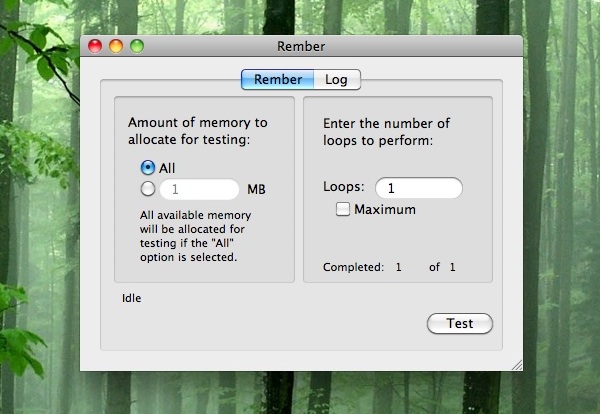
If you have recently upgraded your Mac RAM, or if you are experiencing strange system crashes, it’s a good idea to test your memory modules integrity using a free tool called memtest. Essentially, memtest is a utility designed to stress test RAM for errors. Without getting overly technical in the explanation, memtest works by writing … Read More

Take a Timed Screen Shot in Mac OS X

May 1, 2011 - 16 Comments
Timed Screen Shot in Mac OS X

You can take time delayed screenshots in Mac OS X easily by using the Grab utility or the Terminal app, included with every Mac OS X version. We’ll cover taking timed screen shots in Grab first because it’s more user friendly and doesn’t involve the command line which is a bit more technical, and then … Read More

Show What Apps & Processes Are Using an Internet Connection via Command Line in Mac OS X

Apr 29, 2011 - 3 Comments
Mac Wi-Fi Tool

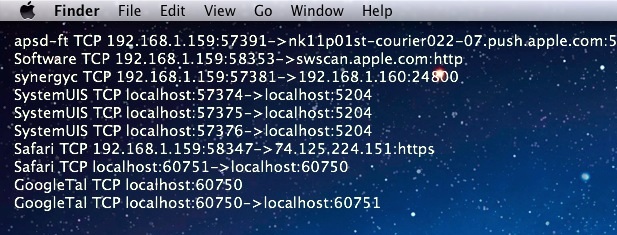
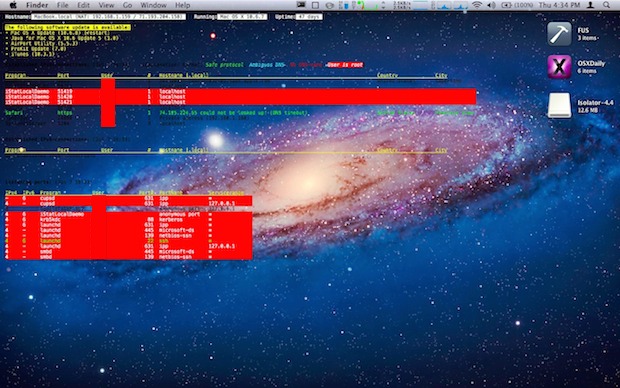
Much like you can monitor Mac OS X filesystem usage through the command line, you can also discover what apps and individual processes are currently using your Macs internet connection. This is a really handy trick if you know your bandwidth is being used by something, or if you’re just trying to track down what … Read More

Subscribe to OSXDaily

Subscribe to RSS Subscribe to Twitter Feed Follow on Facebook Subscribe to eMail Updates

Tips & Tricks

News

iPhone / iPad

Mac

Troubleshooting

Shop on Amazon to help support this site