Tips & Tricks

Tips and tricks for all things Apple! Whether you want to learn tips for a Mac, iPhone, iPad, Apple Watch, or much more, you will find many tricks, tips, tutorials, and excellent walkthroughs for Apple devices and software here.

Search Tips & Tricks

Stop Mac OS X from Shutting Down by Quickly Launching an App

Jan 25, 2011 - 1 Comment

If you’ve ever accidentally shut down your Mac, you’re not alone. That dreaded feeling when everything starts closing when you didn’t mean to reboot, ahh! But don’t freak out, there’s an incredibly simple way to stop the shut down process in OS X! All you need to do to stop a Mac shutdown is immediately … Read More
Set a Screensaver as Desktop Wallpaper in Mac OS X

Jan 22, 2011 - 25 Comments

Using a Terminal command, you can turn any screensaver into your background wallpaper on the Mac. In the screenshot above I have the iTunes Album Art screensaver running as the Mac OS X desktop, but you can choose any screensaver you want. Here’s how to do this: Launch System Preferences Click on Desktop & Screen … Read More

How to Password Protect your Mac

Jan 21, 2011 - 7 Comments

There are several steps to password protect a Mac, we’ll cover the essentials so that if someone is to turn on your Mac, wake it from a screensaver, or wake from sleep, they will be required to enter a password in order to use the computer.

Show Print History in Mac OS X

Jan 20, 2011 - 22 Comments

You can check your entire print history in Mac OS X by accessing the browser based CUPS utility. This is a very helpful tool for managing printing as well as tracking down origins of printed items, and it works on all versions of Mac with all printers.

How to Add a Spacer to the Mac OS X Dock

Jan 19, 2011 - 6 Comments

You can add blank spacers to the Mac OS Dock as a way of customizing the appearance a bit. This is accomplished by issuing a defaults write command in the Terminal. Each spacer is about the same width as an icon would be, except nothing takes the place of the space, it simply separates other … Read More

Lock a Mac Screen

Jan 17, 2011 - 49 Comments

Any time that you are away from your computer, it’s a good idea to lock the screen. This provides a level of privacy and security to the Mac that is very easy to use and implement and it should be considered a must-use trick, particularly for anyone working in public spaces, offices, schools, or anywhere … Read More

Automatically Accept FaceTime Calls in Mac OS X

Jan 17, 2011 - 25 Comments

FaceTime is the video chat protocol available to Mac users in OS X as well as iOS for iPhone and iPad, and it works great to beam images from one camera to another device over the internet. One lesser known feature that is hidden from the general usage of the Mac FaceTime app however is … Read More

How to Update Apps from the Mac App Store

Jan 16, 2011 - 7 Comments

When an update is available for any Mac app that has been installed through the Mac App Store, you will notice the App Store icon in Mac OS X gets a numerical badge on it, indicating the number of software updates available. Additionally, you will notice the the App Store entry within the  Apple … Read More

Disable the Apple Remote Control

Jan 15, 2011 - 11 Comments

The Apple Remote Control used to be bundled with all new Macs, but unless the remote is paired specifically to your Mac a single remote can control multiple Macs at the same time. This is annoying if you’re trying to control a single Mac with the remote and suddenly FrontRow is activated on all other … Read More

Tweet from anywhere in Mac OS X with Twitter for Mac

Jan 14, 2011 - 7 Comments

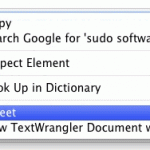
The Twitter for Mac client has a great feature that lets you send tweets from just about anywhere in Mac OS X, including the Finder. I’ve tested this out in the Mac OS X Finder, iTunes, Chrome, Safari, iChat, TextEdit, Terminal, and can confirm that this works all over the place. To access the ‘Tweet’ … Read More

Turn Off the MacBook or MacBook Pro Screen with the Computer Still On

Jan 14, 2011 - 26 Comments
OS X El Capitan on a Mac

You can turn off the internal MacBook Pro screen and still use the computer as long as it’s hooked up to an external display, and no you don’t have to use it in clamshell mode to achieve this. Here are two ways to keep your Mac laptop with the lid open but the internal display … Read More

Check and Install Mac OS X Software Updates from Terminal

Jan 13, 2011 - 19 Comments

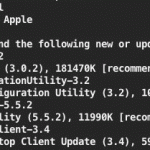
Want to update Mac OS software from the Terminal? You can check for available updates, ignore packages, and install any or all Mac OS X Software Updates directly from the command line. To see what updates are available for a Mac, or to install a software update from the Terminal of Mac OS X, amongst … Read More

Quickly Access System Preferences Using Option & Function Keys

Jan 11, 2011 - 6 Comments

If you want to quickly access the Mac OS X System Preferences, you can do so with an indirect keyboard shortcut trick by holding down the Option key and then hitting various function keys. This jumps directly to the System Preference panel corresponding to the function key. For example, Option+Brightness pulls up the Display preference … Read More

Enable Mac App Store Hidden Debug Menu

Jan 10, 2011 - 7 Comments

The Mac App Store includes a hidden Debug menu that can be enabled with a simple defaults write command. The menu includes a variety of interesting options and tweaks that are clearly intended for internal development purposes.

How to Uninstall Flash from a Mac

Jan 9, 2011 - 13 Comments

Want to remove and uninstall Flash Player from a Mac? Some users install Flash but later decide they do not want the app and plugin on their Mac, thus will want to remove it. Adobe Flash Player is known to cause a slew of issues, slowdowns, battery drain, crashes, and other problems for Mac OS … Read More

How to Enter iPhone Recovery Mode with iPhone 6s, 6s Plus, 6, 6 Plus, iPhone SE, 5s, 5, 4s, 4, etc

Jan 8, 2011 - 72 Comments
iPhone Plus

Sometimes things go wrong and you need to put your iPhone into Recovery Mode to restore it and get it working again. It turns out that Recovery Mode is what your iPhone goes into when you are doing a standard iOS upgrade or restore anyway, but you may want to put your iPhone into recovery … Read More

Convert video to iPod, iPhone, iPad, Apple TV easily with Handbrake

Jan 4, 2011 - 5 Comments

Handbrake is famously known to allow you to rip DVD’s but the new version also works wonders as a video conversion tool to get your favorite videos and movies onto your iPod touch, iPhone, iPad, and Apple TV. If you’re new to video conversion, don’t worry, Handbrake is extremely easy to use and it’s free … Read More

Customize the Mac Login Screen Easily with Ravissant

Jan 3, 2011 - 12 Comments
Retro rainbow Apple logo

If you want to customize your Mac OS X login screen but don’t feel like getting your hands dirty mucking around in system files the old fashioned way, check out a free app called Ravissant.

Subscribe to OSXDaily

Subscribe to RSS Subscribe to Twitter Feed Follow on Facebook Subscribe to eMail Updates

Tips & Tricks

News

iPhone / iPad

Mac

Troubleshooting

Shop on Amazon to help support this site