Mirror an iPhone or iPad Screen to a Mac through AirPlay with Reflection
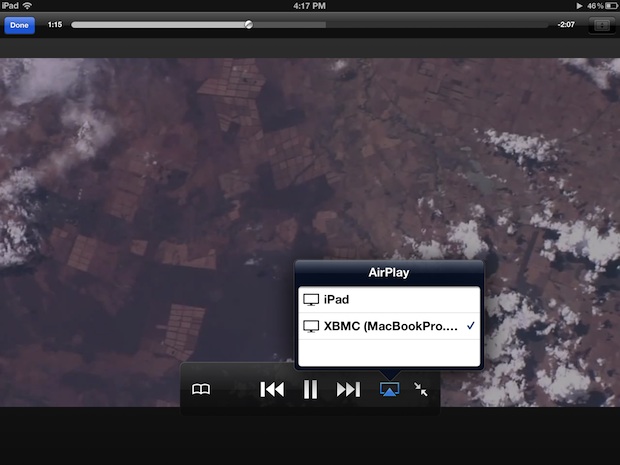
Reflection is a great new app for OS X that mirrors an iPhone or iPad display directly to a Mac by way of AirPlay.
iOS is the mobile operating system that runs on iPhone, iPad, iPod touch, and other mobile hardware from Apple. Though it may look differently and run on different hardware, iOS is based upon a highly modified variation of Mac OS, the desktop operating system software that runs on Macs.
Reflection is a great new app for OS X that mirrors an iPhone or iPad display directly to a Mac by way of AirPlay.
By far the easiest way to sync an iPhone to a new Mac or Windows PC is to transfer all iPhone files and backups from the old computer to the new one. The necessary data is stored in several different locations, and we’ll cover what files and where they go for both Mac OS X … Read More
Deleting a group of emails in iOS Mail is fairly straight forward, it entails manually selecting each specific email you want to delete, and then relocating them to the Trash. This process of deleting multiple emails is the same on Mail app for iPhone, iPad, and iPod touch. We’ll cover the exact steps to take.
If you’re suffering from email overload, sometimes the easiest thing to do is just mark everything as read and start over again. While there is no select all or mark all as read option in iOS, you can mark multiple emails as read on the iPhone, iPad, or iPod touch as long as you select … Read More
Adobe has released the first real version of Photoshop for the iPad, called Photoshop Touch. The app is impressively featured and includes much of what you’d expect from Photoshop, including full layer support, all the standard color adjustments tools, a wide variety of filters, and many of the standard selection tools and brushes that make … Read More
Wondering if a particular contact or person is using iMessage? You can find that out rather easily from an iPhone, iPad, or Mac. iMessage is a great addition to iOS and Mac OS X that lets you send unlimited text messages, pictures, videos, documents, and even files, between other iMessage users. Though you probably know … Read More
Miss a phone call? Rather than tapping through to the recent call log and finding the last caller, you can immediately return a missed call by swiping to the right on the phone icon alongside the callers name, directly from the iPhone lock screen. You’ll need iOS 5 or later and Notifications Center must be … Read More
Need to quickly transfer contacts to an iPhone without using iTunes or connecting the iPhone to a computer? The easiest way to do this is by emailing a vCard file containing all the contacts to the phone, these .vcf files can be exported from many other phones, another iPhone, Address Book, Google and Gmail, Yahoo, … Read More
Remember that retro iOS ’86 concept theme for iPhone that popped up recently? We were hoping it would become an iOS theme, and it has. To use the iOS 86 theme you’ll need to jailbreak your iPhone or iPod touch running iOS 5.0.1, here is how to do that with absinthe for iPhone 4S, or … Read More
iOS has an optional system wide zoom ability accessible by a gesture, much like OS X’s zoom feature. This allows any iPhone, iPad, or iPod touch user to zoom into elements or text on screen, making them much larger and easier to read, interpret, or access. To use the extra zoom gestures on an iPad, … Read More
Want to see more of an email than the default two lines of body text? Don’t want to see any preview of email contents, other than the subject of a message? If you’re not happy with the default setting, you can change the line count of mail previews within iOS easily: Tap on “Settings” Tap … Read More
A little-known feature of iMessage lets any Mac send files to another iMessage user (or yourself) using an iOS device, and vice versa. Yes, this means iMessages can function as a full-fledged file transfer app for both Mac OS and iOS users, providing for simple transferring of files, pdf’s, text and rtf documents, movies, pictures, … Read More
If you want to delete all music from an iPhone, iPad, or iPod touch, you can handle the entire music removal process directly on the iOS device itself, you don’t need to sync to iTunes or do anything fancy. Do be warned however, this deletes every single song and album from the Music app and … Read More
Growth of iOS, the mobile operating system that powers iPhones, iPads, iPod touch, and Apple TV, is exploding. To put iOS’s success into some context, Asymco crafted the above chart to demonstrate the growth curve relative to years of Apple products on the market. The most staggering observation? Apple sold 156 million iOS devices last … Read More
You can prevent the installation of new apps onto an iOS device by enabling a restriction setting. There are plenty of reasons to want to disable app installing, but this is a particularly effective kid-proofing feature before letting a youngster use an iPhone, iPad, or iPod touch to prevent any accidental charges or purchases. Disable … Read More
Rarely, you will need to force quit an iOS app. While iOS is generally very stable, every once in a while you’ll encounter a third party app that misbehaves. iOS apps can freeze or become stuck, and you’ll usually know instantly because the iPhone or iPad becomes unresponsive to touch behavior, or something within the … Read More
Update 2/22/2012: Want your iPhone to look like this? Here’s how to install the iOS 86 theme on an iPhone and iPod touch! What would iPhone’s iOS look like had it been made in 1986? Maybe this, and it looks awesome in that retro sort of way. This is just concept art from a few … Read More
Photo Stream is a nice feature of iCloud that pushes all of your pictures automatically to your other iOS devices and your Mac with iPhoto or Aperture. If you haven’t used it before, this means if you take a picture on your iPhone, it will automatically show up in the Photo Stream on your iPad, … Read More