
List All Mounted Drives and their Partitions from the Terminal
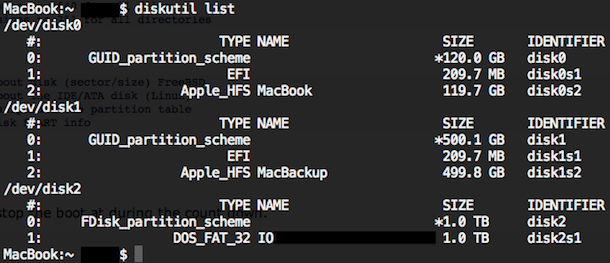
To list all mounted drives and their accompanying partitions from the Terminal on Mac OS X, you can use the diskutil command with the list flag. This approach will display all disks, drives, volumes, and containers on any drive connected to the Mac, including boot volumes, hidden volumes (like the Recovery partition), empty volumes, unformatted drives, and all other disks.
How to List All Mounted Drives, Partitions, Volumes on Mac via Command Line
This is easily done at the command line by typing the following command:
diskutil list
Hit return to see the results, showing all mounted volumes, drives, and their respective partitions.
This will give you feedback displayed like the following, listing out the mounted drives, their volume names, the size of the drive and partitions, their partition types, and their identifier location:
$ diskutil list

/dev/disk0

   #:                       TYPE NAME                    SIZE       IDENTIFIER

   0:      GUID_partition_scheme                        *121.3 GB   disk0

   1:                        EFI                         209.7 MB   disk0s1

   2:                  Apple_HFS Macintosh HD            120.5 GB   disk0s2

   3:                 Apple_Boot Recovery HD             650.0 MB   disk0s3

/dev/disk1

   #:                       TYPE NAME                    SIZE       IDENTIFIER

   0:     Apple_partition_scheme                        *21.0 MB    disk1

   1:        Apple_partition_map                         32.3 KB    disk1s1

   2:                  Apple_HFS Sample-OSXDaily-Drive 1.2.6            20.9 MB    disk1s2
This is also demonstrated in the screenshot shown above with a much more accurate representation of formatting, when it is printed in your own terminal it will display nicely in tables, making it easily scannable and readable.
Note that all containers and/or all partitions are shown through this command, including hidden partitions like the Recovery HD, the EFI partition, reboot, and partition map and scheme information.
Alternatively, you can use the ‘df -h’ command at the terminal to list mounted file system partitions.
If you know of another handy approach to list out all drives and volumes connected to a Mac, share with us in the comments below!






Perfect, thanks for the help. Solved an issue i was seeing with upgrading firmware on Viltrox lenses and Fringer adapters using Ventura.
Had to play around a bit to find the volume name for the external drive but diskutil list was all I needed.
Cheers
[…] output is obviously much shorter than the full output of diskutil list which we showed […]
+1 pour df -h
Diskutil does not show ALL mounted drives. Diskutil only shows local disks.
To see all mounted partitions, use df (or df -h for human-readable partition sizes.)
Bill your comment help me a lot thanks
Thx a lot. Even in 2018 macos have these bugs.
df -h saved my day!
repaired,
`diskutil list` will list all volumes now (at least from 2020)
By the way,
`diskutil list external/internal` to list external or internal only.