
How to Backup your iPhone to iTunes
 Backing up an iPhone is important because it allows you to recover all of your personal data, apps, and stuff, if you ever need to restore the iPhone, upgrade it, or replace it with a new phone, all of which is done by restoring from the backups that are made. By default your iPhone will automatically sync and create a backup itself, and this can be done one of two ways. The first backup method is handled by iTunes each time your iPhone is connected to your computer through USB. Otherwise, newer iPhones will automatically back up through iCloud if that feature has been enabled, and those iCloud backups happen anytime the device has been plugged into a power source and is on wi-fi.
While the automatic backups are extremely useful and you should always use at least one of them, be it iTunes or iCloud, you can also initiate an instant backup of an iPhone manually. These self-started backups can be made from either iTunes or iCloud very easily, here is how to do either.
How to Backup iPhone with iTunes
Initiating a backup with iTunes is often the fastest method because the tethered USB connection is quick and doesn’t rely on the speed of internet service.
- Plug your iPhone into your computer
- Launch iTunes
- Select your iPhone within iTunes from the devices list
- Choose “Back Up” at the summary screen, or optionally right-click on your iPhone and choose “Back Up”
- Wait for iPhone backup to complete
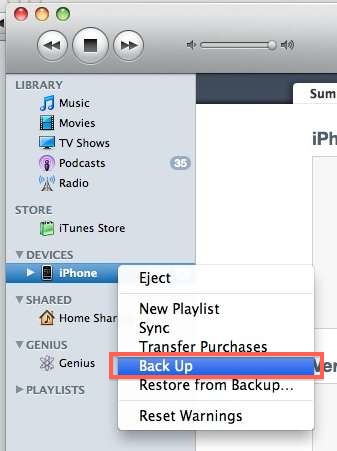
This will create a backup of your iPhone that you will be able to restore from later, and the procedure is the same in Mac OS X or Windows. It is a good idea to create a current backup before you download and install the latest iOS version.
There is no limit to the amount of backups that can be made through iTunes, you could technically have a thousand of them if your hard drive capacity would support it. Additionally, you can have backups stored both on a computer as made through iTunes, in addition to iCloud, which is the backup procedure we’ll cover next.
How to Backup iPhone to iCloud
Backing up to iCloud is very easy and can be started manually at any time. The potential downsides to iCloud backups are the limited base storage (5GB) which fills up quick without paying for more, and, perhaps more importantly, is that iCloud backups are dependent on the speed of the internet connection. Thus, if you’re on a slow network or do not have network access, you will need to use the iTunes backup approach instead.
- Connect the iPhone to a power source and make sure it is on a Wi-Fi network
- Open Settings, then go to iCloud, followed by “Storage & Backup”
- Tap the “Back Up Now” option to start a new backup from the iPhone to iCloud
While you are in the iCloud Backup settings screen on the iPhone it’s a good idea to enable the service if it hasn’t been turned on yet, this is done simply by toggling the “iCloud Backup” switch to ON.
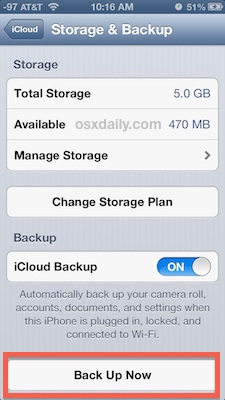
To use iCloud backups you must have an iCloud account set up and configured on the iPhone, and available space on that iCloud account for the backup.
Does this work to backup my iPod touch or iPad too?
Yes, these backup procedures are exactly the same for all iOS devices, whether backing up an iPhone, iPod, iPod Touch, Apple TV, or iPad, it is all the same process and handled through iTunes or iCloud in the exact same manner.
Additional iPhone Backup Resources
* How to restore from a backup made either from iCloud or iTunes
* How to speed up slow iPhone backups
* Find the location of iPhone backups and access the files directly






“There is no limit to the amount of backups”
should be
“There is no limit to the number of backups”
grammar is important.
This is infamous GCjenkins my iPhone 7is 🔥 lit but I need my iCloud cleared from being backed up
My iPhone 6 has a problem on iCloud please help me how to sign out without Apple ID and password
I have an I phone 6 and this is my first I phone… I use my phone in place of a computer and find it not only very very frustrating to do what was very simple on my galaxy. Example : I have just been prompted to backup my phone… impossible without computer or wifi….sigh
My iPhone#5 is disabled with failure attempt of passcode how i can resolve this problem without losing data or with losing data?
Best
I can’t update my iPod.
still cannot ,apps problem or phone problem?
[…] unlock you’ll need a USB connection and a computer running iTunes. First you’ll want to backup the iPhone, then insert a valid SIM card into it and restore the iPhone as new with iTunes to […]
[…] with any other iOS update, downgrade, or modification, you should back up before beginning. You can do that with iTunes to the computer, which is often faster since […]
[…] out of harms way. I get it. A replacement iPhone is only $230 on eBay (and you should be properly backing up your iPhone anyway). A less expensive alternative would be to purchase a Lifeproof […]
I’d use CopyTrans Contacts to back up my iphone contacts. Why? Because the backup made via iTunes requires you to restore your whole iphone data and settings to a previous state.
[…] losing any of your personal data. To err on the completely safe side, you may want to manually back up to the computer with iTunes in addition to a remote backup with iCloud, guaranteeing a reliable backup is […]
[…] to backup to iTunes or to iCloud before […]
Icloud
TO: Ehab Magdy- Hi you need to delete the duplicated contact you cont do nay think for that:)
I have a problem with my icloud contacts being duplicated can anybody please help me remove the duplicates ?
Hi you cont do any think for that duplicated contacts you just need to delete one bye one:)
[…] Wait! Back Up First: Before beginning any iOS update, it’s a good idea to back up your device. The easiest way is with iCloud, which can be done through Settings > iCloud > Storage & Backup > Back Up Now, but you can also backup through iTunes. […]
Mine doesn’t allow me to choose Back up when i right click on my iphone under devices. why is it? does it always automatically do the back up when you plug it in?
[…] the iOS device to the computer and perform a backup by right-clicking and choosing “Back Up”, let this finish before […]
[…] final step performs a manual backup with iTunes and stores that backup on the local […]
[…] iCloud you won’t have this option because the apps will not be stored locally. You can always backup locally in addition to iCloud to prevent that being an […]
Thank you for this guide. I feel stupid as I did not know this function existed at all. Is there also possibility to only backup the iPhone contacts – without the rest of my iPhone data?
Yes you can do that with Address Book application
Use a dedicated program. There are many if you are on PC – use CopyTrans Contacts to backup your iPhone contacts. If you are on Mac, the native Address Book application will help you achieve that.
[…] your iOS gear. If you decide to turn this off, get in the habit of manually backing up to iCloud or manually backing up to the computer through iTunes itself, otherwise you will be lacking a backup if something goes wrong and you need to restore the […]
i have an iphone 4 with ios 5 and everytime i go to back up everything it comes up with the message on my itunes “itunes could not back up the iphone “iPHONE” because the backup was corrupt or not compatible with the iphone. do you have any suggestions?
I need help I want to restore my backup but when i click in the right button i cannot see ” restore my backup” in the list
[…] Backup your iOS device before proceeding, you can do this manually with iTunes. […]
[…] reset process will remove all data on the device, you will want to backup the iPhone manually or to iCloud just in […]
[…] in mind that I personally do a manual backup of my iPhone before ever doing any major upgrade as in the past I’ve run into some issues. Note […]
[…] Make sure you backup your Iphone or Ipad before updating your device. (How To Backup Your Device) […]
So what if i haven’t put iTunes on my computer ? Its there another way to back up my iPhone?
[…] you will likely encounter errors in various places, plus it will make it impossible to sync and backup iOS hardware like an iPhone or iPad. Basically, if you don’t have a good reason to be removing iTunes, […]
thank you sooooo much!!!
[…] backed up everything on my iPhone. I went ahead and factory reset the iPhone, which may not be necessary, but […]
you will everything this is dummm thing to do
no itz not u r dummmm hrhrhr
Transfer and backup iPhone songs/videos/contacts/SMS/books to computer
more:
G’day, I can’t see the “Backup” option on iTunes to 10.1.0.56 for my iPod Gen2 8GB. Plus there is no backup existing in my “…\application data\…\backup” directory.
Damn satellite cut out halfway thru update by iTunes so I direct downloaded iOs 4.2.
Any ideas to fix?
If you want to backup/analyze your iPhone, you can get the DataPilot software.
How to back up notes and calendar on iphone to computer? Does the ‘Back Up’ on itunes also back up these two automatically?
[…] Greenpoison might bar UltrasnOw from ever operating! Step 1: First, before you do any jailbreak, backup your iPhone 4 Step 2: Download Greenpoison From here or visit http://www.greenpois0n.com Step 3: Switch off you […]
[…] you notice that the last synced time is not particularly recent, you just need to backup your iPhone more often! Keeping frequent backups is a good idea across all devices, whether its your Mac, PC, […]
Thanks for this sharing this tip… The tutorial is very simple yet comprehensive…
[…] First, before you do any jailbreak, backup your iPhone! […]
[…] iPhone/iPod Touch usage is to completely restore the iPhone through iTunes. Remember to sync and backup your iPhone otherwise you will lose your contacts, settings, music, and other […]
[…] private data on the device that you don’t want in front of some prying eyes. Just be sure to backup your iPhone before enabling something like this, just in […]
[…] you should backup your iPhone with iTunes just in case something doesn’t […]
[…] access these locations directly unless your iPhone is jailbroken! Without a jailbreak you have to backup your iPhone normally since you can not access these […]
[…] can also sync your photos using just iTunes on either Mac OS or Windows but that is more for iPhone backup […]
[…] can also sync your photos using just iTunes on either Mac OS or Windows but that is more for iPhone backup […]
[…] iPhone/iPod Touch usage is to completely restore the iPhone through iTunes. Remember to sync and backup your iPhone otherwise you will lose your contacts, settings, music, and other […]