
Create an iTunes Account Without a Credit Card
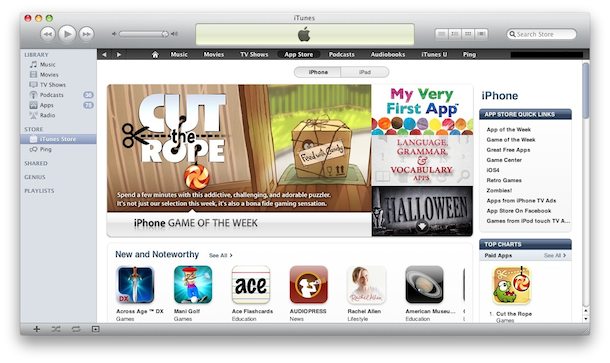
Updated 5/9/2012: If you don’t have a credit card you can still create an iTunes account. Effectively this is creating a free iTunes account, with access to download all the great free apps and other free content from the App Store.
Setup iTunes Account Without a Credit Card
This is the process to create an iTunes account with no credit card for payment:
- Log out of any existing iTunes accounts
- Launch the App Store from iTunes or by clicking a link to a free app
- Find and select a free app (Remote is a free app from Apple, for example)
- Click on “Free App” to purchase the free app
- Click on “Create New Account”
- Click on Continue and create a new account as per the directions
- You’ll soon see a Payment Options menu, select “None”
- Verify the newly created account with the email address you provided
- Your new iTunes account has been created – with no credit card!
 The process is the same from your iPhone or iPod/iPad too, just go through the processes of creating a new account and just be sure to select “None” as the payment option.
As stated before, the account can download any free content, but will be prompted for a credit card if an app costs money. This is a great iTunes solution to provide children with, giving them access to all of the freebies on the App Store, but avoiding any potentially high credit card bills.






tnx for ur help i real apritiate
Hi, i forgot my iphone6 Apple id and password so any software can’t download and my mobile software can’t update. Please help me thanks
Rsjtghnfsgj
You really make it seem so easy with your presentation but I find this matter to be actually something that I think I
would never understand. It seems too complex and very broad for me.
I’m looking forward for your next post, I will try to get the
hang of it!
[…] the country of choice, and you can also switch countries with iTunes accounts that have been setup without a credit card on file and download free apps and music […]
Using iphone 4s (did not work on laptop) I followed the instructions and the ‘none’ payment method DID show. Installed a .com free app which I couldn’t from the UK store. itunes help was not helpful. Had to set up a fake itunes id and address from US.
[…] iTunes and be sure to have an iTunes Account setup – note, kids can create aone without a credit card on file and still take advantage of […]
first change your region to united states
second find the app you want to download and click free
third click create new account
put in your email address and questions then when you click continue none should appear.
(make sure you have a valid address in the united states)
there is none option even after i switch to us… plzz help???
After making my new account so that I can update my existing apps without going through a credit card, I signed back in with my new app ID and tried to update my apps but it forwarded me back to billing all over :( is the app that I’m trying to download not free anymore so now it’s making me pay???? Help !!!!
If it can help ppl, my personnal experience.
Logout from Apple ID, and stop iTunes,
Use the free “Tunnel Bear” on computer, set to “US”.
DISABLE any other internet connection from any other source (computer, phone, tablet…) because they share the same IP.Better safe than sorry.
Use iTunes on your computer ONLY.
Use a regular email address provider, not a junk one.
Trace your own IP (google search) to know where the Tunnel Bear US City VPN is.
Generate a fake profile (google search) from the same City than VPN one.
Register AND validate profile before cutting Tunnel Bear.
With all those precautions, it worked for me (France to US).
But without, i always got “contact iTunes support blah blah”
Good luck !
hey, i want to create an account but this is not accept the password whatever i trying password but it is not accept my password ? please help me thanks
hey, i’m creating my account, but its only show vis,mastercaed and amex as a choise. so how can i solve it? please help me
So I finally passed it but then it said please go to iTunes services to finish to form wat do I do !!!!!!!!
i try to create avvount without credit.but its not working.why…?its saying please contact i tunes support to complete this transaction..what can i do now
Mine too
oooh thank you sooo much…. but it works only if u go to purchase something free. i was trying and trying until i came across your post and read in the comments that it works if u try to purchase a free app and it did for me. im in india and it was not accepting my debit card!!!
p.s.
my country is Australia, I don’t know if it depends on country or not!?
worked on itunes 10.6.3.25.
Thank you so much!!!!!!! :)
hi when i do it itunes want me redeem code what should i do???/
I could not make user ID on my iPhone also not show without credit card option please tell me how to create new user ID.
it only works on other states like singapore :)
I’m from Myanmar. In our country, there’s no credit card even when we want to buy! And I followed your procedure, but after filling all that requirements, they asked me to choose country, and I cannot find Myanmar!! Only Malaysia for ‘M’ alphabet! How should I do now??? I’m dying for this!! Please help me out! ;_(
Try to open a link from a free app and make the free account from there. If you can’t select your country, maybe try a neighboring country instead? Not ideal but hopefully Apple will include Myanmar soon, unless they labeled it as Burma?
I’Ve got an iphone ios 5.0 can someone explain to how i can create my apple id without a credit card?
Open a link from a FREE APP and then follow the instructions up top
It not working piz help
what?!?!?!
[…] up to use the App Store requires a credit card, right? Wrong. We showed you how to use iTunes without a credit card, and it turns out you can do the same thing with the iOS and Mac App Store. This is a perfect […]
Ok I have a iTunes account with a credit card but I redeemed a iTunes gift card on it I have done it before now when I do it a second time it says I need a security code from my credit card and I put it in and it’s still not working but I already have an iTunes card on that account but it still need info from my credit card! Please help!!!!!!!!!!!!!!!!!!’
This is stupid I can get not 1 app because of this
I Have iPhone-3g;how I create apple Id without credit card?I was try to change my location in india to usbut no none option in shown of payment method!Please give me suggestion in how create in my iPhone-3g devce only.
I have an account on itunes and I only have to verify it but my ipod isnt giving me the none option again so i can verify my account. what should i do ?
ok, so i clicked the none button..but it says i have to fill out billing information…does that mean it will still bill me, even if the app is free or i have a gift card?
OMG! IT DOESN’T HAVE AN “ON” BUTTON. I REALLY WANTED TO DOWLOAD SOME OF THE GAMES. PLS HELP ME!!!!!!
first time, you must set ur country to United States.
second, choose free application to install like ‘twitter for iphone’, clik install until you see login/ register screen..
third, try to register, the ‘none’ option will be shown.
if you want to create an account without a credit card on the new itunes, you should buy a 10 dollar itunes card and have it handy. Go to create a new account as usual, but instead of putting in a credit card, there will be an option saying ‘itunes code or redemption number’ or something like that, just below the credit card place. enter the code from the itunes card and click continue. If nothing happens, it should have already made your account, but keep waiting to see if anything happens. If nothing happens, go to create new account again and type in your details and if it says ‘username not available,’ this means that obviously your account was successful. You will now have 10 dollars credit on your account, and after that, you still have an account to which you can use for anything! Hope this helps.. had to figure this out by myself..
Thank you so much! I used an iTunes card but when it wouldn’t continue and kept asking for the credit card number i lost all hope! Then i read your comment and signed in again, and TA-DAH i finally had an account!
this thing rocks! :D ty ty ty! :D
Hi there…thank you so much for the tips. It works for me from ethiopia Thanks a lot for sharing
Cheers!
Hi there…thank you so much for the tips. It works for me from Singapore.
Thanks a lot for sharing
Cheers!
Payment option of none not available.
However if you first set up with a credit card and and then later edit the account you will be able to select none as a payment option.
[…] can apply gift cards to iTunes accounts without credit cards, allowing for a simple budgeting […]
No ‘none’ option…
I know! Its s annoying how come other people get it but not me, you and other people. GOSH!
used the app-store on my mac and still no ‘none’ option.
[…] be it to access international app stores and their different content offerings, having another iTunes account without a credit card for their kids, or because you’re dodging country and timezone restrictions. We all know […]
It is totally works for me!!! Thanks so much for sharing! ;)
It works for me too!
I made the mailing address to Singapore and it still works.
Thanks a lot for sharing~
Cheers!
it works…thanks
sola na miko sa erumana iPhone 4, sola mai kundi unak veno? maanda? Help malika kunna arora. iPhone 4, iPad 2.
soma da dhaba pogam le.
“I order Ipod from my friend who is living in Singapore.”
This is immaterial, this has no relevance to your question and should not have been included in your post. Please try and edit your post and remove this sentence.
You can setup a http://www.paypal.com account for free, link that account to your bank account, and then setup an apple ID linked to your paypal account – no credit card required.
How can I have Apple ID? I am living in Myanmar. I have bought ipod -touch. We cannot use credit card in Myanmar. Please send suggestion to me. I order Ipod from my friend who is living in Singapore.
NT WORKING
Same
I do not see non option
Omg no none button you have to do it on the computer
You have to go through the App-store on your mac, iPhone or iPad to create the new account… it won’t work through Itunes!!!
what about ipod ?
Yes, iPods too.
NO NONE BUTTON!
hmmmmmmm….it’ doesn’t work….no NONE option anymore…:( what to do now, I just want to get account without paying methode…;)
lol thanks sooo much i guess i must of beeen blind cuz i didnt see it there :)
um im in australia but to do the none thing u have to say us and if i buy a itunes card i cant use it is there a way for a fake credit card
I have iTunes 10 and it doesn’t have the “none” option! HELP!!!
Mine either !!!!! have you found anything ?
-Lilly Billchester
init its sooo annoying hav u found anything to do this ?
mine doesn’t have that none thing it’s making me put in card details!!! this bollocks it’s only works if your in an different place from the uk!!!!!
It does not work in Saudi Arabia either!!! Very annoying!
Great idea. My 8 year old son has an iPod Touch and uses it constantly, I’m going to make one of these accounts for him.
Want an account for app store please help thnx.